Port Communication Requirements
Active Directory
For EmpowerID to communicate with Active Directory environments, the following ports must be open:
| Port | Protocol | Service |
|---|---|---|
| 135 | TCP | RPC |
| 137 | UDP | NetBIOS |
| 138 | UDP | NetBIOS |
| 139 | TCP | NetBIOS |
| 389 | TCP/UDP | LDAP |
| 636 | TCP | LDAP SSL |
| 3268 | TCP | LDAP GC |
| 3269 | TCP | LDAP GC SSL |
| 53 | TCP/UDP | DNS |
| 88 | TCP/UDP | Kerberos |
| 445 | TCP | SMB |
| 123 | UDP | NTP |
Internal EmpowerID Communications
Server to Server Communications
EmpowerID server to server communications require the following ports be open:
| Port | Protocol | Purpose |
|---|---|---|
| 443 | TCP | HTTPS/TLS |
Server to SQL Database Communications
EmpowerID server to SQL Database communications require the following ports be open:
| Port | Protocol | Purpose |
|---|---|---|
| 1433 | TCP | Microsoft SQL Server |
The EmpowerID WAM/Reverse Proxy does not require any communication with the Microsoft SQL database. The Reverse Proxy retrieves all of its configuration data by calling the EmpowerID REST API on any front-end servers.
EmpowerID Communications Architecture
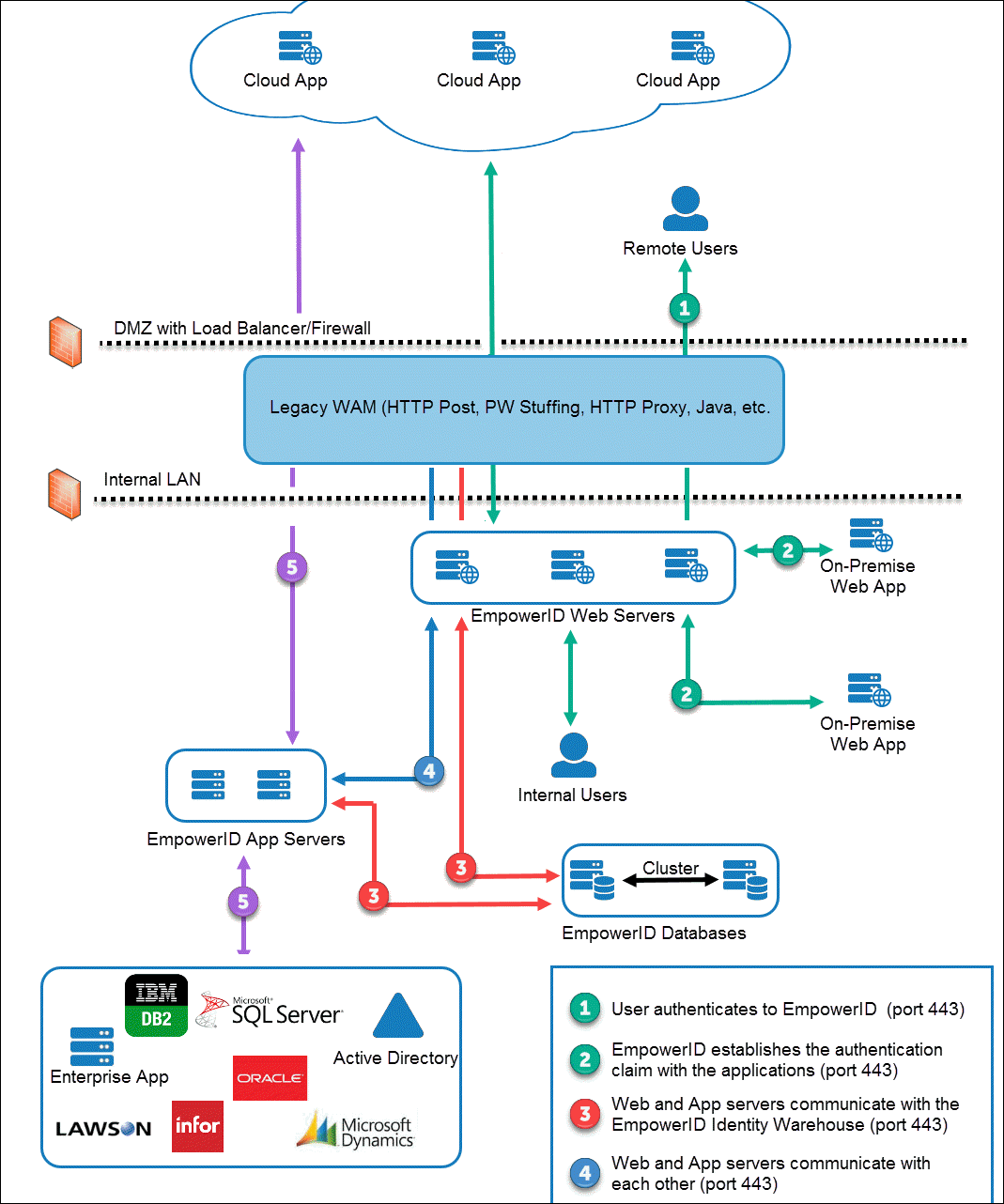
The below two images depict the EmpowerID Communications and Connectivity architecture. The first shows the architecture without EmpowerID WAM/Reverse Proxy, while the second shows the architecture with EmpowerID WAM/Reverse Proxy.
Figure 1: EmpowerID Communications and Connectivity Architecture
Additional Port Requirements
In addition to the above, for password resets you may need to open TCP/UDP 135, as well as all RPC dynamic ports. For more information, see the following Microsoft topics: