Business Rules
When developing workflows, business requirements often demand varying outcomes based on the conditions present during workflow execution. Business Rules provide the mechanism to create these conditional paths, allowing workflows to make decisions and branch to different activities based on runtime conditions.
What Are Business Rules?
In Workflow Studio, Business Rules are Boolean expressions that you create and apply to the lines connecting activities at points where the process can diverge based on the conditions encountered by the activities. When a Business Rule is applied to an activity line, it sets the conditions that dictate whether the process can flow through that line.
How they work:
- If the Business Rule expression evaluates to true, the process flows through the line and proceeds to the next activity
- If the expression evaluates to false, the process cannot flow through the line and must follow an alternative path
Generally, one Business Rule applies to any two lines exiting a given activity, evaluating true for one line and false for the other.
Why Use Business Rules?
Business Rules enable workflows to handle different scenarios dynamically. For example:
Scenario: Some users may be able to initiate a workflow but lack the appropriate permissions to perform all operations associated with certain activities in that workflow, while others possess all necessary permissions to execute every operation within the workflow.
Solution with Business Rules:
- Users without permissions have their actions routed for approval before execution
- Users with full permissions complete each business process task without interruption
- The workflow automatically determines the correct path based on user permissions
This conditional logic ensures that workflows adapt to different user contexts and authorization levels.
Flow Chart Requirement
Business Rules can only be implemented with Flow Chart workflows, as they allow the creation of multiple exit points on a single activity. Other workflow types require using IfElse activities and branching to achieve a similar effect. The utilization of flow charts and Business Rules enables process flow simplification.
Business Rules in Action
The following image illustrates how Business Rules determine a workflow's outcome:
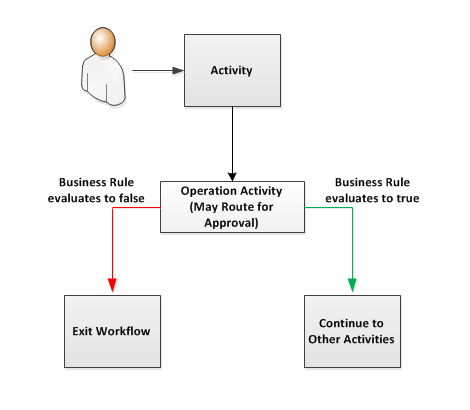 Business Rules applied to activity lines control the workflow path based on runtime conditions
In this workflow:
- A user initiates the workflow and encounters the first activity
- The activity executes its code and the process flows to the Operation Activity, which contains operations against protected resources
- To execute the operations, the user must have those operations permitted for the resources targeted by the Operation Activity
- If the user is granted or approved for those operations, the code within the Operation Activity executes against the resources, and the process continues to other activities in the workflow (green path)
- If the user lacks the necessary permissions and is denied by an approver, the code within the Operation Activity remains unexecuted, and the process flows to the Exit Workflow activity (red path)
In both cases, the Business Rule applied to the activity lines serves as the controlling factor for the process flow.
Writing Business Rules
Business Rules are written in C# and must return a Boolean value. Here's an example of a simple Business Rule:
return CurrentWorkflow.OperationActivity.OperationExecuted;
This code returns the value of OperationExecuted, which indicates whether an operation was successfully executed in the Operation Activity.
Applying Business Rules to Lines
When using a Business Rule with activity lines, you control the flow by applying the evaluation of the Business Rule to the lines:
True evaluation - Applied to the line where you want the process to flow when the condition is met (e.g., operation was executed successfully)
False evaluation - Applied to the line where you want the process to flow when the condition is not met (e.g., operation was denied or failed)