What are EmpowerID Operations?
EmpowerID Operations are protected code objects that control what actions users can perform on resources. Each operation—such as viewing a page, adding an account to a group, or editing a report—must be explicitly granted to users before they can execute that action. This granular approach ensures consistent, auditable access control across all resources managed by EmpowerID.
Understanding Operations
In EmpowerID, controlling access to resources requires more than simply determining whether a user can access something. It requires defining precisely what they can do with that resource. Can they view it? Edit it? Delete it? Share it? Each of these actions represents a different level of access, and EmpowerID manages these distinctions through Operations.
An EmpowerID Operation is a protected code object that, when executed within an EmpowerID workflow, enables a specific action on a resource. Operations work alongside native system rights—the permissions used by applications like Microsoft Exchange or Windows Servers to control access within their own systems. While native system rights manage access within those external systems, EmpowerID Operations manage access within EmpowerID itself and in custom applications that integrate with EmpowerID for authorization.
This dual approach provides comprehensive access control. Granting someone native rights to a mailbox enables them to use that mailbox within Exchange. Granting them EmpowerID Operations for that mailbox enables them to manage it through EmpowerID's interface, approve requests related to it, or delegate access to others. The two work together but serve different purposes.
Rights are the native permissions used by applications or operating systems to manage security for specific resource types. Granting these rights enables capabilities for users within that system, separate from EmpowerID. Having rights granted does not grant users any abilities within EmpowerID or make them potential approvers for any workflow operations.
How Operations Control Access
To understand how Operations work in practice, consider a simple scenario. EmpowerID has a "Find User Account Page" where administrators can view user account information. Access to this page is controlled by the "Use" operation, which is a general operation that controls whether users can view and interact with pages and other UI elements in EmpowerID.
Suppose you have three users: Robert, Sally, and Ulrich. Robert needs to view account information for both Sally and Ulrich. For this to work, Robert must be granted the "Use" operation for the Find User Account Page. Without this operation, the page remains invisible to him in EmpowerID's interface—he cannot access it at all.
Now consider the reverse direction. If Sally wants to view Robert's account information, she also needs the "Use" operation for the Find User Account Page. Similarly, if Ulrich wants to view either Robert's or Sally's accounts, he needs the same operation. The operation controls access to the page itself, and without it, users cannot see account information for anyone.
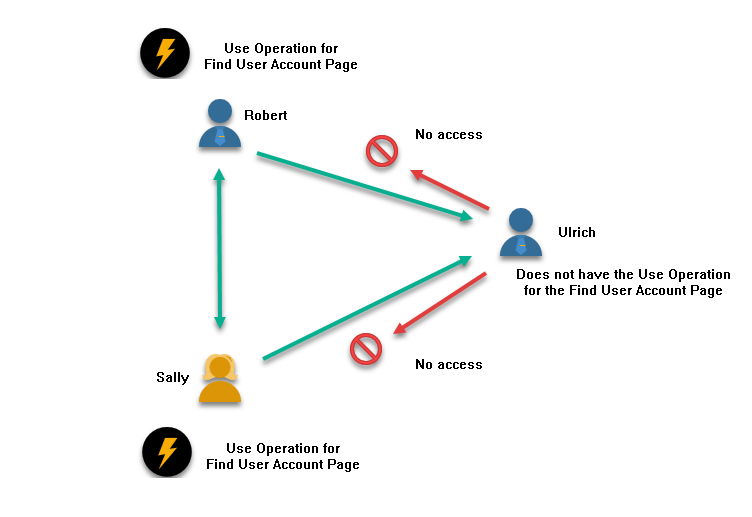
In the image illustrated, Robert has the "Use" operation for the Find User Account Page, enabling him to see both Sally's and Ulrich's accounts. Similarly, Sally has the "Use" operation for the Find User Account Page, allowing her to see account information for both Ulrich and Robert. However, Ulrich does not have the "Use" operation for the Find User Account Page, so he cannot see the account information for either Robert or Sally.
This example demonstrates the foundational principle of EmpowerID Operations: access must be explicitly granted. There is no implicit access, no inheritance based on hierarchy, and no assumptions about what users should be able to do. Each operation must be delegated to each user for each resource.
Operations for Complex Tasks
Many tasks in EmpowerID require more than simply viewing a resource. They involve changing the state of one or more resources and affecting relationships between resources. These more complex delegations require multiple operations working together.
Consider the task of adding a user account to a group. This action involves changing the state of two objects: the account being added and the group receiving the new member. To perform this task, a user needs appropriate operations for both resources.
Suppose Melissa needs to add Ben's user account to the HR group. For this task to succeed, Melissa must be granted three distinct operations:
First, she needs the "Use" operation for the Find User Account Page. Without this, she cannot see Ben's user account in the EmpowerID interface. If she cannot see the account, she cannot add it to any group.
Second, she needs the "AddAccountToGroup" operation for Ben's specific account. This operation allows her to add this particular account to a group. Even if she can see Ben's account, she cannot add it to any group without this operation.
Third, she needs the "AddAccountToGroup" operation for the HR Group itself. This operation allows her to add accounts to this specific group. Even if she has permission to add Ben's account to groups in general, she cannot add any account to the HR group without this operation.
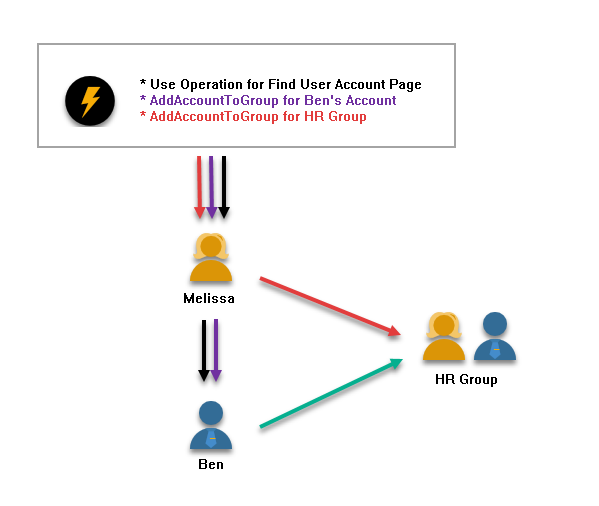
In the image above, the three operations Melissa needs are illustrated:
- The "Use" operation for the Find User Account Page (indicated by black) allows her to see Ben's user account
- The "AddAccountToGroup" operation for Ben's account (indicated by purple) allows her to add the account to a group
- The "AddAccountToGroup" operation for the HR Group (indicated by red) allows her to add an account to the group
The green line flowing from Ben to the HR group indicates that Melissa has successfully added the account to the group because she possesses all three necessary operations.
These examples show that the number of operations needed by a user to perform a task can vary greatly according to the number and type of resources affected by the task. In the first example, each person required only one operation for one resource type: the "Use" operation for a page. In the second example, the user needed three operations across two resource types: one operation to view the page, and two operations to manipulate the account and group resources.
Operation Activities in Workflows
Operations are secured within EmpowerID through special workflow activities called Operation Activities. These activities are based on EmpowerID's workflow authorization framework and are used to determine whether a user within a workflow process can execute the code for each operation in the activity.
Operation activities assess at runtime whether the user can perform the attempted operation(s) on the target resources affected by the operation(s). This runtime evaluation ensures that access control is enforced consistently regardless of how a workflow is invoked or what path it takes through its logic.
An Operation Activity is a workflow activity that can contain one or more operations and can evaluate those operations against one or more resource types. When a workflow executes an Operation Activity, EmpowerID checks whether the user has been granted the necessary operations for all resources involved in the action. If the user lacks any required operation, the activity fails and the action is not performed.
This workflow-based approach provides several advantages. It ensures that all actions performed through EmpowerID are consistently secured according to the same operation-based model. It enables approval workflows where unauthorized users can request operations they don't possess, and authorized approvers can grant those requests. It creates a comprehensive audit trail showing not just what actions were taken, but also which operations were evaluated and whether the user possessed them.
Operation Activity Templates
EmpowerID provides templates in Workflow Studio to quickly create new Operation Activities. These templates are designed to handle common scenarios involving different numbers of resource types:
Single Multi-Operation Activity template - This template creates Operation Activities capable of executing one or more operations against a single resource type. Use this template when your workflow needs to perform actions on one type of resource, such as editing multiple properties of a user account.
Dual Multi-Operation Activity template - This template creates Operation Activities capable of executing one or more operations against two resource types. Use this template when your workflow affects two types of resources, such as adding an account to a group (which affects both an account resource and a group resource).
Triple Multi-Operation Activity template - This template creates Operation Activities capable of executing one or more operations against three resource types. Use this template for complex workflows that affect three different types of resources simultaneously.
These templates accelerate workflow development by providing pre-built structures for common operation patterns. Rather than building Operation Activities from scratch, developers can select the appropriate template based on how many resource types their workflow will affect, then configure the specific operations needed.
EmpowerID includes default Multi-Operation Activities that secure specific resource types. Generally, an operation in a Multi-Operation Activity provides security for edits against a few EmpowerID properties on a resource object, such as a user account. Often, each EmpowerID property corresponds with an attribute of an Active Directory or LDAP object and is mapped to that object in a one-to-one relationship. Organizations can further subdivide the editing of specific attributes into even more granular operations in Workflow Studio if desired.
Monitoring Operations
EmpowerID maintains comprehensive records of all operations executed within workflows, providing visibility and auditability for access control decisions.
Operation Audit Logs
EmpowerID maintains a record of all operations executed within any given workflow. These records can be viewed in the Workflow Operation Audit Log as well as in the AuditLogOperation table of the EmpowerID Identity Warehouse. This audit trail provides a complete history of what operations were executed, by whom, against which resources, and with what result.
Windows Event Logging
Each time a person attempts to execute an operation for which they do not have the necessary delegations, EmpowerID writes an event to the Windows Event Viewer with an EventID falling in the 419-435 range. These events provide real-time notification of access control violations and can be integrated with security monitoring systems.
The events are formatted to provide detailed information about the attempted operation. For example:
Event 435: Person: Vince LoPresti (PersonID: 3128) does not have access to the operation: Add Account To Group for the following resources: ResourceID: 1733569; ResourceTypeID 2; Name: Vince LoPresti; ResourceID: 1733999; ResourceTypeID: 10; Name: HR New York *(Workflow Execution AppDomain) - /EmpowerIDWorkflowService_WorkerProcess.exe.
In this format, we see:
- The person who attempted the operation without proper access
- The operation attempted
- The resources involved in the operation
When operations are successfully approved and executed, EmpowerID also logs these events. For example:
Event 437: Sent email to VinceLoPresti@tdnfdemo.com Subject RequestID: 223 Approved - Add Account: Vince LoPresti to Group: HR New York *(Workflow Execution AppDomain) - /EmpowerIDWorkflowService_WorkerProcess.exe
This event shows:
- The email was successfully sent to a specific email address bound to the person making the request
- The operation(s) approved; in this case, the request to join Vince LoPresti's account to the HR New York group was approved
This comprehensive logging helps organizations monitor and audit activities within EmpowerID, providing insights into attempted and approved operations, as well as the resources and individuals involved.
Summary
EmpowerID Operations provide granular, auditable control over what actions users can perform on resources. By requiring explicit delegation of each operation for each resource, EmpowerID ensures that users have exactly the access they need—no more, no less. Operations work within EmpowerID's workflow framework, where Operation Activities evaluate at runtime whether users possess the necessary operations to complete requested actions. This approach creates a comprehensive audit trail and enables sophisticated approval workflows while maintaining consistent access control across all EmpowerID-managed resources.