What is Role-Based Access Control?
Role-Based Access Control (RBAC) simplifies permissions management by grouping access rights into roles that match job functions. EmpowerID's resource-based approach to RBAC provides the flexibility of traditional RBAC while eliminating common challenges like role bloat and rigid permissions. This guide explains how EmpowerID's model works and when to use each approach for managing access in your organization.
Understanding RBAC: The Traditional Approach
Role-Based Access Control (RBAC) is a framework designed to streamline the process of managing permissions across various applications and IT resources within an organization. This approach aligns with the real-world organizational hierarchy, acknowledging that individuals typically perform tasks and access resources in accordance with their specific job title or function.
The Problem RBAC Solves
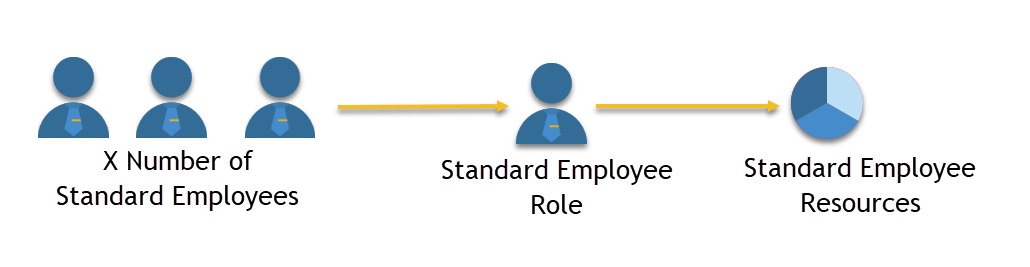
Consider a large company with numerous "Standard Employees" who require identical access to common IT resources. Managing permissions for each person individually would be:
- Labor-intensive and time-consuming
- Error-prone and susceptible to oversight
- Inefficient from a security perspective
- Difficult to audit and maintain compliance
By implementing RBAC, an organization can establish a single "Standard Employee" role, define the expected behavior of this role within the IT environment, and assign all standard employees to this role. The process of permissions management is simplified, transitioning from managing numerous individuals to managing a single role.
How Traditional RBAC Works
Conventional RBAC methodologies enable organizations to ask and answer questions like "What actions should individuals with a specific job title be permitted to perform with our IT resources?" and "How can we distinguish between people with varying roles and resource requirements?"
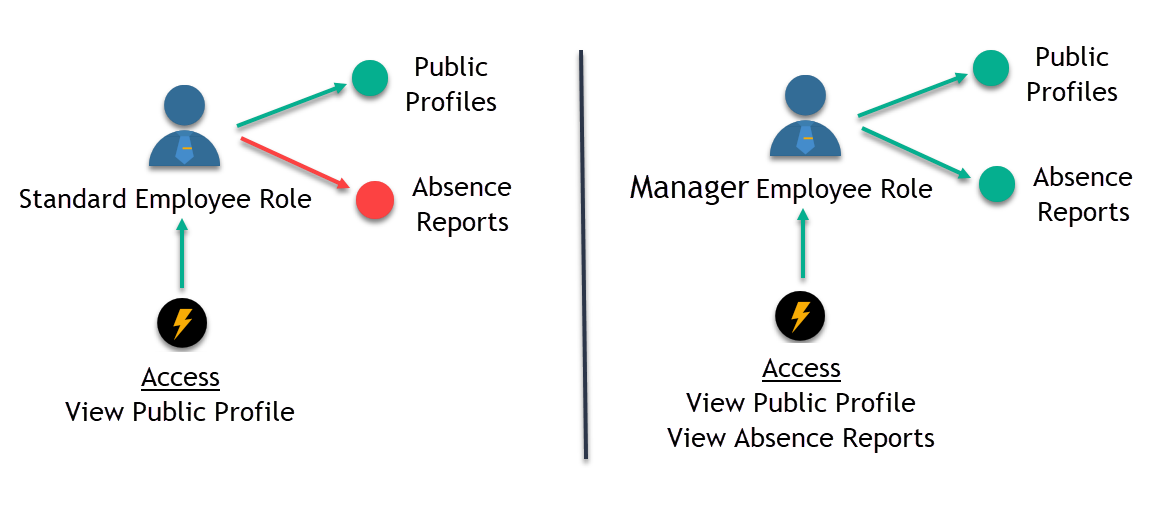
For instance, a common organization may include both Standard Employees and their respective Managers, who must interact with data pertaining to other members within the organization. Due to their differing responsibilities, the extent and nature of their engagement with this information should vary. RBAC facilitates the definition of these interaction differences by assigning distinct permission levels to the two roles.
The following illustration demonstrates this distinction. Both the Standard Employee and Manager roles can view public profile information (represented by the green arrow). However, the Manager role has additional access to view absence reports (indicated by the green arrow), while the Standard Employee is restricted from this capability (signified by the red arrow).
In a coding context, traditional RBAC might look like this:
if (user.role == StandardEmployee)
    this.application.show(Employee.PublicProfile)

else if (user.role == Manager)
    this.application.show(Employee.PublicProfile + Employee.AbsenceReport)
This pseudo-code illustrates how the application differentiates access levels. When a user with the Manager role logs into the application, they can view both public profiles and absence reports of employees. In contrast, Standard Employees can only access public profiles.
The Limitations of Traditional RBAC
Traditional RBAC offers numerous benefits for managing resources but also poses challenges. One significant challenge arises from the top-down approach to resource management. RBAC starts by focusing on roles: defining a role and deciding its capabilities. However, once established, roles can become rigid and require significant effort to align with evolving organizational policies.
Example: If the Manager role is later determined to be overly broad and should be divided into Department Manager, HR Manager, and Regional Manager roles, the IT department would need to update the application, potentially causing downtime:
if (user.role == DepartmentManager || user.role == HRManager || user.role == RegionalManager)
    this.application.show(employee.AbsenceReports)
With each policy change, this process repeats. The IT team must revisit the application, investing considerable resources each time a minor change occurs.
Audit and Transparency Problems: Embedding role checks into code lacks the transparency necessary for maintaining a useful audit trail. There is no clear external connection between the Absence Reports resource and the roles with access to it, making such assignments difficult to audit. Over time, the specific resources each role can access becomes unclear to everyone.
When discussing RBAC, groups often emerge as a related topic. In large environments, users are typically placed into groups, and permissions are assigned to those groups. While this may appear to be an equivalent solution, using AD groups as application roles presents challenges.
Groups do not inherently convey a relationship between the group and the resources or rights it grants. From an auditing and compliance standpoint, auditors must rely on group naming conventions to discern the rights and resources associated with group membership. As organizations expand and add more users to various groups, the likelihood of inadvertently granting inappropriate access increases due to the limitations of naming conventions.
EmpowerID's Approach: Resource-Based Access Control
The EmpowerID RBAC model addresses traditional RBAC challenges by managing resources from a bottom-up perspective, utilizing a methodology known as "Resource-Based Access Control."
The Fundamental Shift
Resource-Based Access Control reframes the questions to better align with the primary purpose of security policies: protecting resources. It starts by identifying what needs protection, rather than determining who can access it. Although this may seem like a subtle distinction, adopting a resource-driven approach results in a highly flexible and granular framework where explicit controls can be placed on each protected resource.
Traditional RBAC asks: "What can people with this role do?"
Resource-Based Access Control asks: "What needs to be protected and how?"
How Resource-Based Access Control Works
Revisiting the Absence Reports example, Resource-Based Access Control would implement the code as follows:
if (user.isAllowedToViewEmployeeAbsenceReports)
    this.application.show(employee.AbsenceReports)
This pseudo-code does not specify a particular role and is unconcerned with the user's identity. It simply verifies whether the user (regardless of their identity) is authorized to view the report and displays or hides it based on that verification. This approach allows organizations to assign or revoke the ability to view the report for any user at any time without causing disruption or necessitating code block rewrites.
EmpowerID Operations: Resource Actions
In EmpowerID, resource actions are represented by code segments called "EmpowerID Operations." Each EmpowerID Operation is a safeguarded code object enabling users to perform tasks on a resource object, such as adding a user to a group, creating a mailbox, or viewing a report.
Users must be delegated these Operations before they can interact with a resource. For instance, if you have an Absence Report, that report will have several EmpowerID Operations associated with it to prevent unauthorized access. If you have a user named "Joe" and you want him to view the report, you must grant him that ability by assigning a specific Operation for the report. If it's later decided that Joe needs to edit the report as well, you assign him another Operation permitting him to do so—all during application runtime without disrupting your users.
Resource-Specific Management
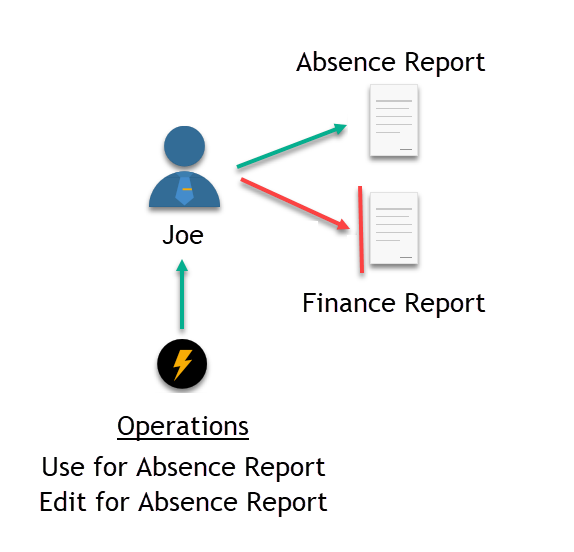
Operation assignments apply to one resource object only, facilitating easy implementation of resource-specific management strategies. If you have two reports—an Absence Report and a Finance Report—granting users the ability to view and edit one will not provide them with any capabilities for the other. You must grant each Operation separately for each report instance unless delegation is done using inheritance or a query-based collection of reports.
In the image below, there are two protected resource objects on the right side and a user named Joe on the left. Joe has been delegated the "Use" and "Edit" Operations for the Absence Report, allowing him to view and edit the report in EmpowerID (illustrated by the green arrow). However, Joe has not been granted any Operations for the Finance Report, so he cannot access the report in any way (represented by the red arrow). He cannot even see that a Finance Report exists in EmpowerID.
EmpowerID's resource-specific model allows you not only to control access to individual objects but also to manage access to particular components within an object. For instance, you can use Operations to secure specific sections or fields within sensitive reports. This level of control accommodates even the most fine-grained security policies.
Core RBAC Components in EmpowerID
Understanding the core objects in EmpowerID's RBAC model is crucial for successfully managing your resources with the platform. These objects work together to provide flexible, auditable access control.
Resources and Resource Types
Resources are the lowest-level secured objects subject to access control, such as individual reports, user accounts, mailboxes, and documents. Resources belong to resource systems, which are specific directories or IT systems containing them—Active Directory domains, LDAP directories, HR systems, Microsoft Exchange Organizations, SharePoint Farms, custom applications, and the EmpowerID system itself.
All objects managed by EmpowerID securely have a resource entry in the EmpowerID Identity Warehouse, uniquely identifying the resource and resource type. Each resource object is cataloged by resource type to support different properties and to allow a consistent interface for managing those objects in EmpowerID.
Access Levels: Bundling Operations and Rights
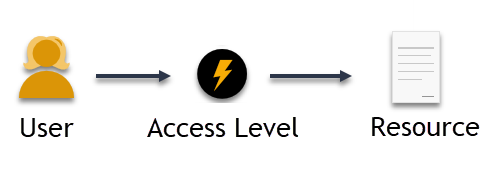
Access Levels are bundles of EmpowerID Operations and/or native external system rights specific to a resource type. When assigned to a user, they grant the ability to perform those operations and rights on the relevant resource.
Access Levels are necessary for all delegations in EmpowerID and are the means by which a user receives access to resources. You cannot directly assign EmpowerID Operations or native system rights to users. Those assignments are made to Access Levels and then assigned to users.
Access Levels serve as both a buffer between resources and users and a conduit for users to connect with resources. Operations and/or rights assigned to Access Levels establish boundaries around each resource object, restricting users' actions on the resource.
Example: Consider a Quarterly Absence Report, a group of users, and an Access Level for the report. The Access Level includes a single EmpowerID Operation: the Use operation. This operation, when executed against the report, enables it to be viewed in EmpowerID. User Group B can view the report because it has been assigned an Access Level containing the Use operation. However, User Group A lacks this Access Level, so they cannot view the report.
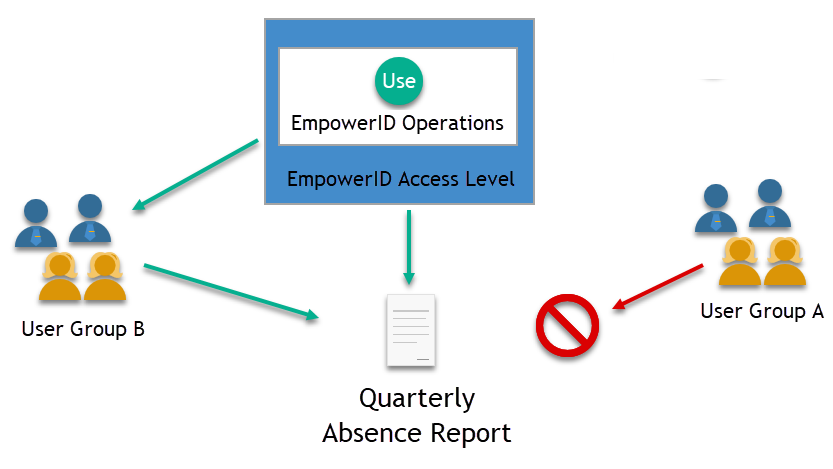
Access Levels can be customized to grant any type of access to a resource object, provided the object is capable of handling the appropriate rights and operations. For the Quarterly Absence Report, you could create additional Access Levels with operations to edit the report's contents, move the report, delete the report, and more.
Without operations or rights, Access Levels are empty containers not capable of providing functional access to any resource object. These should be added to Access Levels before those roles are assigned to users. For information on how to do this, see Adding Operations to Access Level Definitions and Adding Rights to Access Level Definitions.
Scoping Access Level Assignments
When assigning Access Levels to users, it's crucial to consider the scope of that assignment. Scopes allow you to limit the objects affected by an Access Level assignment. By applying a scope, the assignee can only impact resources within the scope's parameters.
Scope Types:
-
Direct - Provides access to a specific resource object. For example, if you directly assign an Access Level for an Exchange Mailbox to a user, they can perform administrative tasks on that specific mailbox only.
-
By Location - Allows users to affect all resources at or below a location in your organizational structure. For instance, assigning an Access Level scoped by the "Sydney" location allows the user to affect all mailboxes at or below Sydney, but not mailboxes in other locations.
-
Relative Resources - Restricts the assignee's ability to impact resources to only those related to the assignee. These are evaluated at runtime and can include objects in the assignee's location and below, objects in their location and above, or the person object "Self" (resources related to themselves).
-
Target RBAC Containers - Collections of resources allowing location-independent delegations. These include Target Management Role (all people belonging to a role), Target Group (all accounts and people in a group), and Target SetGroup (all resources in a SetGroup).
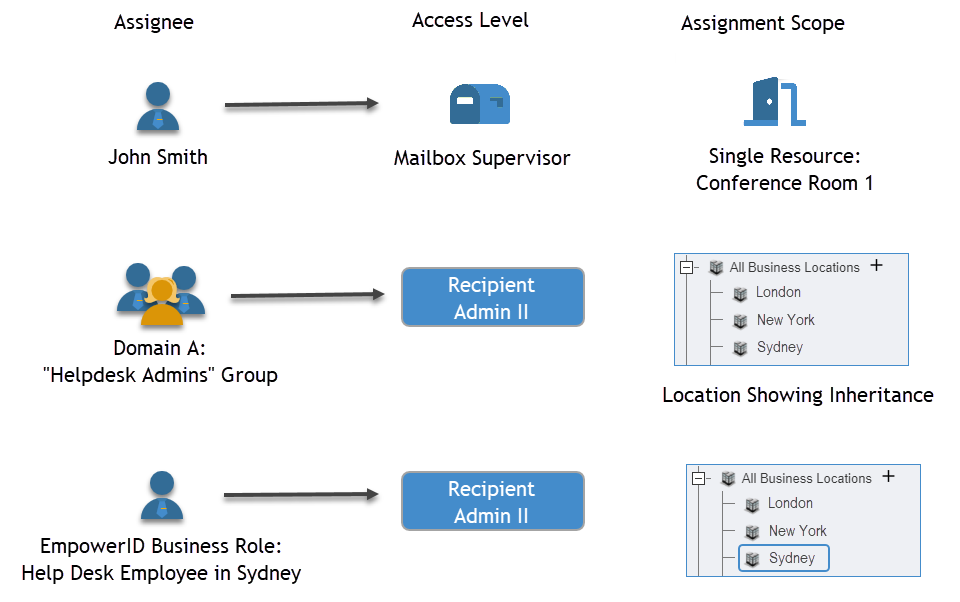
The following image illustrates Access Level assignments granted to three different assignees with different scopes. John Smith has a direct assignment for one mailbox. Members of the Helpdesk Admins Group have an assignment for all mailboxes in the Offices OU and below. All people assigned to the Helpdesk in the Sydney Business Role can access mailboxes in the Sydney location only.
Management Roles: Efficient Bulk Assignment
While Access Levels provide granular access control, directly assigning resources to users through Access Levels is not advised when managing large numbers of users. This is where Management Roles come in.
What are Management Roles?
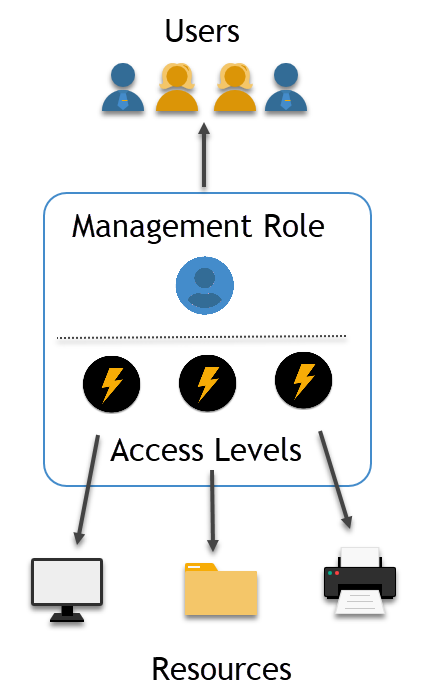
Management Roles are user-defined containers that hold collections of Access Levels packaged together into responsibility or job-based bundles. This allows for efficient and straightforward bulk assignments of resources to users, aligning with their job functions.
Management Roles are fully manageable EmpowerID objects that can contain any number of Access Levels for any resource type. As containers of Access Levels, Management Roles rely on Access Levels to provide users with functional access to resources. Without Access Levels, Management Roles are merely empty containers.
The following image illustrates the relationship between resources, Management Roles, Access Levels, and users. The Management Role connects users and resources via the Access Levels contained within the role.
T-RBAC: Task-Based Role Model
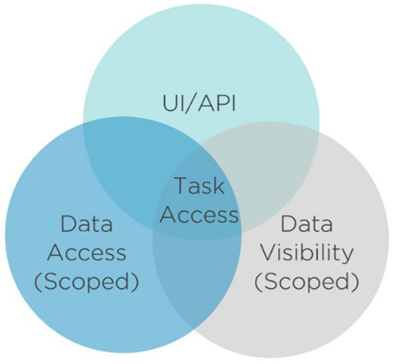
EmpowerID extensively utilizes Management Roles for its out-of-the-box granular roles, delegating access to specific user interfaces, objects, and actions. These task-based roles are divided into three primary types, which segregate the access they grant and allow them to be easily combined and reused without creating and maintaining new roles.
The Three T-RBAC Role Types:
-
UI- Management Roles - Grant access to user interface elements, such as pages and controls, as well as the ability to run workflows.
-
VIS- Management Roles - Provide visibility access to view specific object types or resources within a particular scope. These roles also regulate access to API endpoints, allowing users or applications to make calls to retrieve data for specific object types.
-
ACT- Management Roles - Authorize users to perform specific actions or "operations" within EmpowerID user interfaces and workflows against scoped data, such as individual mailboxes or all objects of a particular type by organizational location.
These three role types work together to enable task-based access. By segregating UI access, visibility, and action capabilities, organizations can combine these roles in different ways without creating numerous similar roles.
Management Role Definitions: Inheritance and Reuse
In EmpowerID, Management Roles are derived from Management Role Definitions. These definitions enable multiple Management Roles to inherit a shared set of Access Levels without managing those assignments in each child Management Role. This allows common access for a set of Management Roles to be defined and managed from one definition, while also permitting customization of each child Management Role with additional Access Levels for unique resource access.
Example: The IT Administrator Management Role Definition includes 345 Access Levels granting access to general pages, workflows, and other resources that IT Administrators might need. The Enterprise IT Administrator Management Role inherits these 345 Access Levels and contains eight additional Access Levels scoped at the "Anywhere" location, providing enterprise-wide capabilities.
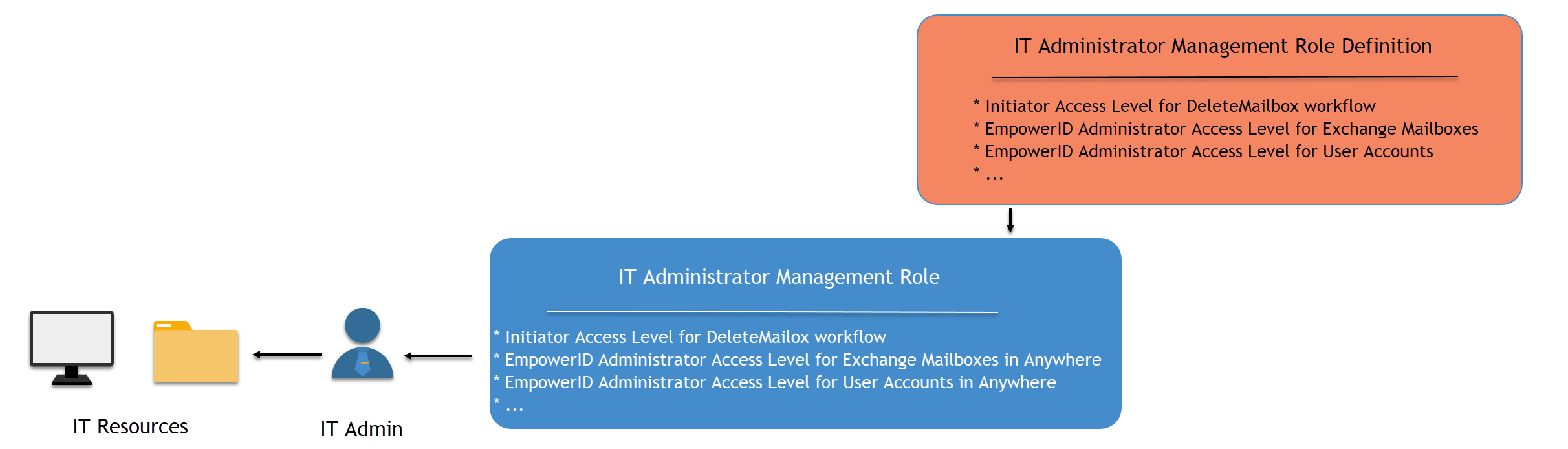
The primary difference between Management Role Definitions and Management Roles is scope. Management Role Definitions typically lack scoped assignments, while Management Roles contain assignments scoped to various locations.
Creating Regional Roles
Management Role Definitions can have multiple child Management Roles, allowing for the creation of regional roles for every region within an enterprise. For instance, if you have organizational locations in "London," "New York," and "Sydney," you could create a London IT Administrator Management Role, a New York IT Administrator Management Role, and a Sydney IT Administrator Management Role from the single IT Administrator Management Role Definition.
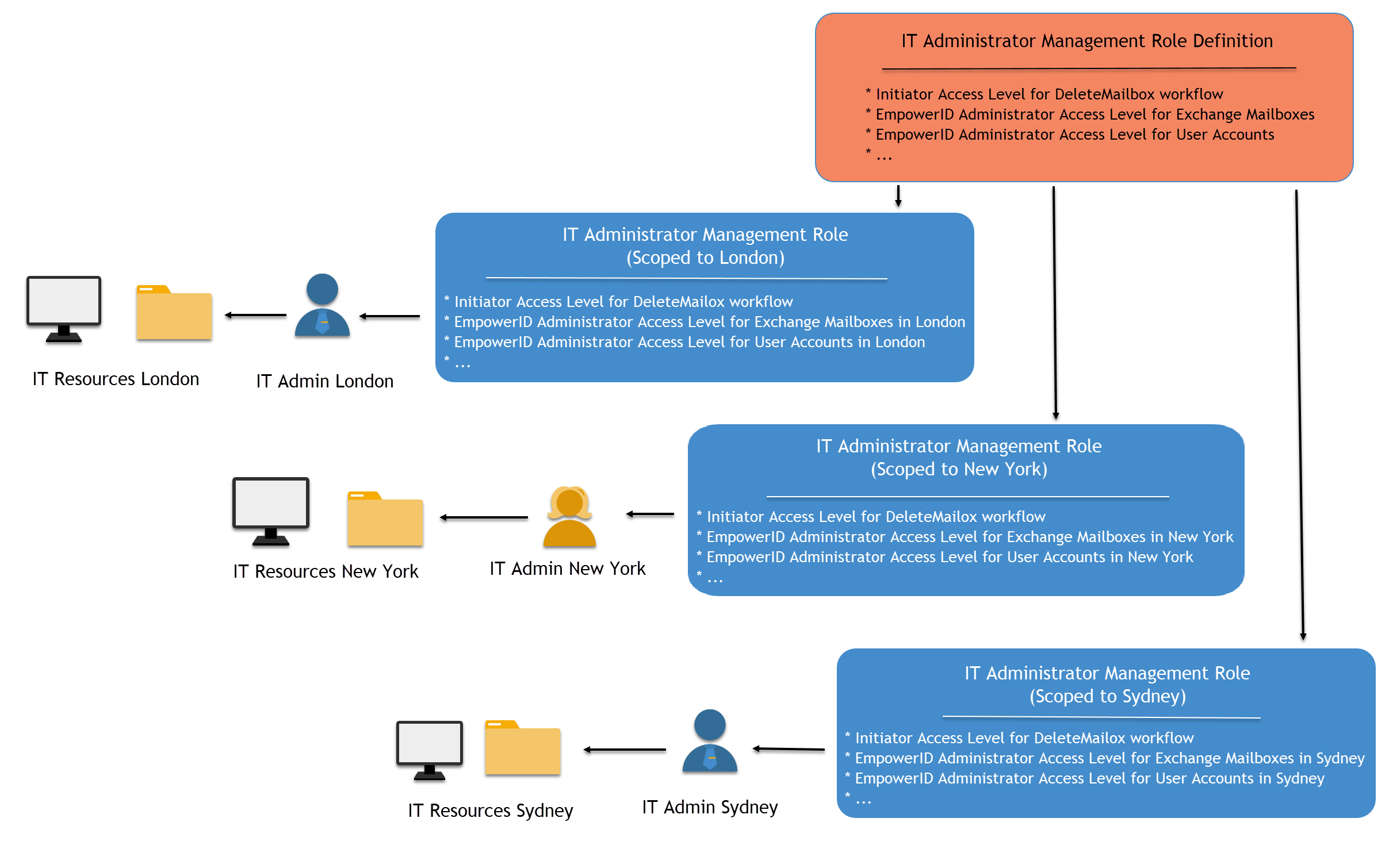
Each regional role inherits the base Access Levels from the definition and has additional Access Levels that scope its influence to the intended location only. Assignees of the London IT Administrator Management Role can only affect resources in London; assignees of the New York role can only affect resources in New York; and so on.
Business Roles and Locations: Polyarchical RBAC
EmpowerID offers a polyarchical RBAC model that enables resources to be allocated based on a combination of an individual's function within the organization (their Business Role) and their work location (their Location). This intersection of Business Roles and Locations results in a substantially smaller "role footprint" than is achievable with most RBAC approaches.
The Role Bloat Problem
To illustrate the value of polyarchical RBAC, consider managing resource access for Tellers in a banking institution. Most tellers perform similar tasks using comparable resources, so a single "Teller" role seems appropriate initially.
However, if the banking institution has branches in numerous cities (e.g., New York, London, and Sydney), complications arise. Each teller requires access to a shared pool of resources due to their job, but they also need resources unique to their location. Tellers in New York would require access to New York-specific resources but not those in London or Sydney, and vice versa.
Traditional RBAC solution: Establish distinct roles for each teller location.
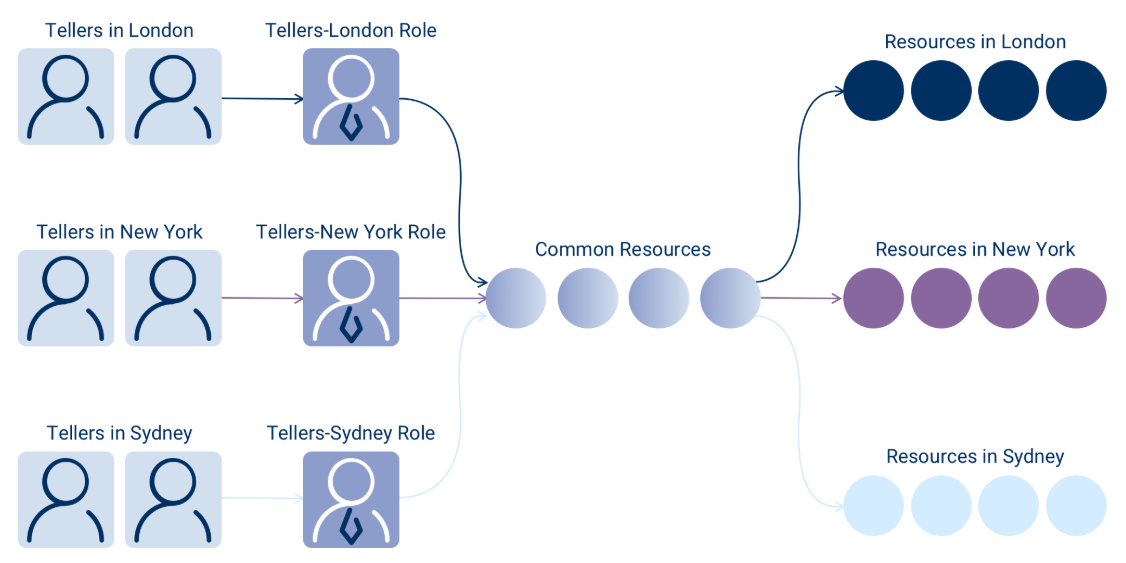
Although this approach might seem sufficient, it rapidly becomes unmanageable, resulting in role bloat and confusion regarding which roles possess access to specific resources. Imagine tellers in branches across every major city globally—the number of roles becomes overwhelming.
EmpowerID's Polyarchical Solution
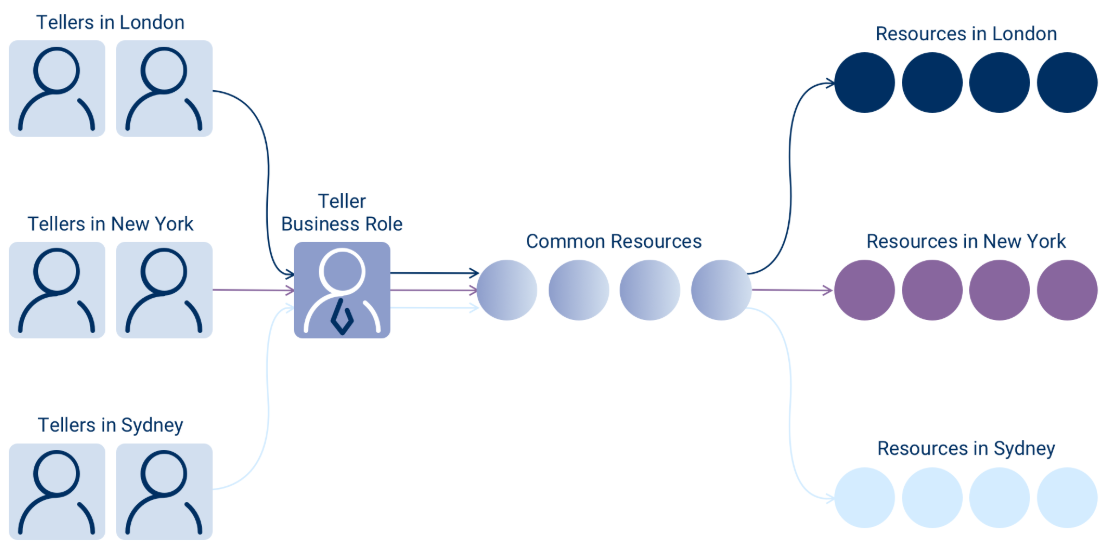
EmpowerID's polyarchical model enables a significant reduction in an organization's role footprint by permitting resources to be assigned to users based on a combination of their Business Roles and Locations. This method allows for the mitigation of role bloat using only one Teller Business Role without generating a "super role."
EmpowerID facilitates differentiation in the resources allocated to a Business Role according to the location of those resources. Consequently, tellers in London, New York, and Sydney can all possess the same Business Role without gaining access to each other's resources.
How Business Roles and Locations Work
A Business Role is a user-defined hierarchical container for grouping EmpowerID Person objects based on a particular job function. An EmpowerID Location is a container for holding resources. These two objects combine to determine a collection of people based on their job function and location within an organization.
This is implemented in EmpowerID via tree interfaces (with inheritance) that allow for the intersection of Business Roles with Locations to support:
Static assignments of people - You can directly assign individuals to a Business Role and Location combination based on their job function and location. For example, if you have a "Sales Manager" Business Role for the "London" location that has been assigned all the resources that a Sales Manager in London needs, you can assign the "Sales Manager-London" Business Role and Location to a specific EmpowerID Person. This gives that person access to all the resources assigned to the Business Role and Location.
RBAC mapping - Business Role and Location mappings allow existing physical directory locations and roles to be mapped to logical EmpowerID Locations. This provides an easy resource management strategy that hides the complexity of the back-end directory structure from business users. For example, if you have multiple AD or LDAP directory containers for London, those containers can be visually mapped to a single virtual EmpowerID "London" location. Once the mapping occurs, the resources in the physical directory containers "belong" to the corresponding EmpowerID Location. Then when people are assigned to a Business Role and Location, they receive access to the resources in that location in the manner defined by the Access Level assignments granted to the Business Role and Location.
SetGroup mapping - SetGroups that contain collections of EmpowerID Person objects can be mapped to Business Roles and Locations to allow the people in that SetGroup to receive the Access Level assignments granted to the Business Role and Location. For example, if you have users in your organization with a Job Title of "Help Desk Technicians" and a City of "New York," you can use a SetGroup to dynamically contain users with those attributes and then map the SetGroup to a corresponding EmpowerID Business Role and Location.
EmpowerID Locations and Resource Organization
Locations play a vital role in the EmpowerID RBAC model, providing a means to organize and assign resources. In EmpowerID, these locations are known as "EmpowerID Locations," which act as containers for grouping resources and scoping access.
Location Trees
There are two main types of Location trees in EmpowerID:
External Locations tree - Mirrors the actual locations of resources in connected resource systems, reflecting real directory structures.
EmpowerID Locations tree - A user-defined logical representation of an organization's structure that can map to real resource locations in the External Locations tree.
When EmpowerID connects to a resource system, it replicates the structure of that system into the External Locations tree, creating a dynamic link with the actual resource locations. After populating the External Locations tree, you can create EmpowerID Locations, map them to External Locations, and use those EmpowerID Locations to allocate resources from your resource systems to users within your organization.
Location Categories
1. Logical Locations
Logical locations represent the organizational and geographical structure of an enterprise, mirroring its operational model. These optional, user-defined locations create intuitive and business-friendly nodes on a hierarchical tree, making it easier for delegated users to interact with system resources. Logical locations map to the physical locations of resource systems and always reflect the resources within that location.
2. External Locations
External locations represent the actual locations of resources within resource systems.
3. All IT Systems
The All IT Systems location is a default EmpowerID location containing locations for all IT systems protected by EmpowerID, including the EmpowerID system itself. EmpowerID creates and dynamically maintains locations representing various resource systems, such as Active Directory, Microsoft Exchange, and Microsoft SharePoint. Resources inventoried from managed resource systems automatically exist in their corresponding EmpowerID location and update if changed in the external system.
These locations differ from standard EmpowerID locations in several ways. Due to their dynamic nature, All IT Systems locations are hidden from role and location selectors for assigning Business Roles and locations to Person objects. They are maintained automatically via inventory, moving when moved in the external system and deleted when deleted in the external system. They automatically map one-to-one to an actual external location and should not be reorganized or modified.
4. Resource Systems Locations
Resource Systems Locations are unique locations representing the structure of various connected resource systems. These locations are contained under the All IT Systems node of the EmpowerID Locations tree.
EmpowerID provides several ways by which resources can belong to a location:
- Manual assignment to a location
- Locations are resources that belong to themselves
- Person objects belong to the location of their primary Business Role and Location
- Resources with a path (user accounts, computers, Exchange mailboxes) belong to locations mapped to an external location whose path matches the resource's ParentPath
- Accounts owned by a person (joined) belong to the location of the person's primary Business Role and location
- Exchange Mailboxes whose account is assigned to a person belong to the locations of the person's primary Business Role and location
- Special "Resource System Match" locations that represent an Account Store or Resource System
- A resource belongs to any parent location of any location to which it has been assigned (exception: resources do not belong to the root node "Anywhere" unless directly assigned)
RBAC Actors: Who Can Receive Access
In EmpowerID, RBAC actors are the "who" of EmpowerID's RBAC model. Actors are those resources in your environment that can receive Access Level Assignments to perform some type of action against other resources.
While RBAC actors can be Person objects, accounts, groups, SetGroups, Management Roles, and Business Roles and Locations, the actions performed are always accomplished by the Person object that owns the account, is placed in a group or SetGroup, or assigned to a Management Role or Business Role and Location. All assignments are proxies used to assign access to Person objects.
EmpowerID Person: The Base Identity
In EmpowerID, a person is an object in the EmpowerID SQL-based Identity Warehouse that links together the user accounts, the permissions assignments, the audit history, and the management policies associated with that person, in whatever directories they may be located.
Persons are the true actors in EmpowerID in that all actions performed via delegations granted by Access Level assignments and Management Role assignments—regardless of which actor type received the delegations—are ultimately performed by an EmpowerID Person. The EmpowerID Person is the base identity in the EmpowerID RBAC model and is necessary for RBAC assignments to occur, regardless of which actor type is the recipient of the assignment.
Assignments of resources to accounts, groups, Management Roles, SetGroups or Business Roles and Locations will only have effect if those objects are linked to EmpowerID Persons. If a user does not have an EmpowerID identity, that user cannot be the recipient of an RBAC assignment. The only exception to this rule are the few workflows configured for anonymous use.
Groups
A group is a collection of user accounts residing in a directory outside of EmpowerID. In EmpowerID, these user accounts are linked to the EmpowerID Person objects that own them, which makes groups simply collections of accounts that resolve to people. This allows EmpowerID to support using groups to assign permissions across directories and IT systems.
An assignment of rights to a group grants those rights to the Person objects that own the member user accounts. This means that groups can be used as collections of Person objects for assignment and the group is not required to be an object in the same directory. For instance, Active Directory groups can be used to grant permissions in any resource system (such as HR systems and custom applications).
SetGroups
A SetGroup is a logical grouping of LDAP or code-based queries, called "Sets," that return collections of people or resources that can be used to dynamically assign resources. SetGroups can be both an EmpowerID Actor type as well as a simple resource type, depending on the objects contained within the SetGroup. To use SetGroups as an EmpowerID Actor capable of performing tasks against other resources, the SetGroup must return collections of people.
Summary
EmpowerID's RBAC model combines the structure of traditional RBAC with the flexibility of resource-based access control. By emphasizing resources rather than roles and providing multiple mechanisms for delegation—Access Levels, Management Roles, and Business Roles and Locations—EmpowerID accommodates both simple and complex security policies.
The decision to utilize Business Roles and Locations versus Management Roles when delegating resources is contingent upon the degree of immediate visibility desired for overseeing the assignment of those resources. Since Business Role and Location assignments occur through the intersection of two distinct EmpowerID objects, auditing the access each individual has to resources necessitates a few additional details compared to using Management Roles. Regardless of the chosen approach, RBAC in EmpowerID proves to be a potent concept, fully capable of satisfying the requirements of even the most intricate security policies.