Business Request Lifecycle Management
Business Requests in EmpowerID have a defined lifecycle from creation through completion or expiration. The system automatically manages request lifecycle to ensure timely processing, prevent stale requests from accumulating, and maintain compliance with organizational policies. This article explains how Business Request expiration works, how status is managed, and what background jobs maintain lifecycle automation.
Business Request Expiration
EmpowerID expires incomplete Business Requests to ensure timely approval processing and prevent outdated requests from remaining indefinitely in the approval queue. Expired requests no longer appear for approvers, reducing clutter and focusing attention on active items.
Expiration Strategies
The system uses two expiration strategies that can operate independently or together, depending on Business Request Type configuration.
Fixed 90-Day Expiration
Automatically expires incomplete requests 90 days after their creation date. This strategy provides a hard deadline regardless of activity level and ensures that no request remains open indefinitely.
The 90-day period begins when the Business Request is created and does not extend based on user interaction. Once 90 days have elapsed, the request expires even if approvers or initiators have recently interacted with it.
Inactivity-Based Expiration
Calculates expiration based on periods of inactivity. The system adds the number of days specified in the "ExpireRequestAfterXDaysOfInactivity" field of the Business Request Type to the date of the last user action.
This expiration date extends each time a user interacts with the request—submitting comments, making approval decisions, or performing other actions. Inactivity-based expiration accommodates requests that require extended review periods or involve multiple rounds of discussion while ensuring that abandoned requests eventually expire.
Expiration Timing Example
Consider a Business Request Type configured with 14 days of inactivity expiration:
- Day 0: Request is created. Inactivity expiration is set to Day 14.
- Day 7: Approver adds a comment. Inactivity expiration extends to Day 21.
- Day 15: Initiator responds to comment. Inactivity expiration extends to Day 29.
- Day 29: No further activity occurs. Request expires.
This approach ensures that active discussions continue while automatically closing requests that participants have abandoned.
Expiration Configuration
Expiration behavior is configured at the Business Request Type level. Administrators can:
- Enable or disable fixed 90-day expiration
- Set inactivity period (in days) for inactivity-based expiration
- Configure both strategies to provide multiple expiration conditions
Organizations typically enable inactivity-based expiration for routine requests where extended discussion may be needed, while relying on fixed expiration as a backstop to prevent indefinite open requests.
Future enhancements may include:
- Ability to define distinct expiration timeframes based on Business Request Type
- Notification events when requests expire
- Automatic actions associated with expiration (e.g., notifying initiators or creating follow-up tasks)
Status Management
Business Requests transition through multiple status values during their lifecycle. The system automatically updates status as requests progress through approval, fulfillment, and completion or expiration.
Status Values
Open
Initial status when a Business Request is created and submitted. Indicates that the request is active and has not yet completed all required approvals.
In Progress
Status when a Business Request has begun approval processing but has not completed all approval steps. Indicates active evaluation by approvers.
Approved
Status when all required approval steps have been completed successfully. Approved requests proceed to fulfillment processing.
Fulfillment In Progress
Status when approved items are being processed by the Fulfillment Job. Indicates that operations are executing against target resources.
Completed
Status when all items in the Business Request have been fulfilled successfully or rejected. Indicates that the request lifecycle is complete.
Rejected
Status when a Business Request is rejected at any approval step. Rejected requests do not proceed to fulfillment.
Expired
Status when a Business Request has exceeded its expiration timeframe without completion. Expired requests are removed from approver task lists and cannot be reactivated.
Canceled
Status when a Business Request is manually canceled by the initiator or an administrator before completion. Canceled requests do not proceed through remaining approval or fulfillment steps.
The system automatically transitions requests between these statuses based on approval decisions, fulfillment outcomes, and expiration conditions.
Business Request JSON Inbox Processor
The "Business Request JSON Inbox Processor" is a background job that maintains Business Request lifecycle automation. This job runs on a scheduled interval and performs several maintenance tasks to keep the approval system operating efficiently.
Primary Responsibilities
Expiration Processing
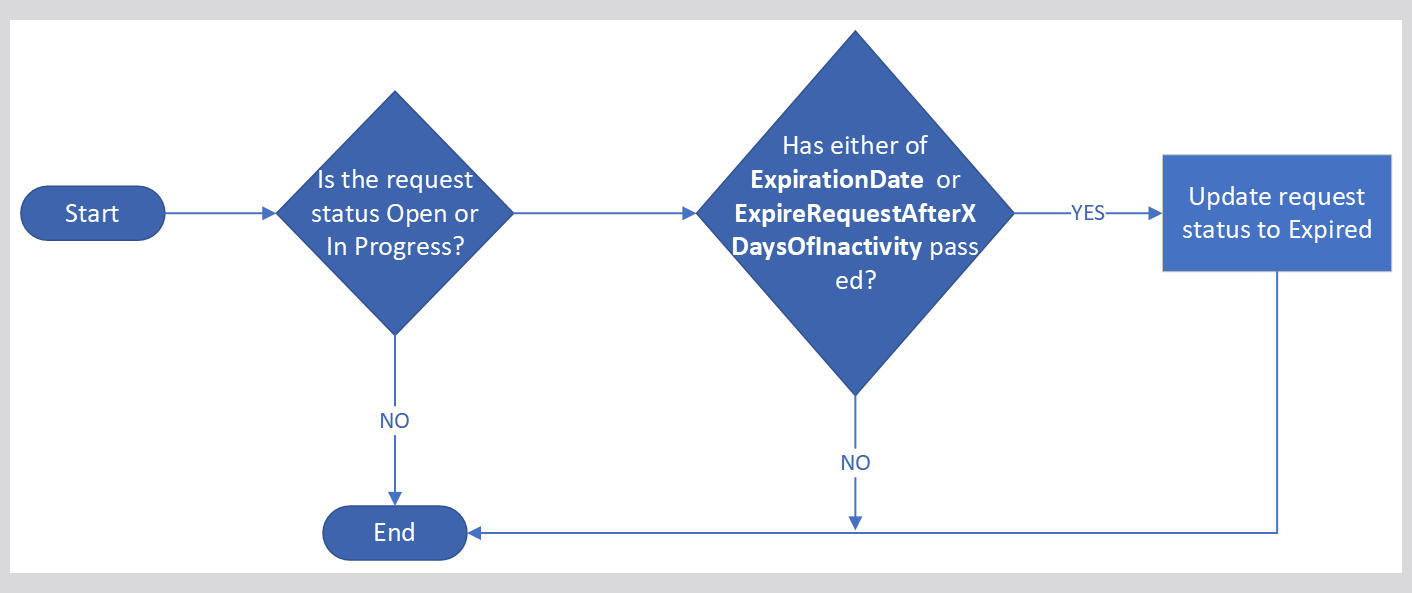
The job identifies Business Requests that meet expiration conditions and updates their status to "Expired." For a request to be expired, it must meet two conditions:
- Active Status: The request status is "Open" or "In Progress," indicating it has not been completed or canceled
- Expiration Threshold Met: Either the fixed expiration date (90 days) or the inactivity expiration date has passed
When both conditions are met, the job updates the request status to "Expired" and removes it from approval task queues.
Status Synchronization
The job ensures that Business Request status accurately reflects the state of contained Business Request Items. If all items are fulfilled, the request status is updated to "Completed." If any approval step is rejected, the request status is updated to "Rejected."
Task Queue Management
The job maintains approval task queues by removing tasks for expired or completed requests. This ensures that approvers see only active, actionable items in their task lists.
Job Configuration
The Business Request JSON Inbox Processor is configured in the EmpowerID job scheduler. Key configuration parameters include:
Execution Interval
How frequently the job runs. Typical intervals range from every 15 minutes to hourly, depending on organizational requirements for expiration responsiveness.
Processing Batch Size
The number of requests processed in each job execution. Larger batch sizes improve efficiency but may increase job execution time.
Error Handling
How the job responds to errors encountered during processing. The job typically logs errors and continues processing remaining items rather than stopping on the first error.
Administrators can monitor job execution through the EmpowerID job history interface, which displays execution timing, items processed, and any errors encountered.
Lifecycle Automation Benefits
Automated lifecycle management provides several operational benefits:
Reduces Manual Maintenance
Automatic expiration eliminates the need for administrators to manually identify and close stale requests.
Maintains Data Quality
Expired and completed requests are properly categorized, supporting accurate reporting and auditing.
Improves Approver Experience
Approvers see only active, relevant items in their task queues, reducing confusion and improving decision quality.
Supports Compliance
Timely expiration of incomplete requests demonstrates process discipline and ensures that access requests do not remain indefinitely pending.
Optimizes System Performance
Removing expired requests from active queues reduces query overhead and improves system responsiveness.
Organizations benefit from these automated capabilities without requiring ongoing administrative intervention.
Monitoring Lifecycle Processing
Administrators can monitor Business Request lifecycle through several interfaces:
Job Execution History
The Business Request JSON Inbox Processor job history shows execution timing, number of requests processed, expiration actions taken, and any errors encountered. Regular review of job history identifies processing issues before they impact users.
Business Request Reports
Standard reports display request status distribution, average time to completion, expiration rates, and other lifecycle metrics. These reports support process optimization and identify approval bottlenecks.
Audit Logs
Status changes and expiration actions are recorded in the EmpowerID audit log. Audit entries provide a complete history of each request's lifecycle progression for compliance and troubleshooting purposes.
Regular monitoring ensures that lifecycle automation operates correctly and that requests progress through approval and fulfillment as expected.
Related Topics
- Approval Engine Overview - Understanding the approval process that generates Business Requests
- Business Request Escalations - Managing approval escalation for pending requests