Advanced Termination Configuration
Advanced Termination Configuration provides granular control over Planned Leaver processing when Flow integration is disabled. This configuration uses the TerminatePersonAdvanced workflow with detailed settings that control account disabling, password resets, resource transfers, and termination scope.
Organizations using Flow integration for Planned Leaver events do not need this configuration, as the Flow engine manages termination logic through customizable Flow policies.
When to Use Advanced Termination Configuration
Advanced Termination Configuration appears on the Account Inbox Settings page under the Leaver tab when the Use Flow Events for Leaver Process checkbox is not selected.
These settings control termination behavior through the TerminatePersonAdvanced workflow. For Flow-based Planned Leaver configuration, see Configure Leaver and Rehire Settings.
How Advanced Termination Processing Works
When advanced termination configuration is active:
-
The Submit Person Terminations Permanent Workflow continuously evaluates the query-based collection specified in PEOPLE TO TERMINATE QUERY-BASED COLLECTION
-
For Person identities meeting termination criteria (ValidUntil date expired beyond the grace period), the workflow submits termination requests to the TerminatePersonAdvanced workflow using the configured initiator
-
The TerminatePersonAdvanced workflow executes termination actions based on the selected checkboxes:
- Disables accounts according to scope settings
- Resets passwords according to password reset settings
- Transfers resources if responsibility transfer is enabled
- Terminates Person objects and accounts according to termination scope settings
-
Email notifications are sent according to the configured email templates
-
The workflow marks Person identities as deleted and updates PersonOrganizationStatusID to reflect termination completion
Prerequisites
Before configuring advanced termination settings:
- Ensure the Use Flow Events for Leaver Process checkbox is not selected on the Account Inbox Settings Leaver tab
- Create a Person identity to serve as the workflow initiator (recommended name: "Planned Leaver Initiator" or similar)
- Assign the Person identity as an Initiator for the TerminatePersonAdvanced workflow
Configure Advanced Termination Settings
-
Navigate to Home → Account Inbox Settings.
-
Click the Leaver tab.
-
Scroll to the Planned Leaver Settings section.
-
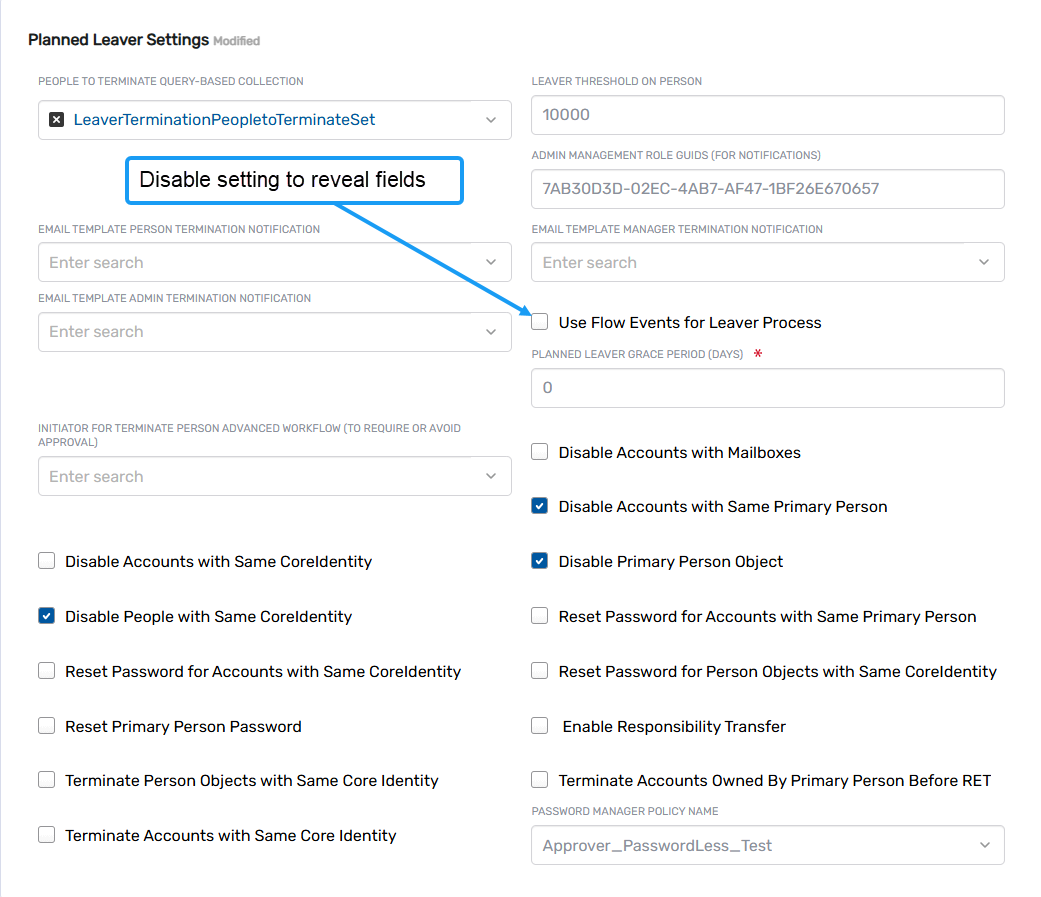
Ensure the Use Flow Events for Leaver Process checkbox is not selected.
When Flow integration is disabled, additional advanced termination fields appear.
-
In the INITIATOR FOR TERMINATE PERSON ADVANCED WORKFLOW (TO REQUIRE OR AVOID APPROVAL) field, search for and select the Person identity that initiates the TerminatePersonAdvanced workflow.
This Person identity must have Initiator access to the TerminatePersonAdvanced workflow.
-
In the PLANNED LEAVER GRACE PERIOD (DAYS) field, enter the number of days.
The grace period specifies how many days after the ValidUntil date expiration before termination processing begins.
-
Configure termination scope settings by selecting the appropriate checkboxes:
Disable Accounts with Mailboxes
- Disables accounts that have associated mailboxes
Disable Accounts with Same Primary Person
- Disables all accounts linked to the same primary Person
Disable Accounts with Same CoreIdentity
- Disables accounts belonging to all Person identities linked to the same CoreIdentity
Disable People with Same CoreIdentity
- Disables Person accounts for all identities linked to the same CoreIdentity
Disable Primary Person Object
- Disables the primary Person account claimed by the termination process
-
Configure password reset settings by selecting the appropriate checkboxes:
Reset Password for Accounts with Same Primary Person
- Resets passwords for accounts linked to the same primary Person using the specified Password Manager Policy
Reset Password for Accounts with Same CoreIdentity
- Resets passwords for accounts belonging to Person identities linked to the same CoreIdentity using the specified Password Manager Policy
Reset Password for Person Objects with Same CoreIdentity
- Resets passwords for Person identities linked to the same CoreIdentity using the specified Password Manager Policy
Reset Primary Person Password
- Resets the primary Person password using the specified Password Manager Policy
-
Configure resource management settings:
Enable Responsibility Transfer
- Enables automatic transfer of resources for which the terminated Person is the responsible party to the Person's manager
-
Configure termination scope for Person objects and accounts:
Terminate Person Objects with Same Core Identity
- Terminates all Person identities linked to the same CoreIdentity as the primary Person
Terminate Accounts Owned By Primary Person Before RET
- Terminates accounts linked to the primary Person before Resource Entitlement Topology (RET) processing
- If enabled, uses the Terminate Accounts with Same Core Identity setting to determine whether to terminate accounts of linked Person identities
Terminate Accounts with Same Core Identity
- Terminates accounts linked to the same CoreIdentity as the primary Person
-
In the PASSWORD MANAGER POLICY NAME field, enter or select the Password Manager Policy name used for password reset operations.
This policy applies when any password reset checkbox is selected.
-
Click Save to apply advanced termination settings.