Configure Leaver and Rehire Settings
Account Inbox Settings control how EmpowerID automates leaver and rehire processes for individuals preparing to leave, scheduled for termination, requiring reactivation, or being rehired. These settings work with the Submit Person Terminations Permanent Workflow to automate identity lifecycle transitions.
The workflow evaluates query-based collections to identify individuals meeting termination, reactivation, or rehire criteria. When Flow integration is enabled, the workflow creates no-code Flow events for individuals in the query result sets, and the Flow engine processes these events according to configured Flow policies. When Flow integration is disabled, the workflow processes lifecycle events directly using default workflows and the notification templates specified in Account Inbox Settings.
For conceptual information about leaver and rehire processes, see Joiner, Mover, and Leaver Processes Overview.
Leaver and Rehire Configuration
Leaver and Rehire configuration includes four distinct processes:
Pre-Leaver Settings — Notifications and workflows for individuals nearing termination dates
Planned Leaver Settings — Termination processing for scheduled departures
Reactivation (Rollback Leaver) Settings — Restoration of terminated individuals
Rehire Settings — Processing for individuals returning to the organization
Each process can use default workflows or integrate with the Flow engine for customized automation.
Resource System Settings for Flow Integration
Flow integration options appear on the Account Inbox Settings page only when specific resource system settings are configured. Configure these settings before enabling Flow integration for leaver and rehire processes.
Resource System Settings
| Setting | Purpose |
|---|---|
TerminatePersonTriggerFlowEvent | Boolean that specifies whether the system bypasses the termination and reactivation process for planned leavers and uses the Business Request Flow engine. When enabled, this global setting overrides the PreTerminatePersonWithFlowEvent, TerminatePersonWithFlowEvent, and ReactivatePersonWithFlowEvent settings. |
PreTerminatePersonWithFlowEvent | Boolean that specifies whether the system should use Flow Events for the Preleaver Notification process. If set to true and TerminatePersonTriggerFlowEvent is set to false, the Account Inbox Settings page displays the Use Flow Events for Preleaver Notification Process checkbox. |
TerminatePersonWithFlowEvent | Boolean that specifies whether the system should use Flow Events for the Leaver Process. If set to true and TerminatePersonTriggerFlowEvent is set to false, the Account Inbox Settings page displays the Use Flow Events for Leaver Process checkbox. |
ReactivatePersonWithFlowEvent | Boolean that specifies whether the system should use Flow Events for the reactivation process. If set to true and TerminatePersonTriggerFlowEvent is set to false, the Account Inbox Settings page displays the Use Flow Events for Reactivation Process checkbox. |
RehirePersonWithFlowEvent | Boolean that specifies whether the system bypasses the rehire process and uses the Business Request Flow engine. If set to true, the Use Flow Events for Rehire Process checkbox appears on the Rehire tab. |
Important: When TerminatePersonTriggerFlowEvent is true, it overrides the individual Pre-Leaver, Planned Leaver, and Reactivation settings, forcing all three to use Flow integration regardless of their individual settings.
Configure Pre-Leaver Settings
Pre-Leaver settings identify individuals approaching termination, enabling proactive offboarding actions. Managers and administrators receive notifications, equipment collection can begin, and offboarding tasks can be initiated before the actual termination date.
-
Navigate to Identity Lifecycle → Settings. This directs you to the Account Inbox Settings form.

-
Click the Leaver tab.
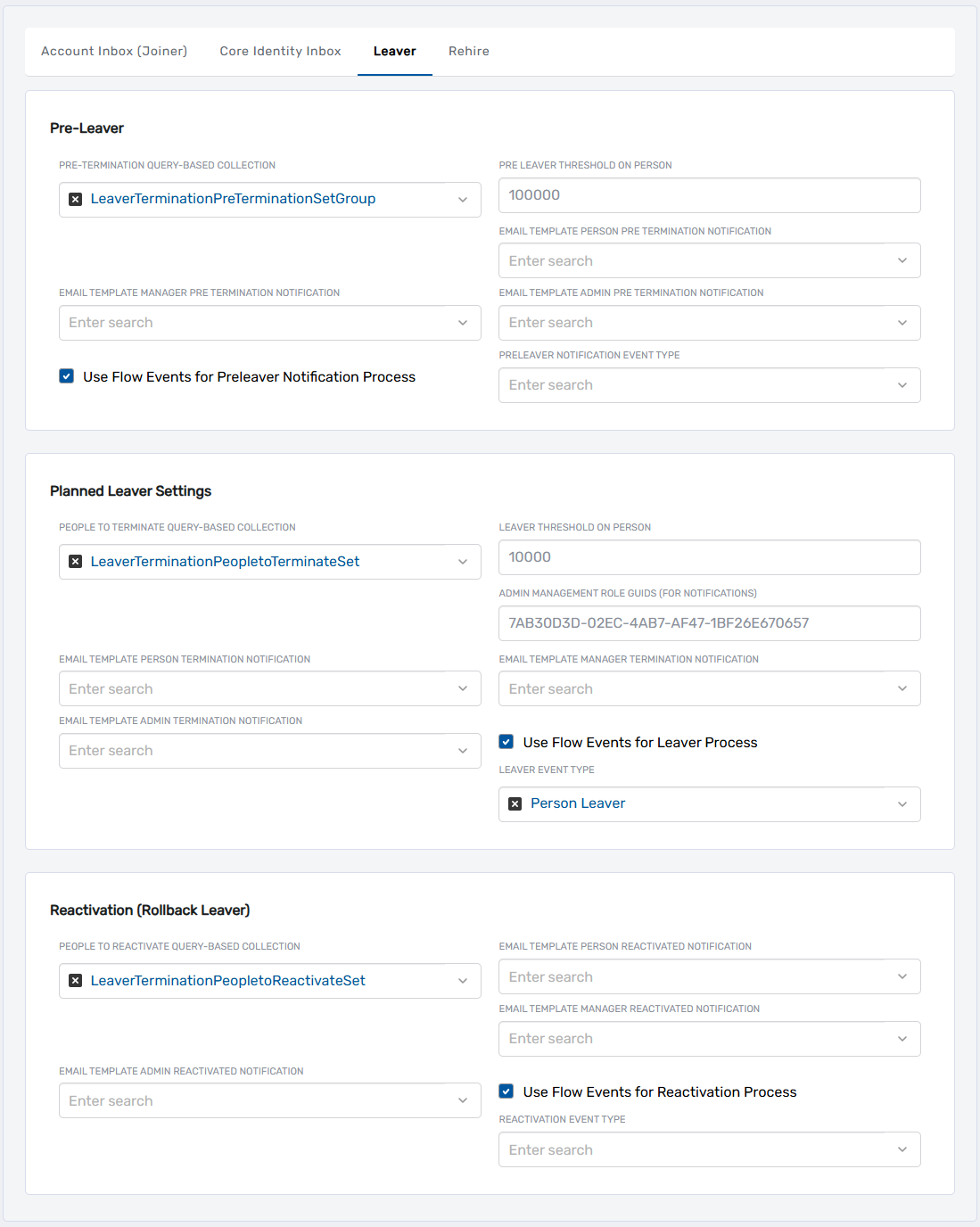
-
In the Pre-Leaver section, configure:
PRE-TERMINATION QUERY-BASED COLLECTION
- Select the SetGroup containing identities flagged as pre-leavers
- Default:
LeaverTerminationPreTerminationSetGroup
PRE-LEAVER THRESHOLD ON PERSON
- Enter the number of days in advance to identify individuals as pre-leavers before their termination date
- Example:
30triggers pre-leaver processing 30 days before termination
EMAIL TEMPLATE MANAGER PRE TERMINATION NOTIFICATION
- Select the email template for manager notifications
EMAIL TEMPLATE PERSON PRE TERMINATION NOTIFICATION
- Select the email template for individual notifications
EMAIL TEMPLATE ADMIN PRE TERMINATION NOTIFICATION
- Select the email template for administrator notifications
-
To enable Flow integration (optional):
- Select Use Flow Events for Preleaver Notification Process
- In the PRELEAVER NOTIFICATION EVENT TYPE field, select the Flow event type
- Default:
Person Preleaver Notification
The Use Flow Events for Preleaver Notification Process option only appears when PreTerminatePersonWithFlowEvent is true and TerminatePersonTriggerFlowEvent is false.
Configure Planned Leaver Settings
Planned Leaver settings define criteria for identifying individuals scheduled for termination. Once identified, EmpowerID triggers termination events that activate workflows or Flows to manage access revocation and cleanup processes.
-
From the Leaver tab, scroll to Planned Leaver Settings.
-
Configure the following settings:
PEOPLE TO TERMINATE QUERY-BASED COLLECTION
- Select the SetGroup containing people scheduled for termination
- Default:
LeaverTerminationPeopletoTerminateSet
LEAVER THRESHOLD ON PERSON
- Enter the number of days in advance to begin the leaver process before termination date
- Example:
0processes on termination date,7processes 7 days before
ADMIN MANAGEMENT ROLE GUIDS (FOR NOTIFICATIONS)
- Enter the GUID of the Management Role containing administrators who receive termination notifications
EMAIL TEMPLATE PERSON TERMINATION NOTIFICATION
- Select the email template for individual termination notifications
EMAIL TEMPLATE ADMIN TERMINATION NOTIFICATION
- Select the email template for administrator termination notifications
EMAIL TEMPLATE MANAGER TERMINATION NOTIFICATION
- Select the email template for manager termination notifications
-
To enable Flow integration (optional):
- Select Use Flow Events for Leaver Process
- In the LEAVER EVENT TYPE field, select the Flow event type
- Default:
Person Leaver
The Use Flow Events for Leaver Process option only appears when TerminatePersonWithFlowEvent is true and TerminatePersonTriggerFlowEvent is false.
Configure Reactivation (Rollback Leaver) Settings
Reactivation settings manage scenarios where terminations are reversed or individuals require quick reactivation. These settings detect and handle reactivation scenarios, avoiding unnecessary full termination processes.
-
From the Leaver tab, scroll to Reactivation (Rollback Leaver).
-
Configure the following settings:
PEOPLE TO REACTIVATE QUERY-BASED COLLECTION
- Select the SetGroup containing people eligible for reactivation
- Default:
LeaverTerminationPeopletoReactivateSet
EMAIL TEMPLATE PERSON REACTIVATED NOTIFICATION
- Select the email template for individual reactivation notifications
EMAIL TEMPLATE MANAGER REACTIVATED NOTIFICATION
- Select the email template for manager reactivation notifications
EMAIL TEMPLATE ADMIN REACTIVATED NOTIFICATION
- Select the email template for administrator reactivation notifications
-
To enable Flow integration (optional):
- Select Use Flow Events for Reactivation Process
- In the REACTIVATION EVENT TYPE field, select the Flow event type
- Default:
Person Reactivation
The Use Flow Events for Reactivation Process option only appears when ReactivatePersonWithFlowEvent is true.
- Click Save to apply Leaver and Reactivation settings.
Configure Rehire Settings
Rehire settings manage individuals who were previously terminated and are now returning to the organization. These settings enable Person identity restoration, account reactivation, and role reassignment.
-
From the Account Inbox Settings page, click the Rehire tab.

-
Configure the following settings:
PEOPLE TO REHIRE QUERY-BASED COLLECTION
- Select the SetGroup containing people eligible for rehire
- Default:
Rehires (People to Restore)
INITIATOR FOR REHIRE PERSON WF (TO CONTROL APPROVAL)
- Select the Person account that initiates the rehire workflow
- This controls workflow permissions and approval routing
-
To enable Flow integration (optional):
- Select Use Flow Events for Rehire Process
- In the REHIRE FLOW EVENT field, select the Flow event type
- Default:
Person Rehire
The Use Flow Events for Rehire Process option only appears when RehirePersonWithFlowEvent is true. When selected, this automatically sets RehirePersonWithFlowEvent to true.
- Click Save to apply Rehire settings.
Related Topics
- Joiner, Mover, and Leaver Processes Overview - Conceptual foundation for JML automation
- Configure Account Inbox Settings for Joiners - Joiner process configuration