About Management Roles
Management Roles in EmpowerID serve as an intermediate layer between job-based Business Roles and the technical entitlements and permissions in external systems. This separation allows organizations to manage access based on activities and tasks rather than rigid job titles, making access governance more flexible and resilient to organizational and technical changes.
This article explains what Management Roles are, how they differ from Business Roles, and how EmpowerID's Task-Based RBAC (T-RBAC) model uses them to provide granular, auditable access control. You'll understand when to use Management Roles versus other access management approaches and how they protect business processes from IT system changes.
What Are Management Roles?
Management Roles are collections of Access Levels (collections of specific permissions for resource types) bundled together to represent the permissions needed for specific activities or tasks. Unlike Business Roles, which represent job titles or organizational positions, Management Roles focus on what people need to do rather than what they are.
These activity-based roles are organized around tasks and responsibilities rather than job titles, making them highly reusable—they can be combined in different ways to grant appropriate access without creating redundant roles. This flexibility supports not only traditional job functions but also teams, projects, and cross-functional collaborations that don't fit neatly into organizational hierarchies. Most importantly, Management Roles provide technical abstraction, shielding business processes from changes in underlying IT systems.
The Anti-Corruption Layer
Management Roles act as a protective buffer between business operations and technical infrastructure. When IT systems change—such as migrating from one application to another or restructuring Active Directory—Management Roles ensure that business activities remain unaffected.

Figure 1: Management Roles act as a protective layer between business processes and technical systems, isolating business operations from IT infrastructure changes.
Without Management Roles: Changes to technical systems require updating every Business Role that references those systems. If you migrate from one HR system to another, you'd need to modify every job-based role that granted HR access.
With Management Roles: You only update the Management Role that maps to the technical system. Business Roles remain unchanged, and users continue working without interruption. The "HR Data Entry" Management Role simply points to permissions in the new system, and all Business Roles that include it automatically gain the updated access.
This approach dramatically reduces the scope and complexity of IT changes, protecting business continuity.
Management Roles vs. Business Roles
Understanding the distinction between Management Roles and Business Roles is essential for effective access governance:
| Aspect | Business Roles | Management Roles |
|---|---|---|
| Purpose | Represent job titles and organizational positions | Represent activities and tasks |
| Assignment basis | What you are (Sales Manager, Engineer) | What you do (Create Reports, Manage Accounts) |
| Stability | Relatively stable, tied to org structure | More dynamic, tied to business processes |
| Scope | Broader, encompassing all aspects of a job | Narrower, focused on specific activities |
| Example | "Finance Manager" role | "Invoice Approval" role |
Organizations typically assign Business Roles to employees based on their job title, and those Business Roles contain the appropriate Management Roles for that position's responsibilities.
Task-Based RBAC (T-RBAC)
EmpowerID uses a specialized implementation of Management Roles called Task-Based RBAC (T-RBAC) to organize access to user interfaces, APIs, workflows, and data. This model breaks access control into three distinct role types that work together to enable specific tasks.
EmpowerID uses standardized prefixes to identify each role type:
- UI- for user interface and API access roles
- VIS- for data visibility roles
- ACT- for action and data modification roles
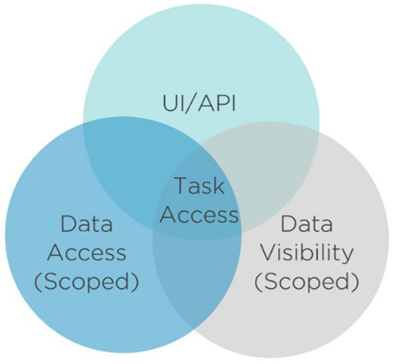
Figure 2: The T-RBAC model showing how three role types (UI/API, Data Visibility, and Data Access) combine to provide complete task access.
The Three T-RBAC Role Types
1. UI/API Management Roles (UI-)
These roles grant access to user interface elements and API endpoints, including:
- Pages and navigation menus
- User interface controls and components
- Workflow execution permissions
- API calls for data retrieval
For example, the UI-ManageUsers role grants access to the user management interface and related workflows.
2. Data Visibility Management Roles (VIS-)
Visibility roles control what data users can see within a particular scope. They provide:
- Visibility to specific object types (users, groups, roles)
- Scoped access to organizational locations
- API endpoint permissions for retrieving data
- Read-only access to resources
The VIS-AllPeople-Boston role, for instance, allows viewing all people in the Boston location and its child locations.
3. Data Access Management Roles (ACT-)
Action roles authorize specific actions or operations on data. They grant:
- Permissions for create, modify, or delete operations
- Administrative actions on resources
- Scoped permissions to perform tasks
- Write access to specific object types
An example would be ACT-CreateUser-NewYork, which allows creating user accounts in the New York location.
How T-RBAC Roles Work Together
Users need a combination of these three role types to perform tasks. Consider the task of creating users in the Boston office:
Complete Task Requirements:
UI-ManageUsers— Access to the user management interfaceVIS-AllPeople-Boston— Visibility to Boston users and dataACT-CreateUser-Boston— Permission to create users in Boston
Only with all three roles can the user successfully complete the task.
Incomplete Access Scenarios:
Having one type without the others results in incomplete access:
- UI role only: User can see the interface but has no data visibility or action permissions
- VIS role only: User can see data through APIs but cannot access the UI or perform actions
- ACT role only: User can perform actions but cannot see data or access the interface to do so
This segregation provides granular control and allows roles to be reused in different combinations without creating numerous redundant roles.
- UI-RoleName = Access to interface and API endpoints
- VIS-RoleName-Location = Visibility to data within scope
- ACT-RoleName-Location = Permission to perform actions within scope
All three types are typically required together to complete administrative tasks.
When to Use Management Roles
Management Roles are most appropriate when:
- Managing access for specific activities or tasks that span different job functions
- Supporting project teams or cross-functional collaboration
- Isolating business processes from technical system dependencies
- Providing granular, auditable access control
- Implementing least-privilege access based on actual responsibilities rather than job titles
Their reusable nature makes them ideal for creating access patterns that can be combined flexibly as organizational needs evolve.
Business Roles, on the other hand, work best when:
- Assigning access based on job titles or organizational positions
- Implementing organization-wide access policies
- Managing access for standard employee types
- Simplifying access assignment during hiring and role changes
Most organizations use both approaches together, with Business Roles containing the appropriate Management Roles for each job function. This combination provides the simplicity of job-based assignments with the flexibility of activity-based control, which is the most common and recommended approach for comprehensive access governance.
Management Role Structure
Management Roles in EmpowerID are fully manageable objects that can contain:
- Access Levels — Collections of operations and rights for specific resource types
- Nested Management Roles — Bundled within for hierarchical permissions
- Ownership and Governance — Designated responsible parties and deputies
- Membership Policies — Enable automatic assignment based on organizational attributes
- Location Scoping — Restricts where the role's permissions apply
Management Role Definitions
Management Roles can be created from Management Role Definitions, which serve as templates containing a baseline set of Access Levels. Multiple Management Roles can inherit from a single definition, providing several key advantages:
- Consistent baseline permissions across similar roles
- Centralized management of common access patterns
- Regional variants with location-specific scoping while maintaining a common foundation
- Customizable child roles through additional Access Levels beyond what the definition provides
Example: An "IT Administrator" definition might contain 345 Access Levels for general IT admin tasks. Regional roles such as London IT Admin and New York IT Admin inherit these 345 Access Levels and add location-specific assignments scoped to their respective regions, eliminating the need to manage hundreds of individual Access Level assignments across multiple roles.
Benefits of Management Roles
Management Roles address several common challenges in access governance:
Reduce role bloat: Reusable, task-based roles can be combined, helping organizations avoid the proliferation of hundreds of job-specific roles with overlapping permissions.
Simplify system changes: When IT systems change, only the Management Roles that map to those systems need updating, leaving business processes and job-based roles unchanged. This dramatically simplifies system migrations and infrastructure changes.
Improve auditability: The activity-based nature of Management Roles makes it clear what specific tasks users can perform, which simplifies compliance audits and access reviews.
Support flexibility: Management Roles support dynamic organizational structures like project teams, temporary assignments, and cross-functional collaborations that don't fit traditional job-based roles.
Implement least-privilege: Granular, task-specific roles make it easier to implement least-privilege access by default, granting only the permissions needed for specific responsibilities rather than broad access based on job title.
Next Steps
Now that you understand Management Roles, explore how to work with them:
- Onboard Management Roles - Create new Management Roles for your organization
- Add People to Management Roles - Assign users to roles
- Manage Resource Access for Management Roles - Configure access assignments
- What is Role-Based Access Control? - Understand the broader RBAC model in EmpowerID
Related Concepts
- What are Access Levels? - Understand how Management Roles grant access through Access Levels
- Business Roles and Locations - Learn about job-based role assignment
- EmpowerID Hybrid Access Control - See how Management Roles fit into the broader access control model