Overview of Partner Delegations
EmpowerID enables organizations to manage partner interactions effectively within their IT infrastructure through specialized Organization locations and role-based access control. This delegation model allows partners to manage their allocated IT resources independently without accessing or being aware of each other's resources or the internal organizational infrastructure.
Partner Management Roles
EmpowerID provides two key Management Roles for partners:
Partner Admin Management Role
- Grants administrative capabilities within partner locations
- Allows managing people and resources within assigned partner locations
- Includes elevated permissions for user administration and resource management
Partner User Management Role
- Focused on basic end-user actions
- Enables searching for people, requesting resources, and initiating workflows
- Provides self-service capabilities within partner context
Both roles are designed with specific Access Levels to ensure partners can manage their domain effectively without accessing the hosting organization's internal resources.
Organization Locations
Organization locations in EmpowerID provide hierarchical access control for partner management. These locations use specialized Access Levels, such as "People In My Organizations," which are effective only within assigned Organization locations.
How Organization Location Access Works
The RBAC compiler in EmpowerID determines relative access based on the Organization tree hierarchy:
People as Actors When people are assigned to an Organization location via a Business Role and Location assignment, they are limited as actors to resources in their Organization location and any Organization locations below theirs in the tree. They cannot act on resources above their location in the hierarchy.
People as Resources As resources, people belong to all Organization locations in the tree, including parent locations. This allows people in top-level Organization locations to manage those below them in the hierarchy.
Visual Representation
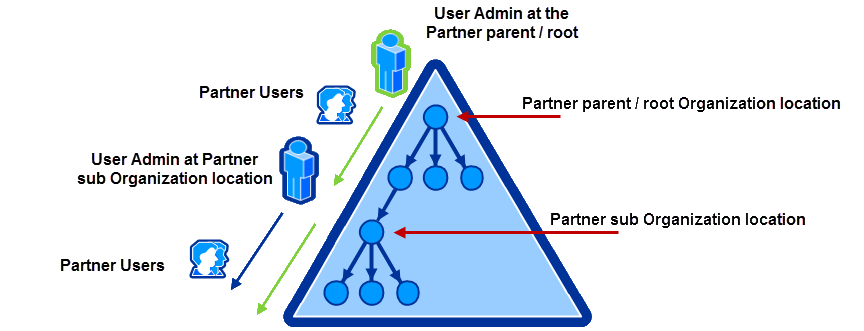
In this diagram:
- The triangle represents the complete partner organization
- The figure outlined in green represents a User Admin at the root location who can manage all users throughout the partner organization (green arrows)
- The figure outlined in blue represents a User Admin at a sub-organization location who can only manage users in their sub-organization and below (blue arrow)
- The blue User Admin cannot manage users in locations above their organization but can themselves be managed by the green User Admin at the parent location
This structure allows partner organizations to have sub-organization locations with self-contained management capabilities that can be altered as needed by administrators at the top-level Organization.
EmpowerID includes a default Partners Organization location under which all partner Organizations should be created. See Managing Partner Delegations for implementation details.
Partner Business Roles
Managing partner access involves the intersection of Business Roles and Locations in the EmpowerID RBAC model. All people must have a Business Role, and all resources must belong to a location. The RBAC compiler uses partner Business Role and Location assignments to determine relative access to resources.
EmpowerID includes two default partner Business Role and Location combinations:
- Partner Admin in Partners – Assigned to the Partner Admin Management Role
- Partner in Partners – Assigned to the Partner User Management Role
Any person assigned to these Business Role and Location combinations receives the Access Levels granted to their respective Management Role.
Related Topics
- Managing Partner Delegations – Step-by-step guide to implementing partner delegations
- Partner Access Assignment Details – Detailed breakdown of Management Roles and their permissions
- Add Partner Company Registration to the Login Page – Enable partner organization registration
- Add Partner Self Registration to the Login Page – Enable individual partner user registration