Configure Computers for Just-In-Time Access
Just-In-Time (JIT) account provisioning automatically creates temporary user accounts for PSM sessions and removes them when sessions end. This approach enforces a zero-trust, least-privilege security model by ensuring privileged access exists only during active sessions.
How JIT Access Works
When JIT is enabled:
- At the start of a PSM session, EmpowerID creates a unique account by combining the user's login with a random string (e.g.,
jposada_566054625600) - The account is added to the appropriate permission group (such as local administrators)
- The user accesses the computer with the permissions granted by that group membership
- When the session ends, the account is removed from the group or deleted entirely (based on configuration)
Without JIT provisioning, users must have existing accounts on the computer with the necessary permissions to access it through PSM.
Prerequisites
To configure JIT access for a computer:
- The computer must be connected to EmpowerID as a Local Windows Server Account Store
- IAM Shop Permission Levels should be assigned to the computer
JIT Configuration Scenarios
Review the scenarios below before starting configuration to determine which approach fits your security requirements.
Maximum Security (Recommended)
- Enable Just in Time Account Provisioning: Selected
- Delete JIT-Created Account on Check-In: Selected
- Use Existing Account if Applicable: Not applicable
Accounts are created for each session and completely deleted afterward, leaving no trace.
Balanced Approach
- Enable Just in Time Account Provisioning: Selected
- Delete JIT-Created Account on Check-In: Not selected
- Use Existing Account if Applicable: Selected
Accounts are created once per user and reused for subsequent sessions, reducing overhead while maintaining session-based privilege assignment.
Configure JIT Access Settings
-
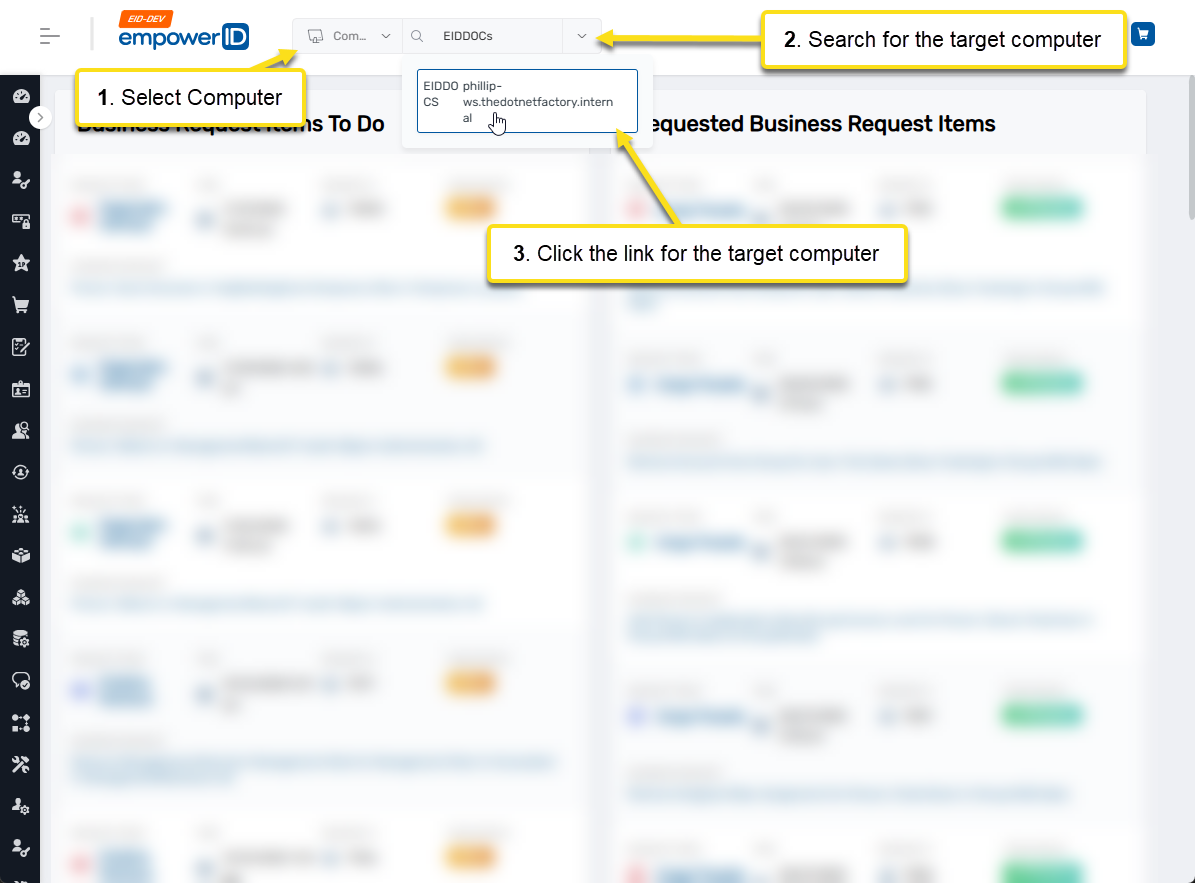
Navigate to the computer's View One page using Global Search.
-
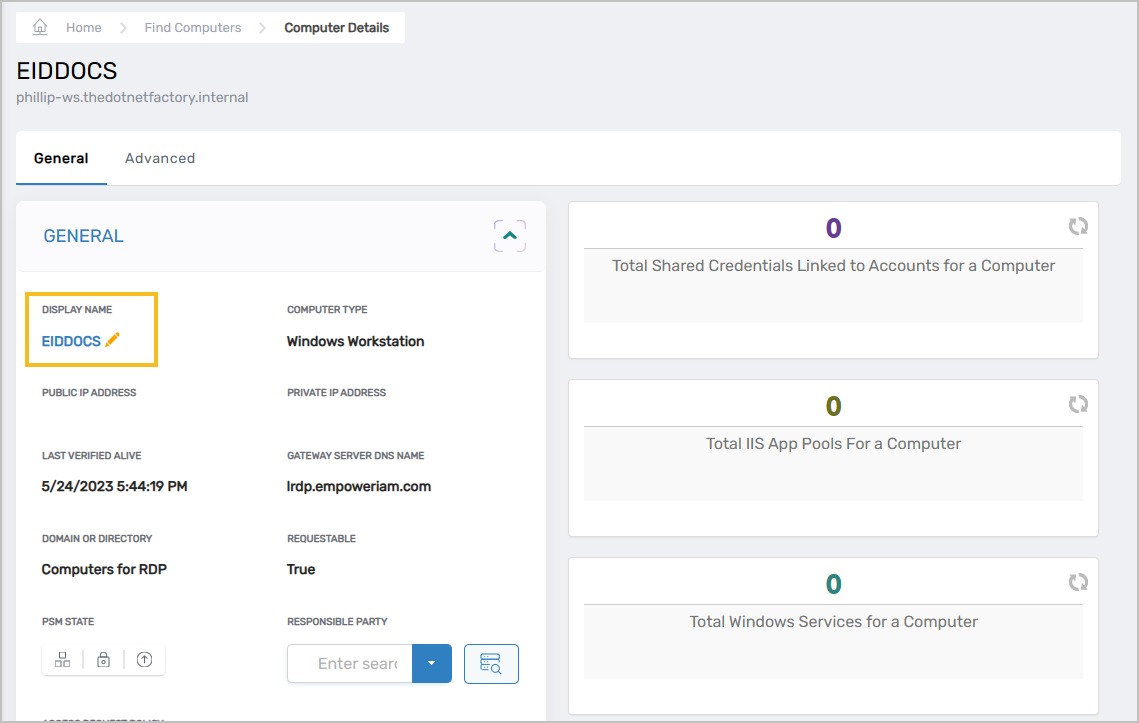
Click the Display Name link to put the computer in Edit mode.
-
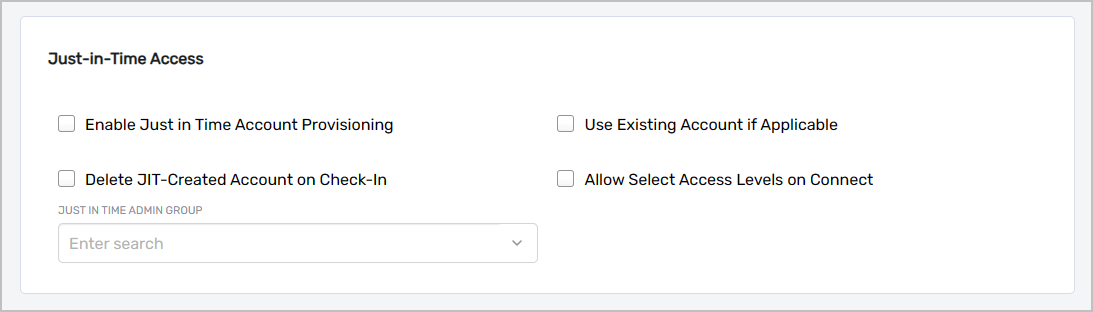
Navigate to the Just-in-Time Access section.
-
Configure the JIT settings according to your chosen scenario:
- Enable Just in Time Account Provisioning — Enables automatic creation of unique accounts for PSM sessions. Without this setting, users must have existing accounts with appropriate permissions on the computer.
- Delete JIT-Created Account on Check-In — When selected, EmpowerID deletes the provisioned account when the session ends, ensuring no residual accounts remain.
- Use Existing Account if Applicable — When selected (and Delete JIT-Created Account on Check-In is not selected), EmpowerID reuses previously provisioned accounts for the same user in subsequent sessions.
- Just In Time Admin Group — Specifies the group on the computer to which JIT accounts are added as members during sessions.
-
Click Save to apply the changes.
Results
After configuring JIT access:
- When users initiate PSM sessions to the computer, temporary accounts are created automatically
- Accounts are added to the specified admin group for the duration of the session
- Upon session completion, accounts are removed from the group or deleted based on your configuration
- No standing privileged accounts exist outside of active sessions
Related Topics
- Assign IAM Shop Permission Levels to Computers – Configure permission levels that use JIT accounts
- Understanding IAM Shop Permission Levels – Overview of permission levels and PSM integration
- Connecting to Local Windows Servers as Account Stores – Prerequisite for JIT functionality