Delete Computers
Deleting computers removes computer objects from Active Directory. Deleted computers are moved to the Active Directory Deleted Objects container and can be restored within the tombstone lifetime period.
Prerequisites
To delete computers, you need the Initiator Access Level for the DeleteComputerBulk workflow.
Delete a Computer
- On the navbar, expand Privileged Access and select Computers.
- On the Computers tab, search for the computer you want to delete.
- Click the record to select the computer.
- Click the Delete Computers action link.
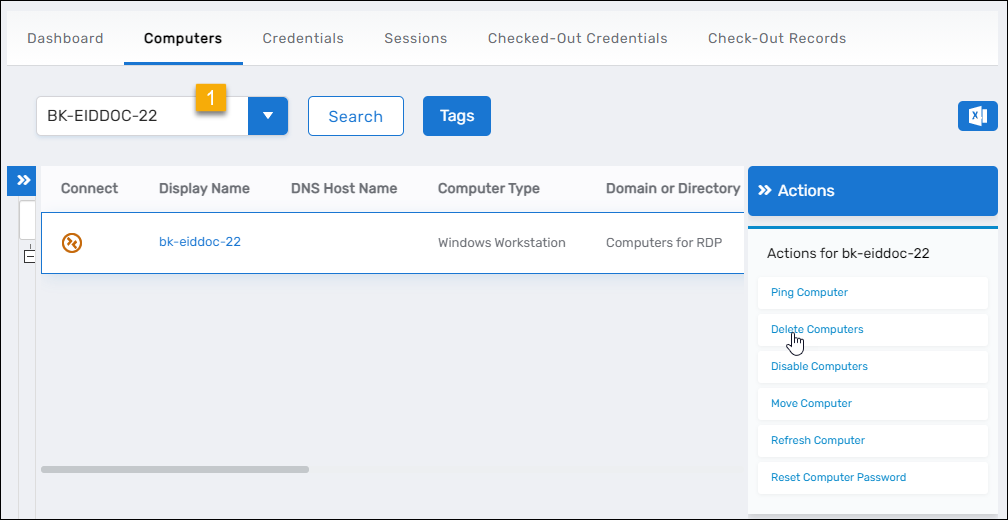
- Click Yes to confirm the deletion.

- Click OK to close the Operation Execution Summary.
Results
After completing the operation:
- The computer object is deleted from Active Directory
- The computer is moved to the Deleted Objects container
- The computer's IsDeleted attribute is set to True
- The computer can be restored using the Restore Deleted Computers workflow during the tombstone lifetime period
- The deletion operation is logged in the EmpowerID audit log
warning
Deleted computers remain in the Deleted Objects container for the duration of the tombstone lifetime (typically 180 days by default). After this period, the computer object is permanently removed and cannot be restored.
Related Topics
- Restore Deleted Computers – Recover deleted computer objects
- Disable Computers – Temporarily prevent computer access without deletion
- Move Computers – Relocate computers between organizational units