Disable Computers
Disabling computers prevents computer accounts from authenticating with the domain while preserving the computer objects in Active Directory. This is useful for temporarily removing computer access without permanent deletion.
Prerequisites
To disable computers, you need the Initiator Access Level for the DisableComputer workflow.
Disable a Computer
- On the navbar, expand Privileged Access and select Computers.
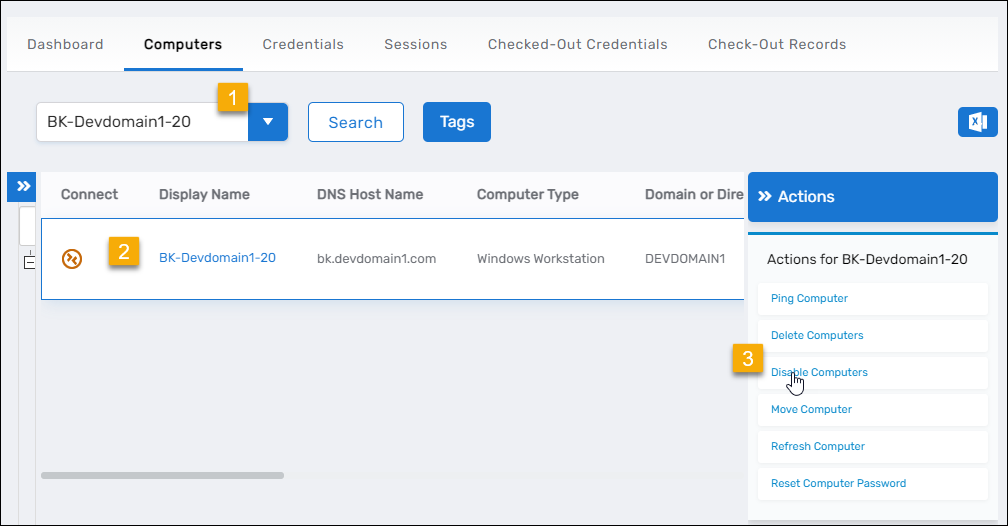
- Search for the computer you want to disable and click the record to select it.
- Click the Disable Computers action link.
- Click OK to close the Operation Execution Summary.

Results
After completing the operation:
- The computer account is disabled in Active Directory
- The computer's Enabled attribute is set to False
- The computer cannot authenticate with the domain or access network resources
- The computer object remains in Active Directory and can be re-enabled
- The disable operation is logged in the EmpowerID audit log
Related Topics
- Enable Computers – Re-enable disabled computers
- Delete Computers – Permanently remove computer accounts
- Move Computers – Relocate computers between organizational units