Universal Connector Integration Details
EmpowerID provides a Universal Connector that can be used for inventorying and managing resources originating in account stores for which EmpowerID does not provide a specific out-of-the-box connector, such as HR systems and custom applications via a Universal Connector database.
Using the Universal Connector requires that data from your external system be imported into the Universal Connector database via the technology of your choice—such as scripting, an ETL tool like Microsoft SSIS, or custom code—according to the schema defined by EmpowerID.
To use this topic effectively, you should have a good understanding of SQL and database principles.
Inbound Data
EmpowerID provides the following tables for importing data from an external system into the Universal Connector database:
- User Table — Defines all attributes of user accounts.
- Group Table — Defines groups and distribution lists.
- Location Table — Defines hierarchical or organizational locations.
- Business Role Table — Defines business roles.
- UserGroup Table — Maps users to groups.
- UserBusinessRoleLocation Table — Maps users to Business Role + Location combinations.
The following sections describe the schema for each table in full detail.
User Table
The User table defines all attributes of user accounts from your external system. Each record is synchronized into EmpowerID as an account object.
| Field | Data Type | Max Length (Bytes) | Optional | Default | Description |
|---|---|---|---|---|---|
| UserGUID | uniqueidentifier | 16 | No | (newid()) | Uniquely identifies a user account in EmpowerID. If this field is blank, EmpowerID will generate the guid. This field should never be updated for the life of the record. |
| UserID | nvarchar(200) | 400 | No | Specifies the UserID for a user in the external system. This value is derived from the external system and must be unique for each user. This field should never be deleted or updated for the life of the record. | |
| LogonName | nvarchar(200) | 400 | No | Specifies the logon name for the user account. This value must be unique for each user and can be set to any desired value, such as a user's EmployeeID contained within an external system or a combination of data that can be found, derived or calculated from an external system. If this field is blank, EmpowerID will generate a unique logon name for each user record. | |
| Active | bit | 1 | No | ((1)) | Specifies whether a user is active. This field can be used in place of the Status field. |
| FriendlyName | nvarchar(255) | 510 | Yes | Specifies the name shown to users in EmpowerID user interfaces. The field maps to the DisplayName attribute in Active Directory. | |
| Name | nvarchar(255) | 510 | Yes | Specifies the account name. This value should be unique and maps to the CN or DistinguishedName in Active Directory. | |
| FirstName | nvarchar(50) | 100 | Yes | Specifies the first name of the user and maps to the givenName attribute in Active Directory. | |
| MiddleName | nvarchar(50) | 100 | Yes | Specifies the middle name of the user and maps to the middleName attribute in Active Directory. | |
| LastName | nvarchar(50) | 100 | Yes | Specifies the last name of the user. Maps to the LastName field in Active Directory. | |
| nvarchar(255) | 510 | Yes | Specifies the email address of the user. The value of this field can be used to set the email address of the user in Exchange when an Exchange Resource Entitlement exists. Additionally, this field is used by EmpowerID to determine whether the specific user account needs to be joined to an EmpowerID Person. | ||
| EmployeeID | nvarchar(50) | 100 | Yes | Specifies the Employee ID of the user in the external system and will set the EmployeeID attribute of the user in Active Directory. When used, this value must be unique for each user. Additionally, this field is used by EmpowerID to determine whether the specific user account needs to be joined to an EmpowerID Person. | |
| BusinessRoleID | nvarchar(200) | 400 | Yes | Specifies the Business Role ID of the Business Role associated with the user in EmpowerID. See Note A. | |
| BusinessRoleName | nvarchar(200) | 400 | Yes | Specifies the Business Role Name of the Business Role associated with the user in EmpowerID. See Note A. | |
| LocationID | nvarchar(200) | 400 | Yes | Specifies the ID of the Location associated with the user in EmpowerID. See Note B. | |
| LocationName | nvarchar(200) | 400 | Yes | Specifies the name of the Location associated with the user in EmpowerID. See Note B. | |
| ManagerLogonName | nvarchar(200) | 400 | Yes | Specifies the LogonName of the user's manager, if any. If populated, the field will be used to set the user's direct manager in EmpowerID. When populating user manager data, you can elect to set this field or the ManagerAccountID field. | |
| ManagerAccountID | nvarchar(200) | 400 | Yes | Specifies the User ID of the user's manager, if any. If populated, the field will be used to set the user's direct manager in EmpowerID. When populating user manager data, you can elect to set this field or the ManagerLogonName field. | |
| Telephone | nvarchar(50) | 100 | Yes | Specifies the primary telephone number of the user's place of business and maps to the telephoneNumber attribute in Active Directory. | |
| MobileNumber | nvarchar(50) | 100 | Yes | Specifies the mobile number of the user and maps to the mobile attribute in Active Directory. | |
| BusinessPhone | nvarchar(50) | 100 | Yes | Specifies the business telephone number of the user. | |
| HomePhone | nvarchar(50) | 100 | Yes | Specifies the home telephone number of the user and maps to the homePhone attribute in Active Directory. | |
| StreetAddress | nvarchar(255) | 510 | Yes | Specifies the street address of the user and maps to the streetAddress attribute in Active Directory. | |
| StreetAddress2 | nvarchar(255) | 510 | Yes | Specifies a secondary street address of the user. | |
| City | nvarchar(100) | 200 | Yes | Specifies the city where the user is located and maps to the l attribute in Active Directory. | |
| State | nvarchar(100) | 200 | Yes | Specifies the state where the user is located and maps to the st attribute in Active Directory. | |
| Country | nvarchar(50) | 200 | Yes | Specifies the country where the user is located and maps to the co attribute in Active Directory. | |
| Province | nvarchar(100) | 200 | Yes | Specifies the province where the user is located. | |
| Company | nvarchar(256) | 512 | Yes | Specifies the user's company name and maps to the company attribute in Active Directory. | |
| Department | nvarchar(256) | 512 | Yes | Specifies the user's department name and maps to the department attribute in Active Directory. | |
| DepartmentNumber | nvarchar(50) | 100 | Yes | Specifies the user's department number and maps to the departmentNumber attribute in Active Directory. | |
| OfficeLocation | nvarchar(450) | 900 | Yes | Specifies the location or address of the user's office and maps to the physicalDeliveryOfficeName attribute in Active Directory. | |
| Location | nvarchar(450) | 900 | Yes | Specifies the user's location within an organization, such as their office number, and maps to the location attribute in Active Directory. | |
| Division | nvarchar(450) | 900 | Yes | Specifies the user's division and maps to the division attribute in Active Directory. | |
| PersonalTitle | nvarchar(255) | 510 | Yes | Specifies the user's personal title, such as "Mr", "Mrs" or "Ms." Maps to the personalTitle attribute in Active Directory. | |
| Description | nvarchar(255) | 510 | Yes | Specifies a description for the user and maps to the description attribute in Active Directory. | |
| SecondLastName | nvarchar(50) | 100 | Yes | Specifies a second last name for the user, where such is used. | |
| GenerationalSuffix | nvarchar(10) | 20 | Yes | Specifies a generational suffix for the user, such as "JR" or "SR." Maps to the generationQualifier attribute in Active Directory. | |
| Initials | nvarchar(6) | 12 | Yes | Specifies the user's initials and maps to the initials attribute in Active Directory. | |
| BirthName | nvarchar(255) | 510 | Yes | Specifies the name given to the user at birth. | |
| DisplayNamePrintable | nvarchar(255) | 510 | Yes | Specifies the printable name for the user and maps to the displayNamePrintable attribute in Active Directory. | |
| PreferredFirstName | nvarchar(50) | 100 | Yes | Specifies the preferred first name of the user. | |
| PreferredLastName | nvarchar(50) | 100 | Yes | Specifies the preferred last name of the user. | |
| JobTitle | nvarchar(255) | 100 | Yes | Specifies the user's job title within an organization and maps to the title attribute in Active Directory. | |
| AboutMe | nvarchar(max) | max | Yes | Specifies user-defined demographic information about the user. | |
| PreferredLanguage | nvarchar(50) | 100 | Yes | Preferred written or spoken language. If set, EmpowerID displays UIs in that language when localization is applied. | |
| PostOfficeBox | nvarchar(50) | 100 | Yes | Specifies the post office box for the user and maps to the postOfficeBox attribute in Active Directory. | |
| SocialSecurityNumber | nvarchar(50) | 100 | Yes | Specifies the social security number for the user. Note: EmpowerID does not mask these characters. Mask or store partial values if required. | |
| NationalIdentificationNumber | nvarchar(50) | 100 | Yes | Specifies the national identification number for the user. | |
| CarLicense | nvarchar(50) | 100 | Yes | Specifies the vehicle license/registration plate of the user's vehicle. Maps to the carLicense attribute in Active Directory. | |
| Ethnicity | nvarchar(50) | 100 | Yes | Specifies the ethnicity of the user. | |
| Gender | nvarchar(15) | 30 | Yes | Specifies the gender of the user. | |
| District | nvarchar(256) | 512 | Yes | Specifies the district of the user. | |
| Assistant | nvarchar(450) | 900 | Yes | Specifies an assistant to the user. | |
| PhotoUrl | nvarchar(256) | 512 | Yes | Specifies the location of the user's photo. | |
| IMAddress | nvarchar(256) | 512 | Yes | Specifies the instant messaging address of the user. | |
| SIPAddress | nvarchar(256) | 512 | Yes | Specifies the SIP address of the user. | |
| IdentityURL | nvarchar(256) | 512 | Yes | Specifies the identity URL for the user. | |
| URLPersonal | nvarchar(256) | 512 | Yes | Specifies a personal URL for the user. | |
| URLBusiness | nvarchar(256) | 512 | Yes | Specifies the business URL for the user. | |
| URLOWA | nvarchar(256) | 512 | Yes | Specifies the OWA URL for the user. | |
| Pager | nvarchar(50) | 512 | Yes | Specifies the pager number for the user. | |
| IpPhone | nvarchar(50) | 100 | Yes | Specifies the user's IP phone number. | |
| Fax | nvarchar(50) | 100 | Yes | Specifies a fax number for the user. | |
| Notes | nvarchar(1024) | 100 | Yes | Field for inserting notes. | |
| DateOfBirth | datetime | 8 | Yes | Specifies the date of birth for the user. | |
| CityOfBirth | nvarchar(50) | 100 | Yes | Specifies the city of birth for the user. | |
| CountryOfBirth | nvarchar(50) | 100 | Yes | Specifies the country of birth for the user. | |
| EmployeeIDOther | nvarchar(50) | 100 | Yes | Specifies an alternative Employee ID for the user. | |
| EmployeeType | nvarchar(50) | 100 | Yes | Specifies the user's employee type. | |
| ExtensionAttribute1 | nvarchar(1024) | 2048 | Yes | Can be used for setting a unique attribute value. | |
| ExtensionAttribute2 | nvarchar(1024) | 2048 | Yes | Can be used for setting a unique attribute value. | |
| ExtensionAttribute3 | nvarchar(1024) | 2048 | Yes | Can be used for setting a unique attribute value. | |
| ExtensionAttribute4 | nvarchar(1024) | 2048 | Yes | Can be used for setting a unique attribute value. | |
| ExtensionAttribute5 | nvarchar(1024) | 2048 | Yes | Can be used for setting a unique attribute value. | |
| ExtensionAttribute6 | nvarchar(1024) | 2048 | Yes | Can be used for setting a unique attribute value. | |
| ExtensionAttribute7 | nvarchar(1024) | 2048 | Yes | Can be used for setting a unique attribute value. | |
| ExtensionAttribute8 | nvarchar(1024) | 2048 | Yes | Can be used for setting a unique attribute value. | |
| ExtensionAttribute9 | nvarchar(1024) | 2048 | Yes | Can be used for setting a unique attribute value. | |
| ExtensionAttribute10 | nvarchar(1024) | 2048 | Yes | Can be used for setting a unique attribute value. | |
| ExtensionAttribute11 | nvarchar(1024) | 2048 | Yes | Can be used for setting a unique attribute value. | |
| ExtensionAttribute12 | nvarchar(1024) | 2048 | Yes | Can be used for setting a unique attribute value. | |
| ExtensionAttribute13 | nvarchar(1024) | 2048 | Yes | Can be used for setting a unique attribute value. | |
| ExtensionAttribute14 | nvarchar(1024) | 2048 | Yes | Can be used for setting a unique attribute value. | |
| ExtensionAttribute15 | nvarchar(1024) | 2048 | Yes | Can be used for setting a unique attribute value. | |
| ExtensionAttribute16 | xml | max | Yes | Can be used for setting a unique attribute value. | |
| ExtensionAttribute24 | nvarchar(1024) | 2048 | Yes | Can be used for setting a unique attribute value. | |
| ExtensionAttribute25 | nvarchar(1024) | 2048 | Yes | Can be used for setting a unique attribute value. | |
| ExtensionAttribute26 | nvarchar(1024) | 2048 | Yes | Can be used for setting a unique attribute value. | |
| ExtensionAttribute27 | nvarchar(1024) | 2048 | Yes | Can be used for setting a unique attribute value. | |
| Alias | nvarchar(100) | 200 | Yes | Specifies an alias for the user. | |
| TargetAddress | nvarchar(255) | 510 | Yes | Specifies a target address for the user. | |
| Deleted | bit | 1 | No | ((0)) | Soft delete flag. See Note C. |
| DeletedDate | datetime | 8 | Yes | Specifies the date and time when the user was deleted from the external system. For information purposes only. | |
| TerminationDate | datetime | 2048 | Yes | Specifies the date and time when the user was terminated from a hired condition. | |
| Disabled | bit | 1 | No | ((0)) | Specifies whether the user is disabled. |
| LockedOut | bit | 1 | No | ((0)) | Specifies whether the user is locked out. |
| LockedOutTime | bigint | 8 | Yes | Specifies the time the user was locked out. | |
| ExpiresOn | datetime | 8 | Yes | Specifies when the account expires. | |
| ValidFrom | datetime | 8 | Yes | Specifies when the account is valid from. | |
| ValidUntil | datetime | 8 | Yes | Specifies when the account is valid until. | |
| PasswordNeverExpires | bit | 1 | No | ((0)) | Specifies whether the user's password is set to never expire. |
| CannotChangePassword | bit | 1 | No | ((0)) | Specifies whether the user can change their password. |
| PasswordExpires | datetime | 8 | Yes | Specifies the date and time a user's password expires. | |
| PasswordLastChanged | datetime | 8 | Yes | Specifies the date and time the user last changed their password. | |
| MustChangePasswordAtNextLogon | bit | 1 | No | ((0)) | Specifies whether the user must change their password the next time they log in to the system. |
| RequiresSmartCardForInteractiveLogon | bit | 1 | No | ((0)) | Specifies whether a smart card is required for logon. |
| EnableSyncPassword | bit | 1 | No | ((1)) | Specifies whether EmpowerID will synchronize the password set on the user's Person object back to the account for the user in the external system. See Note D. |
| DoNotAllowDelete | bit | 1 | No | ((0)) | Specifies whether the user can be deleted in EmpowerID workflows. |
| LastLogonTime | datetime | 8 | Yes | Specifies the last logon time. | |
| Status | nvarchar(50) | 100 | Yes | Used to specify the condition of the user in an external system (e.g., "pre-hire", "on leave", "terminated"). Can trigger RET policies for provisioning and deprovisioning resources. | |
| SecurityIdentifier | nvarchar(255) | 510 | Yes | Specifies the unique value used to identify the user account and maps to the securityIdentifier attribute in Active Directory. | |
| SID | nvarchar(255) | 510 | Yes | Specifies the unique value that identifies the user as a security principal. Maps to the objectSid attribute in Active Directory. | |
| DistinguishedName | nvarchar(2048) | 4096 | Yes | Specifies the location of the user object in the external system. | |
| UserPrincipalName | nvarchar(255) | 510 | Yes | Specifies the UPN of the user. | |
| ProfilePath | nvarchar(450) | 900 | Yes | Specifies the path to the user's profile. Maps to the profilePath attribute in Active Directory. | |
| LogonScript | nvarchar(450) | 900 | Yes | Specifies the logon script to run for the user, if any. | |
| HomeDirectory | nvarchar(450) | 900 | Yes | Specifies the home directory for the user. Maps to the homeDirectory attribute in Active Directory. | |
| HomeDrive | nvarchar(5) | 10 | Yes | Specifies the drive letter to which to map the UNC path set for HomeDirectory. Maps to the homeDrive attribute in Active Directory. | |
| AllowDialin | bit | 1 | Yes | Specifies whether the user can connect remotely. | |
| HideInEmpowerID | bit | 1 | No | ((0)) | Specifies whether the account will be hidden from most views in EmpowerID. |
| AllowJoin | bit | 1 | No | ((1)) | Specifies whether EmpowerID will join the user account to an EmpowerID Person. |
| AllowProvision | bit | 1 | No | ((1)) | Specifies whether EmpowerID will provision a new EmpowerID Person for the user account upon inventory. |
| ConfigurationXml | xml | max | Yes | Extensibility field. Reserved. | |
| SystemChangedDate | datetime | 8 | Yes | For sync tracking. See Note D. | |
| CreatedDate | datetime | 8 | No | (getutcdate()) | Auto-populated with the UTC time corresponding to the date and time the user record is created. |
| ChangedTime | timestamp | 8 | No | Auto-updated timestamp when record modified. See Note E. |
Field Notes
Note A — BusinessRoleID / BusinessRoleName
When populating Business Role data, set either BusinessRoleID or BusinessRoleName.
- If the user has more than one Business Role and Location, use the UserBusinessRoleLocation table (EmpowerID performs a union of User table and UserBusinessRoleLocation data).
- If multiple entries exist in
UserBusinessRoleLocationfor a user, the record with the lowest priority becomes the primary Business Role.
RBAC membership in Business Roles and Locations; Role & Location Compiler / Processor jobs update a Person’s primary Business Role and Location and remove secondary Locations based on mappings.
Note B — LocationID / LocationName
When populating Location data, set either LocationID or LocationName.
- If the user has multiple Locations, use UserBusinessRoleLocation (union logic applies).
- If multiple entries exist, the record with the lowest priority becomes the primary Location.
RBAC membership and Role & Location Compiler / Processor jobs (same behaviors as Business Role).
Note C — Deleted (Soft Delete)
Do not physically delete rows from the User table. If the record no longer exists in the source system:
- Set
Deleted = 1and optionally populateDeletedDate(informational). - If identifiers like
LogonNamemight be reused in the future, update the old LogonName at delete time to avoid collisions when a new user later takes the same value.
Inventory might run while the table is empty if you bulk remove/reload data; EmpowerID could interpret this as users losing memberships, causing unintended de-provisioning.
Note D — SystemChangedDate (Sync Best Practice)
Optional field to help track source-of-truth changes.
Best practice: Compare the object’s ID and SystemChangedDate here with the external system. If the external SystemChangedDate is later, sync that record to the Universal Connector DB before EmpowerID inventories it.
Note E — ChangedTime (Inventory Delta)
ChangedTime is system-maintained:
- Timestamp updates whenever any values in the record are modified.
- Do not insert or update
ChangedTimemanually.
Inventory behavior:
- On the first inventory, EmpowerID pulls all records from the Universal Connector database into the Identity Warehouse.
- On subsequent inventories, EmpowerID compares
ChangedTimeto the last run; if newer, it updates the corresponding record in the Identity Warehouse.
If you write ETL that touches a row without a real data change, avoid bumping the row unnecessarily—doing so will cause EmpowerID to reprocess it.
Group Table
| Field | Data Type | Max Length (Bytes) | Optional | Default | Description |
|---|---|---|---|---|---|
| GroupGUID | uniqueidentifier | 16 | No | (newid()) | Uniquely identifies a group in EmpowerID. If this field is blank, EmpowerID will generate the guid. This field should never be updated for the life of the record. |
| GroupID | nvarchar(200) | 400 | No | Specifies the ID for group from the external system. The value of this field must be unique for each group. This field should never be deleted or updated for the life of the record. | |
| LogonName | nvarchar(200) | 400 | No | Specifies the group LogonName. The value of this field should be unique. | |
| Name | nvarchar(200) | 400 | Yes | Specifies the name of the group. This value should be unique. | |
| FriendlyName | nvarchar(255) | 510 | Yes | Specifies the name of the group shown to users in EmpowerID user interfaces. | |
| Description | nvarchar(max) | max | Yes | Specifies a description for the group. | |
| IsMailEnabled | bit | 1 | No | ((0)) | Specifies whether the group is mail-enabled. |
| nvarchar(100) | 512 | Yes | Specifies the email address for the group. | ||
| MailNickName | nvarchar(256) | 512 | Yes | ||
| Notes | nvarchar(max) | max | Yes | ||
| ExtensionAttribute1 | nvarchar(1024) | 2048 | Yes | Can be used for setting a unique attribute value. | |
| ExtensionAttribute2 | nvarchar(1024) | 2048 | Yes | Can be used for setting a unique attribute value. | |
| ExtensionAttribute3 | nvarchar(1024) | 2048 | Yes | Can be used for setting a unique attribute value. | |
| ExtensionAttribute4 | nvarchar(1024) | 2048 | Yes | Can be used for setting a unique attribute value. | |
| ExtensionAttribute5 | nvarchar(1024) | 2048 | Yes | Can be used for setting a unique attribute value. | |
| ExtensionAttribute6 | nvarchar(1024) | 2048 | Yes | Can be used for setting a unique attribute value. | |
| ExtensionAttribute7 | nvarchar(1024) | 2048 | Yes | Can be used for setting a unique attribute value. | |
| ExtensionAttribute8 | nvarchar(1024) | 2048 | Yes | Can be used for setting a unique attribute value. | |
| ExtensionAttribute9 | nvarchar(1024) | 2048 | Yes | Can be used for setting a unique attribute value. | |
| ExtensionAttribute10 | nvarchar(1024) | 2048 | Yes | Can be used for setting a unique attribute value. | |
| ExtensionAttribute11 | nvarchar(1024) | 2048 | Yes | Can be used for setting a unique attribute value. | |
| ExtensionAttribute12 | nvarchar(1024) | 2048 | Yes | Can be used for setting a unique attribute value. | |
| ExtensionAttribute13 | nvarchar(1024) | 2048 | Yes | Can be used for setting a unique attribute value. | |
| ExtensionAttribute14 | nvarchar(1024) | 2048 | Yes | Can be used for setting a unique attribute value. | |
| ExtensionAttribute15 | nvarchar(1024) | 2048 | Yes | Can be used for setting a unique attribute value. | |
| ExtensionAttribute16 | xml | max | Yes | Can be used for setting a unique attribute value. | |
| ExtensionAttribute17 | varbinary(max) | max | Yes | Can be used for setting a unique attribute value. | |
| ExtensionAttribute18 | varbinary(max) | max | Yes | Can be used for setting a unique attribute value. | |
| ExtensionAttribute19 | bit | 1 | Yes | Can be used for setting a unique attribute value. | |
| ExtensionAttribute20 | bit | 1 | Yes | Can be used for setting a unique attribute value. | |
| ExtensionAttribute21 | bit | 1 | Yes | Can be used for setting a unique attribute value. | |
| ExtensionAttribute22 | bit | 1 | Yes | Can be used for setting a unique attribute value. | |
| Deleted | bit | 1 | No | ((0)) | Specifies whether the group has been deleted. See Note F. |
| DeletedDate | datetime | 8 | Yes | Specifies the date and time when the group was deleted. For information purposes only. | |
| DoNotAllowDelete | bit | 1 | No | ((0)) | Specifies whether the group can be deleted in EmpowerID workflows. |
| AllowJoinRequests | bit | 1 | No | ((1)) | Specifies whether the group will be visible in workflows that allow users to request group membership. Also specifies whether the group appears in the IT Shop as a requestable resource. |
| AutoAcceptJoinLeaveRequests | bit | 1 | No | ((0)) | Specifies whether users can join or leave the group without requiring access permission to the JoinGroup or LeaveGroup workflows. |
| HIdeInEmpowerID | bit | 1 | No | ((0)) | Specifies whether the group will be hidden in most EmpowerID views. |
| HIdeMembership | bit | 1 | No | ((0)) | Specifies whether group membership will be hidden in most EmpowerID views. |
| IsHighSecurityGroup | bit | 1 | No | ((0)) | Specifies whether the group is a high security group. If true, the group will be flagged and appear in some reports and SetGroups as such. |
| ValidFrom | datetime | 8 | Yes | ||
| ValidUntil | datetime | 8 | Yes | ||
| DistinguishedName | nvarchar(2048) | 4096 | Yes | Specifies the location of the group in the external system. | |
| ConfigurationXml | xml | max | No | ((1)) | Extensibility field. Reserved. |
| SystemChangedDate | datetime | 8 | Yes | Optional field for tracking source-system changes. See Note G. | |
| CreatedDate | datetime | 8 | Yes | This field is auto-populated with the UTC time corresponding to the date and time the record is created. | |
| ChangedTime | timestamp | 8 | No | (getutcdate()) | Auto-populated timestamp corresponding to the time a modification occurs to the group. See Note H. |
Field Notes — Group Table
Note F — Deleted (Soft Delete for Groups)
Do not physically delete rows from the Group table. If the group no longer exists in the source system:
- Set
Deleted = 1and optionally setDeletedDate. - If identifiers like
LogonNamemay be reused, update the old LogonName to avoid collisions later.
Note G — SystemChangedDate (Sync Best Practice)
Optional field for tracking changes in the source system.
Best practice: Compare the object’s ID and SystemChangedDate here with the source. If newer in the source, sync before EmpowerID inventories.
Note H — ChangedTime (Inventory Delta for Groups)
ChangedTime is system-maintained:
- Timestamp updates whenever group values are modified.
- Do not insert or update manually.
Inventory behavior:
- Initial inventory: pulls all group records into the Identity Warehouse.
- Subsequent runs: compares
ChangedTimeagainst the last run; if newer, the corresponding record is updated.
Location Table
This table is used to manage location information. Each record inserted into the table is represented as an external location in EmpowerID. The schema for this table allows organizations to insert data to represent all possible locations to which users can belong within the organization, including departments, divisions, geographical sites, org charts, and functional areas. As with the Business Role table, each location inserted into the table can be mapped to an EmpowerID Location. Assigning users to one or more locations in this table assigns those users to one or more locations in EmpowerID according to the mapping rules set for those locations.
To avoid resource-intensive calls to the EmpowerID synchronization engine, update records in this table only when the corresponding records in the external system change.
| Field | Data Type | Max Length (Bytes) | Optional | Default | Description |
|---|---|---|---|---|---|
| LocationGUID | uniqueidentifier | 16 | No | (newid()) | Uniquely identifies a location in EmpowerID. If this field is blank, EmpowerID will generate the guid. This field should never be updated for the life of the record. |
| LocationID | nvarchar(200) | 400 | No | Specifies the ID for the location in the external system. The value of this field must be unique for each location. This field should never be deleted or updated for the life of the record. | |
| Name | nvarchar(200) | 400 | Yes | Specifies the name of the location. This value should be unique. | |
| ParentLocationID | nvarchar(200) | 400 | Yes | Specifies the ID of the location's parent. You can populate either this field or ParentName. | |
| ParentName | nvarchar(200) | 400 | Yes | Specifies the name of the location's parent. You can populate either this field or ParentLocationID. | |
| FriendlyName | nvarchar(255) | 510 | Yes | Specifies the name of the location shown to users in EmpowerID user interfaces. | |
| Description | nvarchar(512) | 1024 | Yes | Specifies a description for the location. | |
| ExtensionAttribute1 | nvarchar(500) | 1000 | Yes | Can be used for setting a unique attribute value. | |
| ExtensionAttribute2 | nvarchar(500) | 1000 | Yes | Can be used for setting a unique attribute value. | |
| ExtensionAttribute3 | nvarchar(500) | 1000 | Yes | Can be used for setting a unique attribute value. | |
| ExtensionAttribute4 | nvarchar(500) | 1000 | Yes | Can be used for setting a unique attribute value. | |
| ExtensionAttribute5 | nvarchar(500) | 1000 | Yes | Can be used for setting a unique attribute value. | |
| ExtensionAttribute6 | nvarchar(500) | 1000 | Yes | Can be used for setting a unique attribute value. | |
| ExtensionAttribute7 | nvarchar(500) | 1000 | Yes | Can be used for setting a unique attribute value. | |
| ExtensionAttribute8 | nvarchar(500) | 1000 | Yes | Can be used for setting a unique attribute value. | |
| ExtensionAttribute9 | nvarchar(500) | 1000 | Yes | Can be used for setting a unique attribute value. | |
| ExtensionAttribute10 | nvarchar(500) | 1000 | Yes | Can be used for setting a unique attribute value. | |
| ExtensionAttribute11 | nvarchar(max) | max | Yes | Can be used for setting a unique attribute value. | |
| ExtensionAttribute12 | nvarchar(max) | max | Yes | Can be used for setting a unique attribute value. | |
| ExtensionAttribute13 | xml | max | Yes | Can be used for setting a unique attribute value. | |
| ExtensionAttribute14 | varbinary(max) | max | Yes | Can be used for setting a unique attribute value. | |
| ExtensionAttribute15 | varbinary(max) | max | Yes | Can be used for setting a unique attribute value. | |
| Deleted | bit | 1 | No | ((0)) | Specifies whether the location has been deleted. See Note I. |
| DeletedDate | datetime | 8 | Yes | Specifies the date and time when the location was deleted. Informational only. | |
| IsAssignable | bit | 1 | No | ((1)) | Specifies whether the location can be selected from the Location trees in EmpowerID. Set to false if you do not want users to be assigned. |
| ShowInTree | bit | 1 | No | ((1)) | Specifies whether the location appears in the Location trees in EmpowerID. |
| ConfigurationXml | xml | max | No | ((1)) | Extensibility field. Reserved. |
| SystemChangedDate | datetime | 8 | Yes | Optional field for tracking source-system changes. See Note J. | |
| CreatedDate | datetime | 8 | Yes | (getutcdate()) | Auto-populated with the UTC time when the record is created. |
| ChangedTime | timestamp | 8 | No | Auto-populated timestamp when the record is modified. See Note K. |
Field Notes — Location Table
Note I — Deleted (Soft Delete for Locations)
Do not physically delete rows from the Location table. If the location no longer exists in the source system:
- Set
Deleted = 1and optionally setDeletedDate. - If identifiers like
Namemight be reused, update the old Name value to avoid collisions.
Note J — SystemChangedDate (Sync Best Practice)
Optional field to help track source-of-truth changes.
Best practice: Compare ID and SystemChangedDate here against the external system. If newer in the source, sync before EmpowerID inventories.
Note K — ChangedTime (Inventory Delta for Locations)
ChangedTime is system-maintained:
- Timestamp updates whenever location values are modified.
- Do not update manually.
Inventory behavior:
- Initial inventory: pulls all location records into the Identity Warehouse.
- Subsequent runs: compares
ChangedTimewith the last run; if newer, the record is updated.
Business Role Table
This table is used to manage Business Role information. Each record inserted into the table is represented as an External Business Role in EmpowerID that can be mapped to any EmpowerID Business Roles.
To avoid resource-intensive calls to the EmpowerID synchronization engine, update records in this table only when the corresponding records in the external system change.
| Field | Data Type | Max Length (Bytes) | Optional | Default | Description |
|---|---|---|---|---|---|
| BusinessRoleGUID | uniqueidentifier | 16 | No | (newid()) | Uniquely identifies a Business Role in EmpowerID. If this field is blank, EmpowerID will generate the guid. This field should never be updated for the life of the record. |
| BusinessRoleID | nvarchar(200) | 400 | No | Specifies the ID for the Business Role in the external system. The value of this field must be unique. This field should never be deleted or updated for the life of the record. | |
| Name | nvarchar(200) | 400 | Yes | Specifies the name of the Business Role. This value should be unique. | |
| ParentName | nvarchar(200) | 400 | Yes | Specifies the name of the Business Role's parent. You can populate this field or use another parent identifier. | |
| FriendlyName | nvarchar(255) | 510 | Yes | Specifies the name of the Business Role shown to users in EmpowerID user interfaces. | |
| Description | nvarchar(512) | 1024 | Yes | Specifies a description for the Business Role. | |
| ExtensionAttribute1 | nvarchar(500) | 1000 | Yes | Can be used for setting a unique attribute value. | |
| ExtensionAttribute2 | nvarchar(500) | 1000 | Yes | Can be used for setting a unique attribute value. | |
| ExtensionAttribute3 | nvarchar(500) | 1000 | Yes | Can be used for setting a unique attribute value. | |
| ExtensionAttribute4 | nvarchar(500) | 1000 | Yes | Can be used for setting a unique attribute value. | |
| ExtensionAttribute5 | nvarchar(500) | 1000 | Yes | Can be used for setting a unique attribute value. | |
| ExtensionAttribute6 | nvarchar(500) | 1000 | Yes | Can be used for setting a unique attribute value. | |
| ExtensionAttribute7 | nvarchar(500) | 1000 | Yes | Can be used for setting a unique attribute value. | |
| ExtensionAttribute8 | nvarchar(500) | 1000 | Yes | Can be used for setting a unique attribute value. | |
| ExtensionAttribute9 | nvarchar(500) | 1000 | Yes | Can be used for setting a unique attribute value. | |
| ExtensionAttribute10 | nvarchar(500) | 1000 | Yes | Can be used for setting a unique attribute value. | |
| ExtensionAttribute11 | nvarchar(max) | max | Yes | Can be used for setting a unique attribute value. | |
| ExtensionAttribute12 | nvarchar(max) | max | Yes | Can be used for setting a unique attribute value. | |
| ExtensionAttribute13 | xml | max | Yes | Can be used for setting a unique attribute value. | |
| ExtensionAttribute14 | varbinary(max) | max | Yes | Can be used for setting a unique attribute value. | |
| ExtensionAttribute15 | varbinary(max) | max | Yes | Can be used for setting a unique attribute value. | |
| Deleted | bit | 1 | No | ((0)) | Specifies whether the Business Role has been deleted. See Note L. |
| DeletedDate | datetime | 8 | Yes | Specifies the date and time when the Business Role was deleted. Informational only. | |
| IsAssignable | bit | 1 | No | ((1)) | Specifies whether the Business Role can be selected from the Business Role trees in EmpowerID. |
| ShowInTree | bit | 1 | No | ((1)) | Specifies whether the Business Role appears in the Business Role trees in EmpowerID. |
| ConfigurationXml | xml | max | No | ((1)) | Extensibility field. Reserved. |
| SystemChangedDate | datetime | 8 | Yes | Optional field for tracking source-system changes. See Note M. | |
| CreatedDate | datetime | 8 | Yes | (getutcdate()) | Auto-populated with the UTC time when the record is created. |
| ChangedTime | timestamp | 8 | No | Auto-populated timestamp when the record is modified. See Note N. |
Field Notes — Business Role Table
Note L — Deleted (Soft Delete for Business Roles)
Do not physically delete rows from the Business Role table. If the role no longer exists in the source system:
- Set
Deleted = 1and optionally setDeletedDate. - If identifiers like
Namemight be reused, update the old Name to avoid collisions.
Note M — SystemChangedDate (Sync Best Practice)
Optional field to help track source-of-truth changes.
Best practice: Compare the object’s ID and SystemChangedDate here against the external system. If newer in the source, sync before EmpowerID inventories.
Note N — ChangedTime (Inventory Delta for Business Roles)
ChangedTime is system-maintained:
- Timestamp updates whenever Business Role values are modified.
- Do not update manually.
Inventory behavior:
- Initial inventory: pulls all Business Role records into the Identity Warehouse.
- Subsequent runs: compares
ChangedTimewith the last run; if newer, the record is updated.
UserGroup Table
This table is used to map users with multiple group entries. The data in this table should be synchronized with the state of information from the external system.
When changes to the objects in your external system originate there, do not remove and repopulate this table with new values. If EmpowerID inventories during a moment when the table is empty, it may interpret this as users being removed from their groups, causing updates and unintended de-provisioning. Use a change-sync strategy instead of full reloads.
When a user is added to or removed from a group, the ChangedTime field on the appropriate records in the User table of the Universal Connector database is updated. At the next inventory, EmpowerID detects the change and updates the corresponding records in the EmpowerID Identity Warehouse.
| Field | Data Type | Max Length (Bytes) | Optional | Default | Description |
|---|---|---|---|---|---|
| GroupID | nvarchar(200) | 400 | No | Specifies the GroupID for the group to which the user belongs. | |
| UserID | nvarchar(200) | 400 | No | Specifies the UserID of the user belonging to the group. | |
| CreatedDate | datetime | 8 | Yes | (getutcdate()) | Auto-populated with the UTC time when the record is created. |
Field Notes — UserGroup Table
Note O — Sync Strategy
- Do not bulk delete and reload this table.
- Always sync only the changed relationships.
- Prevents EmpowerID from misinterpreting a temporary empty state as group removals.
Note P — ChangedTime Link
Although this table does not contain a ChangedTime field itself, user–group membership changes are captured indirectly:
- Any change here triggers an update to the
ChangedTimefield on the User record. - EmpowerID inventories that delta and synchronizes group memberships accordingly.
UserBusinessRoleLocation Table
This table is used to associate users with Business Role and Location combinations. It can be used in conjunction with, or as a replacement for, the Business Role and Location fields in the User table. EmpowerID performs a union of the data between both sources.
When changes to the objects in your external system originate there, do not remove and repopulate this table with new values. If EmpowerID inventories during a moment when the table is empty, it may interpret this as users being removed from their Business Roles and Locations, causing updates and unintended de-provisioning. Always use a sync strategy that captures changes only.
Additionally:
- Data in this table should not overlap with the Business Role and Location values already specified in the User table.
- The
Priorityvalue must always be greater than 0.
When a user is added to or removed from a Business Role and Location, the ChangedTime field on the appropriate User table record is updated. On the next inventory cycle, EmpowerID detects this delta and updates the corresponding records in the Identity Warehouse.
| Field | Data Type | Max Length (Bytes) | Optional | Default | Description |
|---|---|---|---|---|---|
| UserID | nvarchar(200) | 200 | No | Specifies the UserID of the user in the Business Role and Location. | |
| BusinessRoleID | nvarchar(200) | 200 | No | Specifies the BusinessRoleID of the user's Business Role. | |
| LocationID | nvarchar(200) | 200 | No | Specifies the LocationID of the user's location. | |
| Priority | int | 4 | No | ((0)) | Orders the Business Role and Location combinations for the user. In EmpowerID, higher-priority combinations resolve ties between policies (e.g., Resource Entitlements, Default Person Attributes). |
Field Notes — UserBusinessRoleLocation Table
Note Q — Sync Strategy
- Never wipe and reload this table wholesale.
- Always apply incremental updates.
- Prevents EmpowerID from treating temporary emptiness as removals.
Note R — Overlap with User Table
- Avoid duplicating Business Role and Location data already in the User table.
- EmpowerID unions the values from both sources, so duplication may cause conflicting state.
Note S — Priority Rules
Prioritymust be greater than 0.- Higher values take precedence when policy conflicts exist.
- Used to decide which RET policies or Default Person Attributes apply to the user.
Outbound Data
Once data has been imported into EmpowerID, you can use the bidirectional capabilities of the Universal Connector to write any changes occurring in EmpowerID back to the originating system. The Universal Connector provides two options:
- Real-time processing (recommended)
- Batch processing
The method EmpowerID uses to handle change processing depends on the settings applied to the Universal Connector account store.
Real-time Processing
With real-time processing, updates are sent as they occur in EmpowerID.
To implement this, you must create a .NET module that:
- References
TheDotNetFactory.Framework.Connectors.StandardConnector.dll - Implements the
IChangeLogProcessorinterface
The IChangeLogProcessor exposes methods that process changes to EmpowerID objects against your backend system.
IChangeLogProcessor is provided as a reference implementation.
You may use any other coding or scripting approach to read from the change log and apply updates to your system.
Methods Exposed by IChangeLogProcessor
| Method | Description |
|---|---|
| bool CreateBusinessRole(Dictionary<string, object> attributes, out string businessRoleID) | Invoked when a new Business Role is created in EmpowerID. Returns true if successful. Parameters:
|
| bool CreateGroup(Dictionary<string, object> attributes, out string groupID) | Invoked when a new group is created. Returns true if successful. Parameters:
|
| bool CreateUser(Dictionary<string, object> attributes, out string userID) | Invoked when a new user is created. Returns true if successful. Parameters:
|
| bool CreateLocation(Dictionary<string, object> attributes, out string locationID) | Invoked when a new location is created. Returns true if successful. Parameters:
|
| bool DeleteBusinessRole(string businessRoleID) | Invoked when a Business Role is deleted. Returns true if successful. Parameters:
|
| bool DeleteGroup(string groupID) | Invoked when a group is deleted. Returns true if successful. Parameters:
|
| bool DeleteUser(string userID) | Invoked when a user is deleted. Returns true if successful. Parameters:
|
| bool DeleteLocation(string locationID) | Invoked when a location is deleted. Returns true if successful. Parameters:
|
| bool Disable(string userID) | Invoked when a user becomes disabled. Returns true if successful. Parameters:
|
| bool Enable(string userID) | Invoked when a previously disabled user is re-enabled. Returns true if successful. Parameters:
|
| bool ResetPassword(string userID, string password) | Invoked when a user's password is reset. Returns true if successful. Parameters:
|
| bool RestoreGroup(string groupID) | Invoked when a deleted group is restored. Returns true if successful. Parameters:
|
| bool RestoreUser(string userID) | Invoked when a deleted user is restored. Returns true if successful. Parameters:
|
| bool Unlock(string userID) | Invoked when a locked-out user is unlocked. Returns true if successful. Parameters:
|
| bool UpdateBusinessRole(string businessRoleID, Dictionary<string, object> attributes) | Invoked when Business Role attributes are updated. Returns true if successful. Parameters:
|
| bool UpdateGroup(string groupID, Dictionary<string, object> attributes) | Invoked when group attributes are updated. Returns true if successful. Parameters:
|
| bool UpdateLocation(string locationID, Dictionary<string, object> attributes) | Invoked when location attributes are updated. Returns true if successful. Parameters:
|
| bool UpdateUser(string userID, Dictionary<string, object> attributes) | Invoked when user attributes are updated. Returns true if successful. Parameters:
|
| bool RemoveFromGroup(List<string> userIDs, string groupID) | Invoked when users are removed from a group. Returns true if successful. Parameters:
|
| bool AddToGroup(string userID, string groupID) | Invoked when a user is added to a group. Returns true if successful. Parameters:
|
| bool SetGroupMembers(List<string> userIDs, string groupID) | Invoked when EmpowerID explicitly sets group membership. Returns true if successful. Parameters:
|
Batch Processing
When the Universal Connector account store is set for batch processing, EmpowerID writes each change that occurs in EmpowerID to the ChangeLog table in the Universal Connector database. Your integration code then reads the log and applies those changes to the managed system.
To employ batch processing, you must write application-specific code that reads from the ChangeLog table and processes the entries against your target system.
ChangeLog Table — Fields
| Field | Description |
|---|---|
| ChangeLogID | Unique identifier for the change log event. |
| ObjectID | Unique identifier (object GUID) that corresponds to the changed object. This GUID is generated by EmpowerID during inventory. |
| ChangeLogObjectTypeID | Specifies what type of object was changed, as defined by the ChangeLogObjectType table. See the mapping table below. |
| ChangeLogTypeID | Specifies what type of change occurred to the object, as defined by the ChangeLogType table. See the mapping table below. |
| ChangeLogData | XML-formatted payload describing the change that occurred. |
| ProcessTime | (Optional) Timestamp your integration can set to indicate when the event was processed. |
| ProcessStatus | (Optional) Status code your integration can set to track the processing state of the event. See Field Notes — ChangeLog for suggested codes. |
| FailedCount | (Optional) Number of times processing this event has failed in your client application (useful to trigger retries/backoff). |
| LockedByServer | (Optional) Identifier of the server that has claimed this event (prevents multiple servers from processing the same event concurrently). |
| ModifiedDate | Date and time in UTC when the object was modified in EmpowerID. |
| ConfigurationXml | Reserved field for extensibility. |
| CreatedDate | Date and time in UTC when the change event was created in EmpowerID. Entries are written chronologically by CreatedDate. It is recommended to process oldest to newest by this column. |
ChangeLogObjectType — Mapping
| ChangeLogObjectTypeID | Object Type |
|---|---|
| 1 | User |
| 2 | Group |
| 3 | Location |
| 4 | Business Role |
ChangeLogType — Mapping
For each entry in ChangeLog, the change type is one of the following:
| ChangeLogTypeID | Name | Description |
|---|---|---|
| 1 | Create | Object was created in EmpowerID. |
| 2 | Update | One or more object attributes were edited in EmpowerID. |
| 3 | Delete | Object was deleted in EmpowerID. |
| 4 | ResetPassword | User’s password was reset in EmpowerID. |
| 5 | Enable | Previously disabled user account was enabled in EmpowerID. |
| 6 | Disable | Previously enabled user account was disabled in EmpowerID. |
| 7 | AddToGroup | Object was added to a group in EmpowerID. |
| 8 | RemoveFromGroup | Object was removed from a group in EmpowerID. |
| 9 | SetGroupMembers | Contains the definitive list of users that should belong to a specific group. |
| 10 | Move | Object was moved from one location to another in EmpowerID. |
| 11 | Unlock | Locked user account was unlocked in EmpowerID. |
| 12 | Restore | Previously deleted object was restored in EmpowerID. |
Field Notes — ChangeLog
Note T — Suggested ProcessStatus Codes
EmpowerID suggests (and internally uses) the following status codes. You may adopt these or define your own scheme.
- 0 — Event not processed (default).
- 1 — Event claimed by a server, processing not yet complete. Use this to prevent multiple servers from processing the same event.
- 2 — Event processed successfully.
- 3 — Error occurred processing the event.
- 4 — Event ignored (intentionally skipped).
Note U — Ordering & Throughput
- Process
ChangeLogentries in CreatedDate order (oldest → newest). - Use
LockedByServer+ProcessStatus = 1to safely distribute work across multiple workers without double-processing. - Increment
FailedCountand retain error details in your own telemetry to implement retries or dead-letter handling.
Note V — Reading ChangeLogData
- The
ChangeLogDatafield is XML; the schema varies byChangeLogTypeIDand object type. - Your processor should validate expected elements and handle unknown/extra elements gracefully (forward compatibility).
Note W — Move / SetGroupMembers Semantics
- Move (10): Expect source + destination location identifiers in
ChangeLogData. Apply idempotently (replays must be safe). - SetGroupMembers (9): Treat the provided list as authoritative. Your code should add missing members and remove extra members not in the list.
Registering Your Change Log Adapter
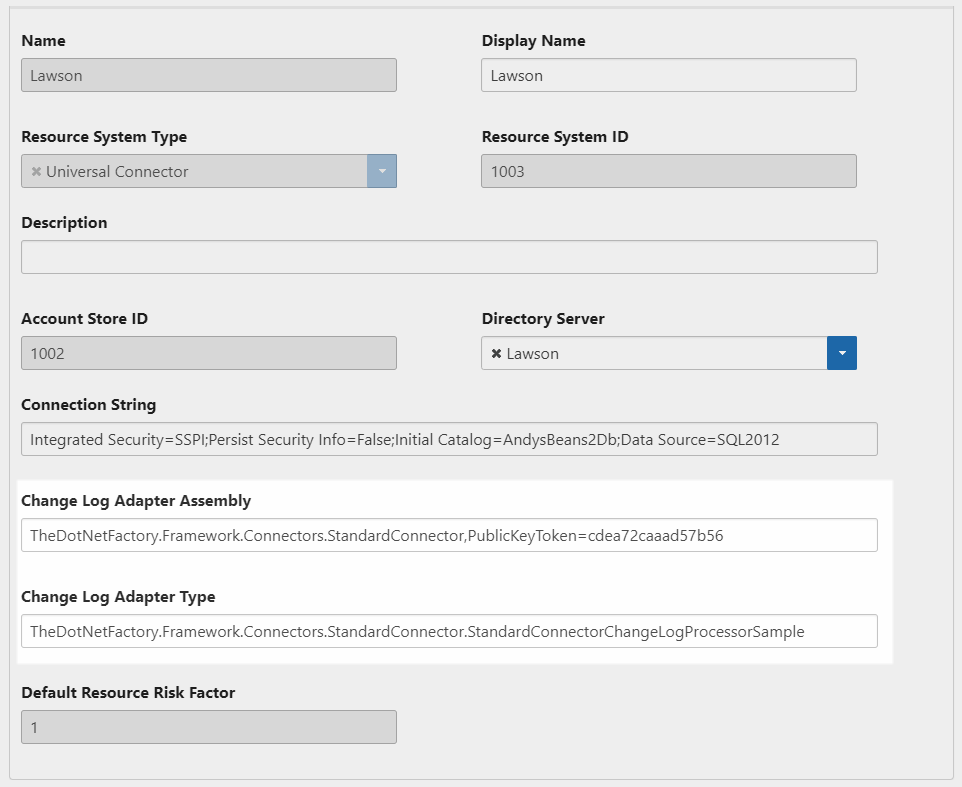
Once you’ve developed your real-time or batch-processing module, register the assembly in EmpowerID by updating the ChangeLogAdapterAssembly and ChangeLogAdapterType fields for your organization’s Universal Connector resource system.
Follow these steps in the EmpowerID Web interface:
- From the Navigation Sidebar, expand Admin > Applications and Directories and click Account Stores and Systems.
- Click the Resource Systems tab and locate your Universal Connector resource system.
- Click the Display Name link for the resource system.
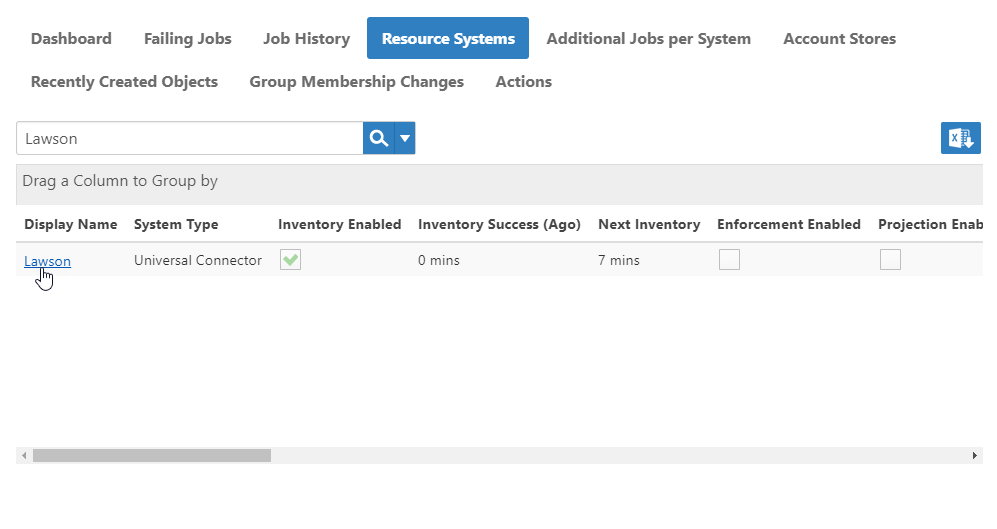
- On the Resource System Details page that opens, click Edit.
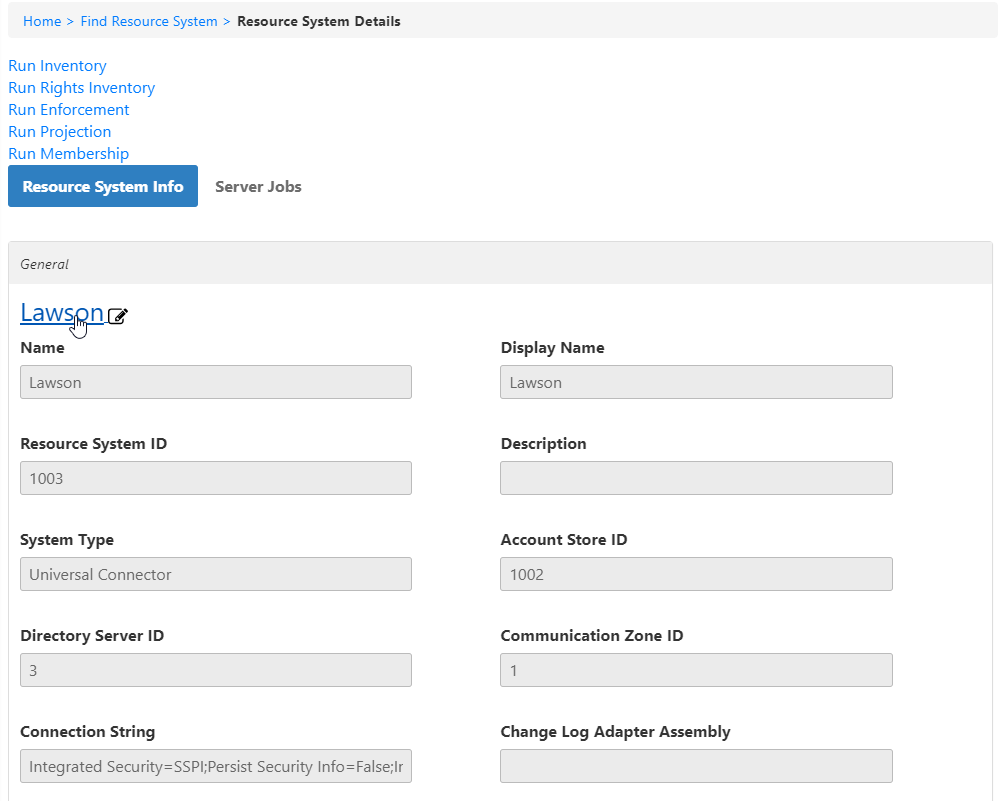
- In the Edit page, locate the fields ChangeLogAdapterAssembly and ChangeLogAdapterType, update them appropriately, and then click Save.
Field Notes — Adapter Registration
Note X — Required Values
- ChangeLogAdapterAssembly must contain the name of your assembly.
- ChangeLogAdapterType must contain the namespace-qualified type name of the adapter in that assembly.