Common User Management Activities
User management activities are Operation activities commonly used in self-service workflows for password management, enrollment, and user profile updates. This reference guide covers the key activities used in workflows such as ChangePassword, Enrollment, and EditPerson.
For an overview of Operation activities and how they work, see Activities Concepts. For detailed information about Operation activity properties, see Common Workflow Activity Types.
About User Management Activities
As Operation activities, user management activities execute code to create or manipulate objects in EmpowerID with built-in authorization checks. These activities have both general properties common to all Operation activities, as well as activity-specific properties (also known as "Dependency properties") that can be bound from one activity to another for maintaining workflow data consistency at runtime.
The activities covered in this guide include:
- ChangePasswordOperation - Allows users to change their own passwords
- EnrollOperation - Enrolls users in Self-Service Password Reset
- UnenrollPerson - Removes users from Self-Service Password Reset
- ResetPasswordOperation - Allows delegated users to reset passwords for others
- EditPersonOperation - Enables editing of person attributes
- UpdatePersonLoginAssociationsOperation - Manages persona switching capabilities
ChangePasswordOperation Activity
The ChangePasswordOperation activity is an Operation activity used in workflows where users can change their own passwords. Stock workflows include ChangePassword and CreatePersonAndAccount.
Activity Properties
| Property | Category | Type | Description |
|---|---|---|---|
| CurrentAccount | Input | Account | Get the current account for the person whose password is being changed. |
| ShowChangePasswordSummary | Input | Boolean | Specifies whether the result of the operation should be shown to the person. Set to True by default. |
| PasswordChanged | Output | Boolean | Returns True if the password is changed. Set to False by default. |
| ChangedPasswordResult | Output | List | Password Action Summary. |
Example Usage
// Set reference to Operation
var changePasswordOperation = CurrentWorkflow.ChangePasswordRequest;

// Get TargetPerson and CurrentAccount
var targetPerson = Person.GetCurrentPerson();
var currentAccount = Person.GetCurrentAccount();

// Set Operation Properties
changePasswordOperation.TargetPerson = targetPerson;
changePasswordOperation.CurrentAccount = currentAccount;
EnrollOperation Activity
The EnrollOperation is an Operation activity used in workflows to allow users to enroll in the Self-Service Password Reset Center. Once enrolled, users can reset forgotten passwords by answering a series of challenge questions. The stock workflow with this activity is Enrollment.
Activity Properties
| Property | Category | Type | Description |
|---|---|---|---|
| TargetPerson | Input | Person Component | This is the person enrolling for Password Self-Service Reset. |
| OperationExecuted | Output | Boolean | Specifies whether the person successfully enrolled. Set to False by default. |
Example Usage
// Set reference to Operation
var enrollOperation = CurrentWorkflow.Enroll;

// Get TargetPerson
var targetPerson = Person.GetCurrentPerson();

// Set Operation Properties
enrollOperation.TargetPerson = targetPerson;
UnenrollPerson Activity
The UnenrollPerson activity is used in workflows to remove people from the Self-Service Password Reset Center. People who unenroll cannot use self-service to reset forgotten passwords.
Activity Properties
| Property | Category | Type | Description |
|---|---|---|---|
| TargetPerson | Input | Person Component | This is the person being unenrolled from Password Self-Service Reset. |
| OperationExecuted | Output | Boolean | Specifies whether the person successfully unenrolled. Set to False by default. |
Example Usage
// Set reference to Operation
var unEnroll = CurrentWorkflow.UnenrollPersonActivity;

// Get TargetPerson - in this example, users unenroll themselves
var targetPerson = Person.GetCurrentPerson();

// Set Activity Properties
unEnroll.TargetPerson = targetPerson;
ResetPasswordOperation Activity
The ResetPasswordOperation is an Operation activity used in workflows to allow delegated users the ability to reset the passwords of other people. The stock workflow with this activity is ResetPassword.
Activity Properties
| Property | Category | Type | Description |
|---|---|---|---|
| TargetPerson | Input | Person Component | This is the person whose password is being reset. |
| AdminResetPassword | Input | Boolean | Specifies whether the password is being reset by an administrator for another person rather than a self-service password reset. Set to True by default. |
| OperationExecuted | Output | Boolean | Specifies whether the person's password was successfully reset. Set to False by default. |
Example Usage
// Set reference to Operation
var resetPasswordOperation = CurrentWorkflow.ResetPasswordRequest;

// Get TargetPerson
var targetPerson = C.Person.GetByPersonID(349);

// Set Operation Properties
resetPasswordOperation.TargetPerson = targetPerson;
EditPersonOperation Activity
The EditPersonOperation is a Multi-Operation Operation activity that is used in workflows to allow delegated users the ability to edit the attributes of another person. The type of attributes that can be edited depends on the operations enabled in the workflow. The stock workflow with this activity is EditPerson.
Activity Properties
| Property | Category | Type | Description |
|---|---|---|---|
| TargetPeople | Input | List of Person Components | This is the person or persons whose attributes are being edited. |
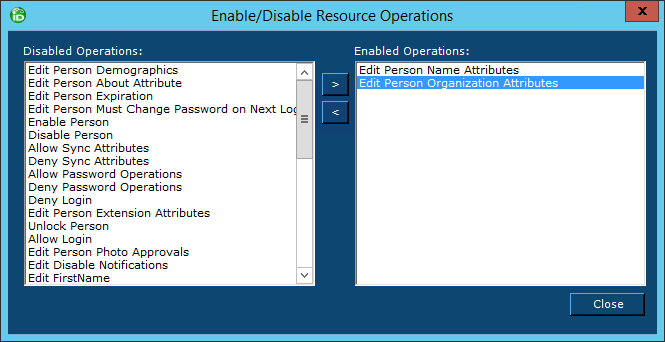
In the example below, the Office attribute is being edited, which is under Organization attributes. To allow the operation to succeed, Edit Person Organization Attributes must be enabled on the EditPersonOperation. To enable specific operations on a Multi-Operation Operation activity within a workflow, right-click on the Operation activity, select Enable/Disable Executing Operations from the context menu and then move the operation from the Disabled Operations pane to the Enabled Operations pane.
Example Usage
// Set reference to Operation
var editPersonOperation = CurrentWorkflow.EditPersonRequest;

// Set the TargetPerson and the attribute being edited
var targetPerson = C.Person.GetByPersonID(349);
targetPerson.Office = "Hampton";

// Create a TargetPeople list and add TargetPerson to it
var targetPeople = new E.TList<C.Person>();
targetPeople.Add(targetPerson);

// Set the TargetPeople property on the Operation
editPersonOperation.TargetPeople = targetPeople;
UpdatePersonLoginAssociationsOperation Activity
The UpdatePersonLoginAssociationsOperation is a Dual Resource Multi-Operation Operation activity that is used in workflows to add and remove the login associations people have within EmpowerID. Login associations, also known as "persona switching," enable people to log in to EmpowerID as another identity without requiring them to know the passwords associated with those identities. The stock workflow with this activity is Update Person Login Associations.
Activity Properties
| Property | Category | Type | Description |
|---|---|---|---|
| TargetAssigneeLoginAssociation | Input | TargetAssigneeLoginAssociation | This is the login association being created. |
| TargetAssigneeLoginAssociations | Input | List of TargetAssigneeLoginAssociation | This is a list of the login associations being created. |
| TimeConstrain | Input | String | Limits the login association to a specified time and date range. If a value is not set, the login association has no time limitations. |
| TimeConstrainActive | Input | Boolean | Specifies whether the login association is time constrained. Set to False by default. |
In the example below, login associations are being created. As this is a Multi-Operation Operation activity, to allow the operation to succeed, Add Assignee Login Association must be enabled on the operation. To enable specific operations on a Multi-Operation Operation activity within a workflow, right-click on the Operation activity, select Enable/Disable Executing Operations from the context menu and then move the operation from the Disabled Operations pane to the Enabled Operations pane.
Example Usage
// Set reference to AddLoginAssociation Operation Activity
var addLoginAssociation = CurrentWorkflow.AddLoginAssociation;

// Get GUID of assignee as the UpdatePersonLoginAssociations base expects GUIDs
var assigneeGUID = C.Person.GetByPersonID(223).PersonGUID;

// Create a list of GUIDs for allowed person logins
var allowedLoginGUIDs = new List<Guid>();

// Create a view that returns all people for allowed logins
// In this example, we are returning everyone with an Office of Hampton
E.VList<C.PersonView> pView = C.PersonView.Get("Office = 'Hampton'", "Name Desc");

// Create a new list of Person components for allowed logins
var allowedLogins = new List<C.Person>();

// Convert the people in the view to components
foreach(var per in pView)
{
    allowedLogins.Add(per.ToPerson());
}

// Add each person's PersonGUID to allowedLoginGUIDs
foreach (var p in allowedLogins)
{
    allowedLoginGUIDs.Add(p.PersonGUID);
}

// Create new list of AssigneeLoginAssociation
List<C.AssigneeLoginAssociation> assigneesToAdd = new List<C.AssigneeLoginAssociation>();

// Create a new AssigneeLoginAssociation for each allowed login
foreach(Guid g in allowedLoginGUIDs)
{
    C.AssigneeLoginAssociation ala = new C.AssigneeLoginAssociation();
    ala.AssigneeID = assigneeGUID;
    ala.AllowedLoginPersonID = g;
    assigneesToAdd.Add(ala);
}

// Set the Operation activity's TargetAssigneeLoginAssociations property
addLoginAssociation.TargetAssigneeLoginAssociations = assigneesToAdd;
Related Resources
- Common Workflow Activity Types - Complete reference for all activity types and properties
- Common Registration Activities - Reference for provisioning activities
- Activities Concepts - Architectural overview of activities in workflows
- Your First Workflow - Hands-on tutorial creating a workflow with activities