Password Reset Center Workflow Activities
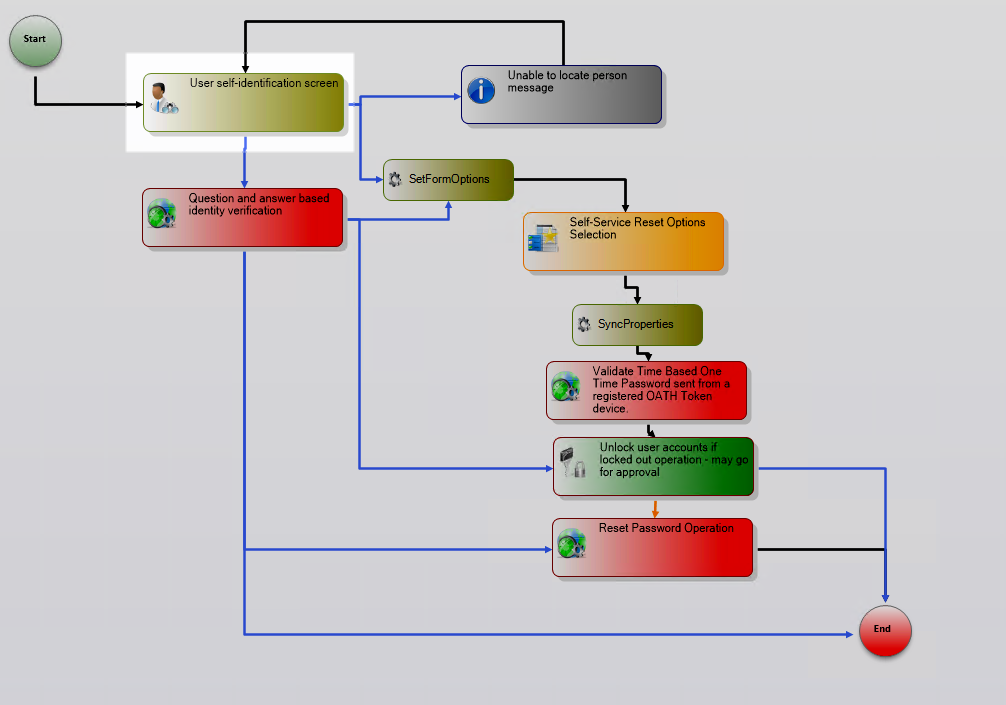
When users enroll for Password Self-Service Reset, EmpowerID directs them to provide answers to a series of password challenge questions that they can use to identify themselves when resetting a forgotten password. Once enrolled, users can initiate self-service password reset by clicking the Password link on the login page of the Web application. Clicking the link initiates the PasswordResetCenter workflow, which is comprised of a number of activities that control the flow for the password reset process.
For an overview of Operation activities and how they work, see Activities Concepts. For detailed information about Operation activity properties, see Common Workflow Activity Types.
About Password Reset Center Activities
The PasswordResetCenter workflow uses a combination of Form activities, System Code activities, and Operation activities to guide users through the password reset process. Many of these activities are customizations of common workflow activities, extended with specific logic for password reset scenarios.
The activities covered in this guide include:
- IdentifyYourself - Captures user credentials and validates with Captcha
- AnswerQuestions - Presents and validates challenge questions
- ValidateTOTP - Generates and validates one-time passwords
- ResetOptions - Displays password delivery options
- Supporting activities for email, SMS, and voice delivery
Workflow-Specific Properties
In addition to the activities, the workflow itself has a number of properties known as "Dependency Properties." Dependency Properties are special properties that can be bound from the workflow to one or more of the workflow's activities and vice-versa, ensuring that the state of the workflow is maintained throughout its execution.
For this workflow, many of these Dependency Properties are workflow parameters that administrators can set in the EmpowerID Web application. These parameters control the workflow's behavior and can be modified without changing the workflow code.
Workflow Parameters
| Property | Category | Type | Description |
|---|---|---|---|
| CheckLockoutLive | Input | Boolean | Specifies whether the workflow should make a live call to Active Directory Domain Controllers to check the lockout status of the person. |
| AskQuestions | Input | Boolean | Specifies whether the person attempting to reset their password is to be presented with their challenge questions. The default value is True; however, the property can be changed on the Workflow Parameter management page of the Web application. |
| AskOTP | Input | Boolean | Specifies whether the person attempting to reset their password is to be sent a one-time password to be used to reset their password. The default value is True; however, the property can be changed on the Workflow Parameter management page of the Web application. Note: AskQuestions must be set to False as well. |
| SendPasswordToEmail | Input | Boolean | Specifies whether the one-time password can be delivered to the person via their primary email address. The default value is True; however, the property can be changed on the Workflow Parameter management page of the Web application. Additionally, for the one-time password to be delivered in this manner, the person must have a primary email address registered in EmpowerID. |
| SendPasswordToMobile | Input | Boolean | Specifies whether the one-time password can be delivered to the person via their mobile phone. The default value is True; however, the property can be changed on the Workflow Parameter management page of the Web application. Additionally, for the one-time password to be delivered in this manner, the person must have a mobile number set on their person as well as have a mobile phone provider selected. |
| SendPasswordToPersonalEmail | Input | Boolean | Specifies whether the one-time password can be delivered to the person via their personal email address. The default value is True; however, the property can be changed on the Workflow Parameter management page of the Web application. Additionally, for the one-time password to be delivered in this manner, the person must have a personal email address registered in EmpowerID. |
| SendPasswordToTwilioSMS | Input | Boolean | Specifies whether the one-time password can be delivered to the person via an SMS sent by Twilio. The default value is True; however, the property can be changed on the Workflow Parameter management page of the Web application. Additionally, for the one-time password to be delivered in this manner, the person must have a mobile number set on their person and the organization must have a Twilio account registered in EmpowerID. |
| SendPasswordToTwilioVoiceCall | Input | Boolean | Specifies whether the one-time password can be delivered to the person via an automated voice call from Twilio. The default value is True; however, the property can be changed on the Workflow Parameter management page of the Web application. Additionally, for the one-time password to be delivered in this manner, the person must have a mobile number set on their person and the organization must have a Twilio account registered in EmpowerID. |
| TwilioOTPVoiceMessageTemplateName | Input | String | Specifies the template to be used when sending the one-time password via the Twilio API. Unless a value is specified, the default EmpowerID template will be used. |
| OAuthConsumerID | Input | String | Specifies the OAuthConsumerID for the PasswordResetCenter request workflow. The default value is generated by EmpowerID; however, the property can be changed on the Workflow Parameter management page of the Web application. |
| UnlockOnly | Input | String | Specifies whether to just unlock the account or to both unlock the account and reset the password. Value is input by the user. Set to False by default. This property applies only when the organization is using one-time passwords rather than challenge questions. |
There are silent errors in the event log in three scenarios:
- The phone number field requires a country code and errors silently if one is not provided.
- If the phone number is invalid the page fails silently.
- If a person does not have a phone number, the page shows successful when it is not.
IdentifyYourself Activity
This activity presents users with the Credentials form, which contains fields for inputting their EmpowerID login or email, as well as a Captcha to ensure the workflow is being initiated by a real person.
Activity Properties
| Property | Category | Type | Description |
|---|---|---|---|
| Enabled | Activity | Boolean | Specifies whether the activity is enabled or not. If an activity is not enabled it will not participate in the execution of the workflow. Set to True by default; this value should not be changed. |
| FormDecision | Input | Control | This places a control on the form, such as a button, and specifies the logic that should occur when the control is interacted with. In the case of this activity, the property must be set to Requested as it is used to validate the Captcha value. |
| ImpersonatePersonID | Activity | Int32 | Specifies the person, if any, the activity is to execute under. In this case, the value is set to -1, which represents an anonymous identity. This value should not be changed. |
| ResourceTypeOperationID | Activity | Int32 | Identifies the Resource Type Operation associated with the activity. Resource Type Operations are blocks of code that when executed perform one or more actions against a selected resource object. In this case, the value is set to -1 as no operations are being executed against any resources. This value should not be changed. |
| SucceedExecuteCode | Event | String | Specifies the event handler for the activity. In general terms, event handlers contain code that is executed when the activity with the handler is encountered in a workflow. In this case the handler is an empty stub that simply allows the workflow logic to continue according to the line rules that connect it to the other activities. |
AnswerQuestions Activity
This activity is executed if the AskQuestions workflow parameter is set to True and the AskOTP workflow parameter is set to False and the person initiating the workflow is successfully identified.
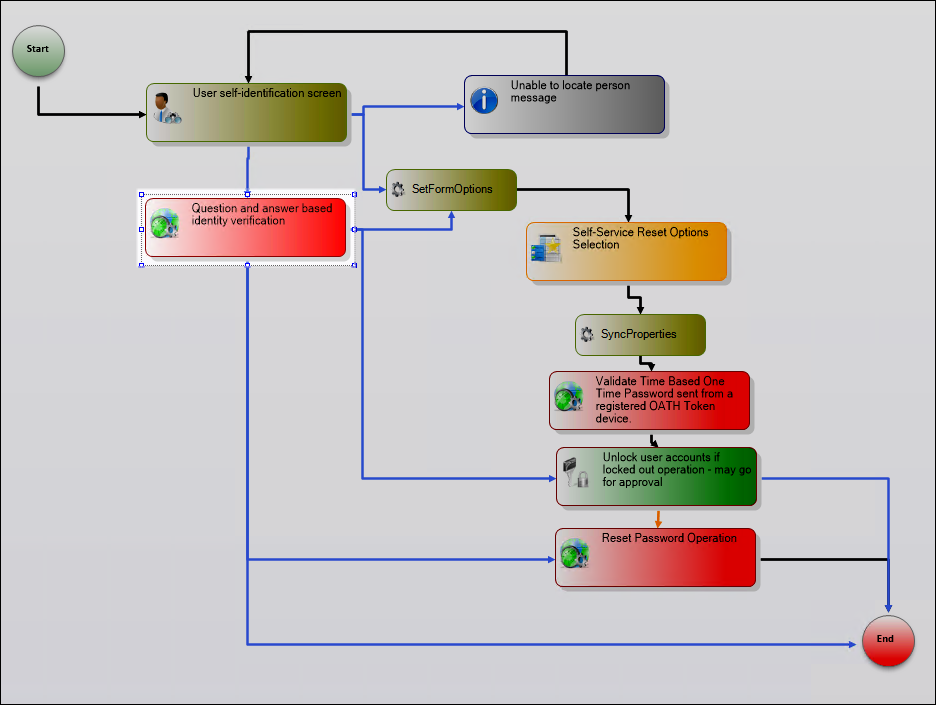
AnswerQuestions is a compiled activity, meaning it is derived from the AnswerEnrollmentQuestions activity that has been previously developed, compiled and published. To open or edit the original activity, right-click on AnswerQuestions and select Open/Edit Original Activity from the context menu.
AnswerEnrollmentQuestions Activity
AnswerEnrollmentQuestions is a flowchart activity comprised of multiple sub-activities, properties and line rules that determine how the logic flows within the activity itself and ultimately within the PasswordResetCenter workflow.
Activity Properties
| Property | Category | Type | Description |
|---|---|---|---|
| RecoveryResult | Output | RecoveryResult | The value of this property is set dynamically during workflow execution, based on whether the person successfully answers the challenge questions. Possible values include: NotEnrolled, Recovered, Lockout, DenyAccess, NotLicensed, FailRecovery, Recovering, EnrollmentExpired, InvalidEnrollment, UnableToRetrieveQuestions. |
| TargetPerson | Input | Person Component | Specifies the person performing the Self-Service Password Reset. The value is set on the IdentifyYourself activity and passed to this activity. |
| recoveryManager | N/A | RecoveryManager | This is used to instantiate a new instance of the base RecoveryManager class for the TargetPerson. This class has methods, properties and enums used to help the person reset their password. |
| recoveryAttempt | N/A | RecoveryAttempt | This is used to instantiate a new instance of the base RecoveryAttempt class for the TargetPerson. This class has methods and properties for presenting the challenge questions and evaluating the answers. |
| BaseProperties | N/A | WorkflowActivationProperties | Gets and sets the base properties of the parent workflow. These properties are defined in the TheDotNetFactory.Framework.Workflow.Common.WorkflowActivationProperties class. |
GetPersonQuestions Activity
GetPersonQuestions is a SystemCodeActivity with a handler that checks whether the person is enrolled for Password Self-Service Reset. If the person is enrolled, the logic flows to the AnswerQuestion activity; if not enrolled, the logic flows to the InvalidEnrollmentMessage activity and exits.
// Instantiate a new instance of the RecoveryManager class, passing in TargetPerson
recoveryManager = new RecoveryManager(TargetPerson);

// Set the RecoveryResult property to the recoveryManager status
RecoveryResult = recoveryManager.Status;

// If person is not enrolled for Password Self-Service reset display the
// invalid enrollment message and exit the activity; otherwise, begin the recovery process
if (RecoveryResult != RecoveryStatus.Recovering)
    InvalidEnrollmentMessage.Message = this.GetRecoveryStatusMessage(RecoveryResult);
else
{
    this.InitializeRecoveryAttempt();
}

// Set the Title and Description properties for the InvalidEnrollmentMessage Bubble activity
InvalidEnrollmentMessage.ControlTitle = "EmpowerIDApplicationGeneralMessages_MessageBoxRequestStatusTitle";
InvalidEnrollmentMessage.ControlDescription = "EmpowerIDApplicationGeneralMessages_MessageBoxRequestStatusDesc";

// Set the Title and Description properties for the AnswerQuestion Form activity
AnswerQuestion.ControlTitle = "PasswordManagerQuestions_AnswerQuestionsTitle";
AnswerQuestion.ControlDescription = "PasswordManagerQuestions_AnswerQuestionsDesc";
AnswerQuestion Activity
If the TargetPerson is enrolled, the logic flows to the AnswerQuestion activity. AnswerQuestion is a Form activity that randomly selects one of the user's challenge questions and asks them to provide the answer.
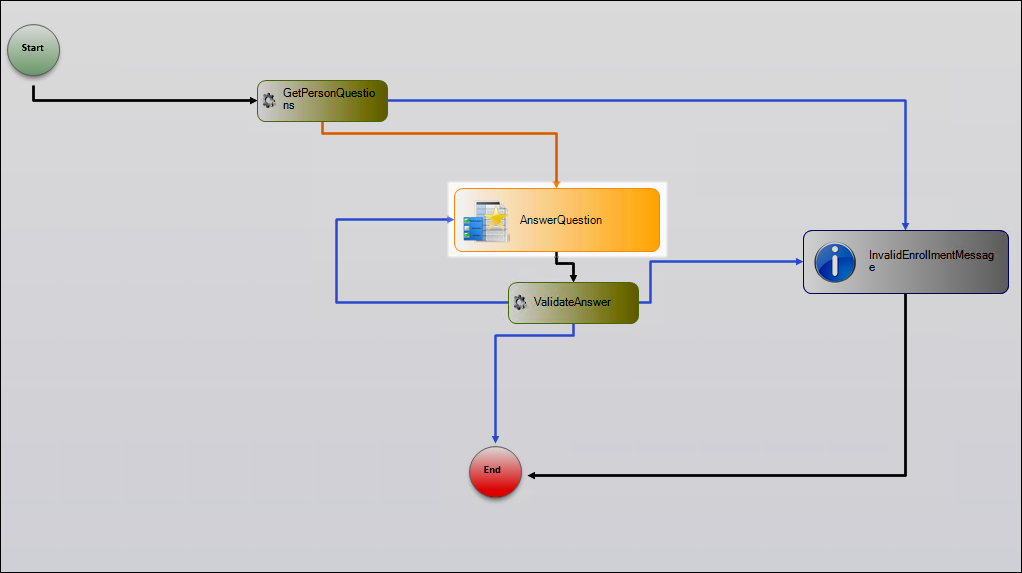
The answer is submitted to the ValidateAnswer activity, which checks whether the answer is correct and then either routes back to the AnswerQuestion activity or to the InvalidEnrollmentMessage activity. The process continues until either the user correctly answers all required challenge questions or becomes locked out.
ValidateAnswer Activity
This activity is a SystemCodeActivity with a handler that checks whether the answer to the challenge question is correct, setting the Status property accordingly.
// Instantiate a new instance of the AnswerRecoveryResult class,
// passing in the answer provided by the person
AnswerRecoveryQuestionResult answerRecoveryQuestionResult = recoveryAttempt.AnswerQuestion(AnswerQuestion.Answer);

// Set the RecoveryResult property to the AnswerRecoveryQuestionResult status
// If the person answered the question correctly, the status is set to Recovering
RecoveryResult = answerRecoveryQuestionResult.Status;

// Reset the answer to an empty string for the next iteration
AnswerQuestion.Answer = "";

// If the person answered the question correctly, present the next question
if (answerRecoveryQuestionResult.Status == RecoveryStatus.Recovering)
{
    AnswerQuestion.Question = answerRecoveryQuestionResult.NextQuestion;
}
else
{
    // If not recovered and incorrect answer, handle failed attempt
    if (answerRecoveryQuestionResult.Status != RecoveryStatus.Recovered)
    {
        recoveryManager.SetFailedAttempt();

        // If maximum failed attempts reached, set status to Lockout
        if (recoveryManager.Status == RecoveryStatus.Lockout)
        {
            RecoveryResult = recoveryManager.Status;
            InvalidEnrollmentMessage.Message = this.GetRecoveryStatusMessage(RecoveryResult);
        }
        else
        {
            InitializeRecoveryAttempt();
        }
    }
}
UnableToIdentifyPersonMessage Activity
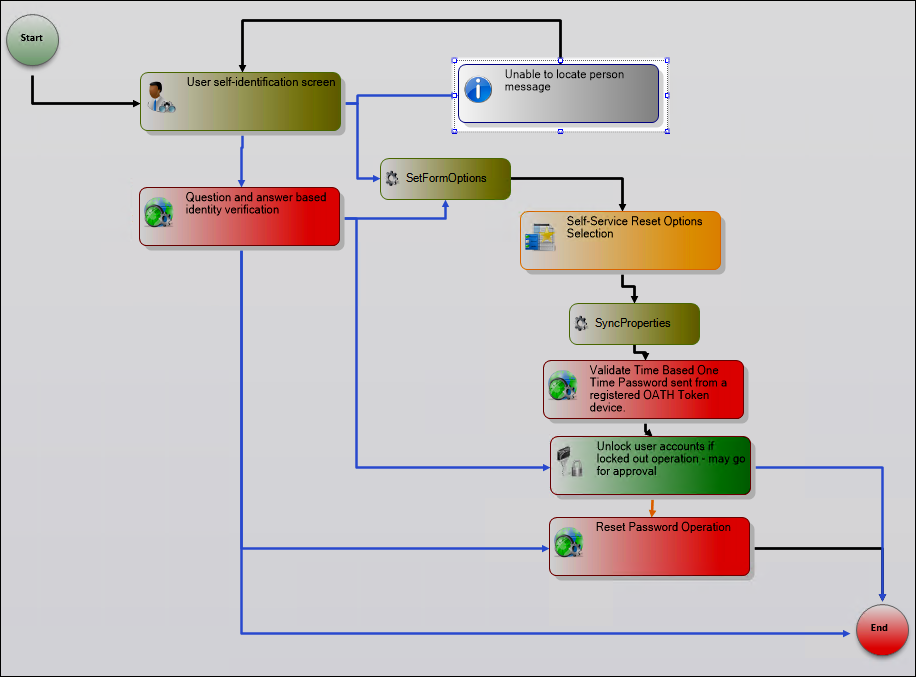
UnableToIdentifyPersonMessage is a Bubble activity that displays when the EmpowerID Login or email address submitted does not belong to an EmpowerID Person. The Message property displays: Unable to retrieve your account.
SetFormOptions Activity
This activity is a SystemCodeActivity with a handler that checks certain attributes on the person and corresponding workflow parameters to determine what Password Reset Options should be displayed by the ResetOptions Form activity.
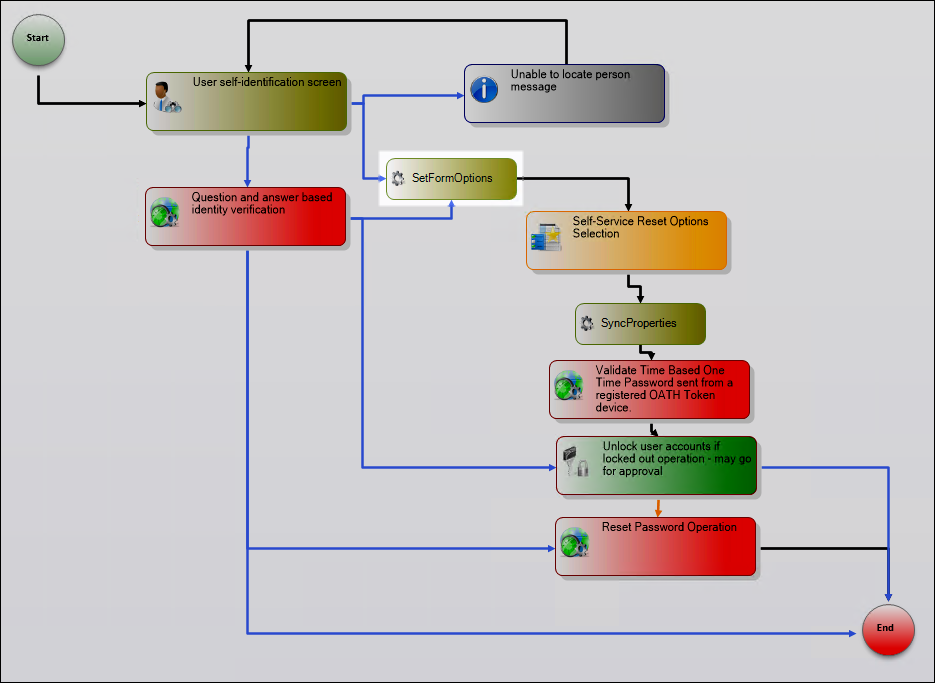
// Give the person the option to have their one-time password sent to their personal email
// if the SendPasswordToPersonalEmail parameter is true and the person has a personal email address
ResetOptions.ShowPersonalEmail = !string.IsNullOrEmpty(IdentifyYourself.TargetPerson.PersonalEmail) &&
                                  (this.SendPasswordToPersonalEmail);

// Give the person the option to have their one-time password sent to their primary email address
// if the SendPasswordToEmail parameter is true and the person has a primary email address
ResetOptions.ShowPrimaryEmail = !string.IsNullOrEmpty(IdentifyYourself.TargetPerson.Email) &&
                                (this.SendPasswordToEmail);

// Give the person the option to have their one-time password sent via a phone call
// if SendPasswordToTwilioVoiceCall is true, person has a mobile phone, and Twilio is configured
ResetOptions.ShowVoiceCall = !string.IsNullOrEmpty(IdentifyYourself.TargetPerson.MobilePhone) &&
                             (this.OAuthConsumerID != null) &&
                             (this.SendPasswordToTwilioVoiceCall);

// Give the person the option to have their one-time password sent via SMS
// if SendPasswordToTwilioSMS is true, person has a mobile phone, and Twilio is configured
ResetOptions.ShowSMSToMobile = !string.IsNullOrEmpty(IdentifyYourself.TargetPerson.MobilePhone) &&
                               (this.OAuthConsumerID != null) &&
                               (this.SendPasswordToTwilioSMS);

// Mask email addresses for display
if(IdentifyYourself.TargetPerson.Email != null)
{
    ResetOptions.EmailFriendlyName = IdentifyYourself.TargetPerson.Email.Substring(0,
        Math.Min(4, IdentifyYourself.TargetPerson.Email.Length)) + "***********";
}
if(IdentifyYourself.TargetPerson.PersonalEmail != null)
{
    ResetOptions.PersonalEmailFriendlyName = IdentifyYourself.TargetPerson.PersonalEmail.Substring(0,
        Math.Min(4, IdentifyYourself.TargetPerson.PersonalEmail.Length))+ "***********";
}

// Mask phone numbers for display
string phoneNumber = IdentifyYourself.TargetPerson.MobilePhone;
if(phoneNumber != null)
{
    int displayDigits = 4;
    string maskedNumber = "*";

    if (phoneNumber.IndexOf("@") > 0)
        displayDigits = phoneNumber.IndexOf("@") - 1;

    for (int i = 0; i < phoneNumber.Length - displayDigits; i++)
    {
        maskedNumber = maskedNumber + "*";
    }

    phoneNumber = maskedNumber + phoneNumber.Substring(phoneNumber.Length - displayDigits);
    ResetOptions.MobilePhoneFriendlyName = phoneNumber;
}
ResetOptions Activity
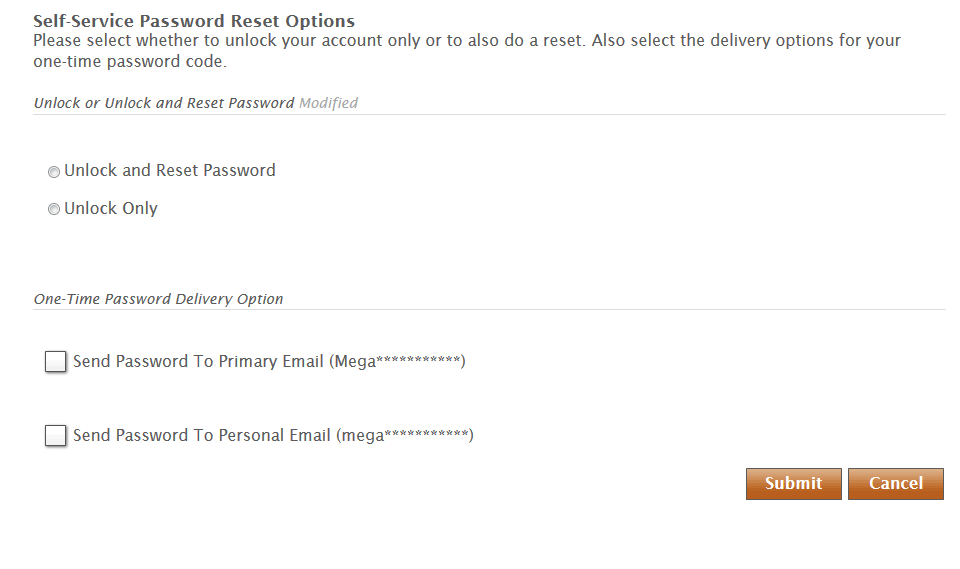
ResetOptions is a Form activity that is executed if the AskOTP workflow parameter is set to True and the AskQuestions workflow parameter is set to False. The form displays the reset options passed to it from the SetFormOptions activity.
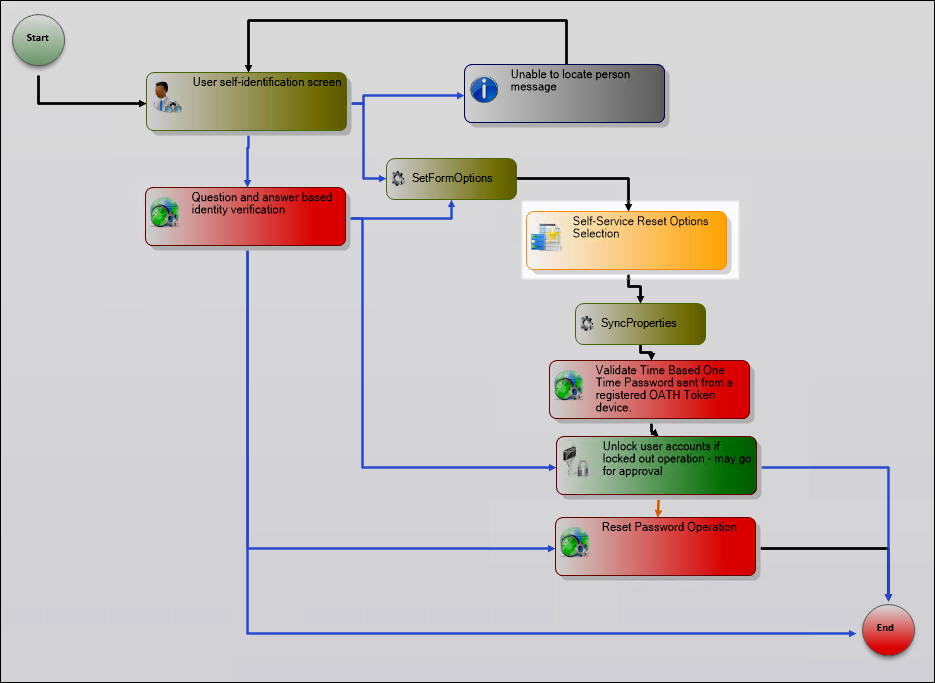
The image below shows what the form looks like when appropriate conditions are met:
SyncProperties Activity
This activity is a SystemCodeActivity with a handler that syncs the value of the corresponding SendPersonOneTimePassword property of the ValidateTOTP activity with the option selected by the user. It also sets the value of the UnlockOnly property on the workflow based on user input.
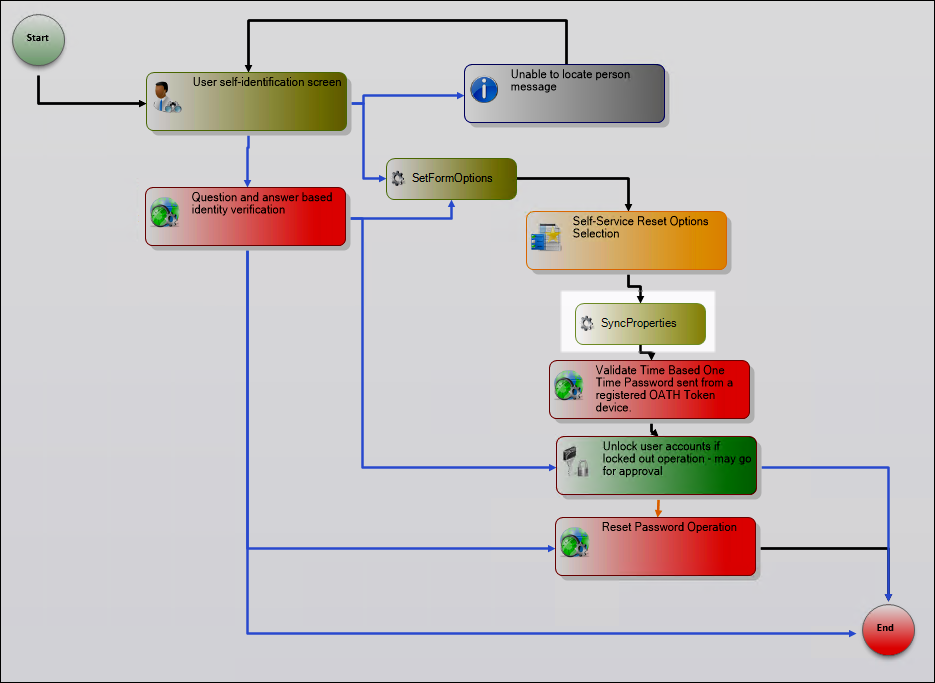
ValidateTOTP.SendPersonOneTimePassword_SendPasswordToEmail = ResetOptions.PrimaryEmail;
ValidateTOTP.SendPersonOneTimePassword_SendPasswordToPersonalEmail = ResetOptions.PersonalEmail;
ValidateTOTP.SendPersonOneTimePassword_SendPasswordTwilioSMS = ResetOptions.SMSToMobile;
ValidateTOTP.SendPersonOneTimePassword_SendPasswordTwilioVoiceCall = ResetOptions.VoiceCall;

UnlockOnly = !ResetOptions.UnlockAndReset;
ValidateTOTP Activity
This activity is executed if the AskOTP workflow parameter is set to True and the AskQuestions workflow parameter is set to False and the person has selected a valid reset option from the ResetOptions Form activity.
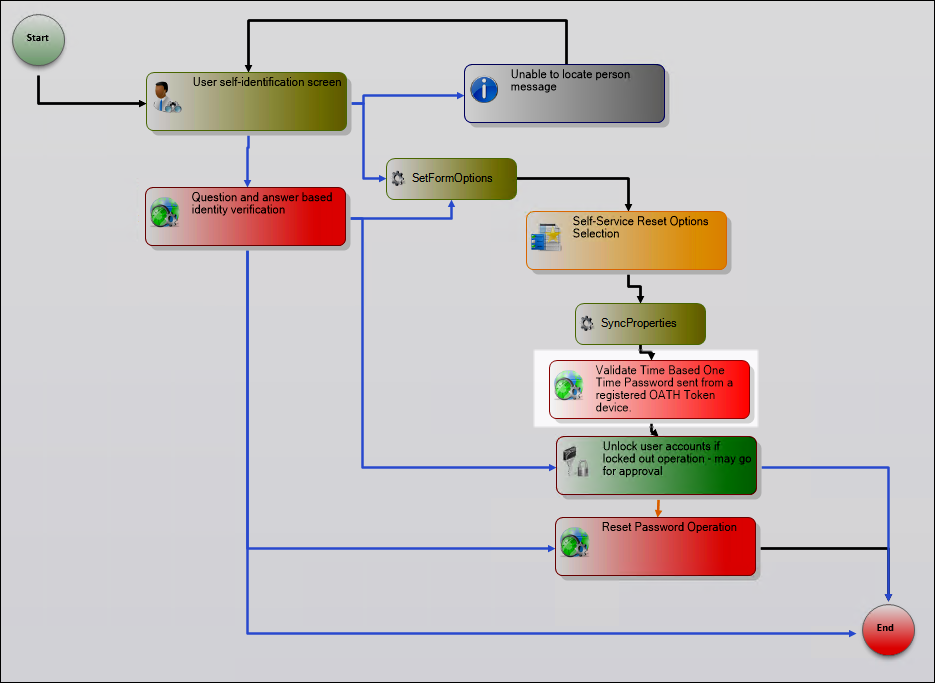
ValidateTOTP is a compiled activity derived from the ValidatePersonTOTP activity. It inherits properties from the base activities and can be modified as needed.
Activity Properties
| Property | Category | Type | Description |
|---|---|---|---|
| Password | Input | String | Specifies the one-time password. The value is dynamically generated at runtime by the activity. |
| PersonID | Input | Int32 | Specifies the PersonID of the person attempting to reset their password. The value is set at runtime to the PersonID of the TargetPerson object. |
| MaxReTry | Input | Int32 | Specifies the maximum number of times the person can attempt to retry entering the one-time password. Set to 0 by default. |
| RetryCount | Input | Int32 | Specifies the current number of retry attempts. Set to 0 by default. |
| IsValid | Output | Boolean | Specifies whether the one-time password submitted by the user is correct. Set to False by default. |
| SendPersonOneTimePassword_NumberOfDigitsInOneTimePassword | Input | Int32 | Specifies the number of digits to be included in the one-time password. The default value is 6. |
| SendPersonOneTimePassword_NumberOfLowerCaseLettersInOneTimePassword | Input | Int32 | Specifies the number of lower case letters to be included in the one-time password. The default value is 0. |
| SendPersonOneTimePassword_NumberOfSpecialCharactersInOneTimePassword | Input | Int32 | Specifies the number of special characters to be included in the one-time password. The default value is 0. |
| SendPersonOneTimePassword_NumberOfUpperCaseLettersInOneTimePassword | Input | Int32 | Specifies the number of upper case letters to be included in the one-time password. The default value is 0. |
| SendPersonOneTimePassword_OAuthConsumerID | Input | String | Specifies the OAuthConsumerID for the PasswordResetCenter workflow. The value is derived from the OAuthConsumerID workflow property. |
| SendPersonOneTimePassword_OneTimePasswordLength | Input | Int32 | Specifies the total number of digits, characters and letters in the one-time password. The default value is 6. |
| SendPersonOneTimePassword_OneTimePasswordValidationDurationInMinutes | Input | Int32 | Specifies the length of time in minutes that the one-time password remains valid. The default value is 10. |
| SendPersonOneTimePassword_SendPasswordToEmail | Input | Boolean | Specifies whether the one-time password can be delivered via primary email address. The default value is True; can be overridden by the SendPasswordToEmail workflow parameter. |
| SendPersonOneTimePassword_SendPasswordToMobile | Input | Boolean | Specifies whether the one-time password can be delivered via mobile phone. The default value is True; can be overridden by the SendPasswordToMobile workflow parameter. |
| SendPersonOneTimePassword_SendPasswordToPersonalEmail | Input | Boolean | Specifies whether the one-time password can be delivered via personal email address. The default value is True; can be overridden by the SendPasswordToPersonalEmail workflow parameter. |
| SendPersonOneTimePassword_SendPasswordToTwilioSMS | Input | Boolean | Specifies whether the one-time password can be delivered via Twilio SMS. The default value is True; can be overridden by the SendPasswordToTwilioSMS workflow parameter. |
| SendPersonOneTimePassword_SendPasswordToTwilioVoiceCall | Input | Boolean | Specifies whether the one-time password can be delivered via Twilio voice call. The default value is True; can be overridden by the SendPasswordToTwilioVoiceCall workflow parameter. |
| SendPersonOneTimePassword_OneTimePassword | Output | String | Specifies the one-time password sent to the user. The value is dynamically generated at runtime. |
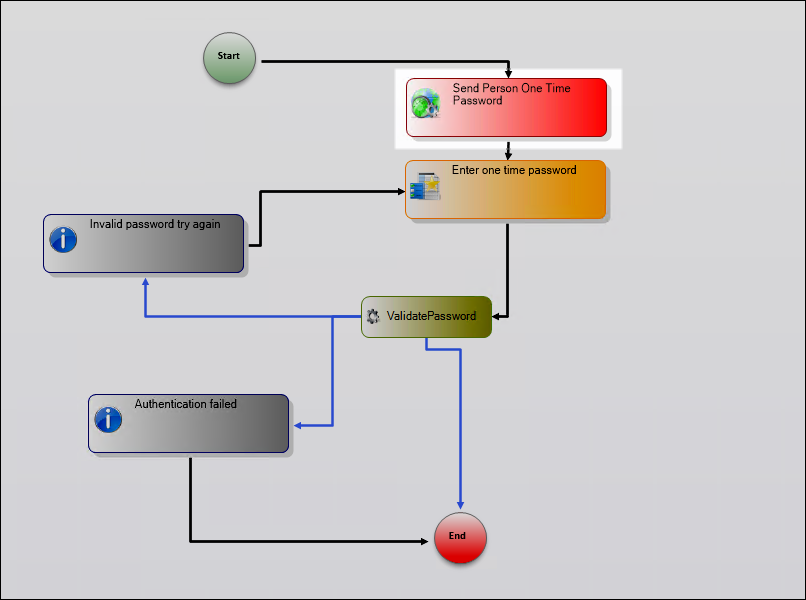
ValidatePersonTOTP Activity
ValidatePersonTOTP is a flowchart activity comprised of multiple sub-activities, properties and line rules. These properties are "Dependency Properties" that can be bound between activities and to the workflow itself.
Activity Properties
| Property | Category | Type | Description |
|---|---|---|---|
| TargetPerson | Input | Person Component | Derives its value from the EmpowerID Person identified in the IdentifyYourself activity. |
| PersonID | Input | Int32 | The PersonID of the TargetPerson. |
| IsValid | Output | Boolean | Returns True or False based on whether the one-time password submitted is valid. |
| Password | Input | String | The one-time password generated for the person. |
| RetryCount | Misc | Int32 | Specifies the current number of retry attempts. |
| MaxReTry | Misc | Int32 | Specifies the maximum number of times the person can retry entering the one-time password. |
| BaseProperties | N/A | WorkflowActivationProperties | Gets and sets the base properties of the parent workflow. |
SendPersonOneTimePassword Activity
When ValidatePersonTOTP executes, the logic flows to the SendPersonOneTimePassword activity. This activity is a flowchart comprised of its own set of activities, properties and line rules.
Activity Properties
| Property | Category | Type | Description |
|---|---|---|---|
| EmailAddress | Input | String | The primary email address of the person attempting to reset their password. Derived from the TargetPerson object. |
| EmailBody | Input | String | The body of the email containing the one-time password. The default value is an empty string; dynamically generated at runtime. |
| EmailMessageID | Input | Int32 | The ID for the EmailMessage template to be used. The default value is 0, meaning the email message is dynamically generated at runtime. |
| EmailSubject | Input | String | The subject of the email containing the one-time password. The default value is an empty string; dynamically generated at runtime. |
| NumberOfDigitsInOneTimePassword | Input | Int32 | Specifies the number of digits to be included in the one-time password. The default value is 6. |
| NumberOfLowerCaseLettersInOneTimePassword | Input | Int32 | Specifies the number of lower case letters to be included. The default value is 0. |
| NumberOfSpecialCharactersInOneTimePassword | Input | Int32 | Specifies the number of special characters to be included. The default value is 0. |
| NumberOfUpperCaseLettersInOneTimePassword | Input | Int32 | Specifies the number of upper case letters to be included. The default value is 0. |
| OAuthConsumerID | Input | String | Specifies the OAuthConsumerID for the workflow. Derived from the workflow. |
| OneTimePasswordLength | Input | Int32 | Specifies the total number of digits, characters and letters for the one-time password. The default value is 6. |
| OneTimePasswordValidityDurationInMinutes | Input | Int32 | Specifies the number of minutes the one-time password remains valid. The default value is 10. |
| SendPasswordToEmail | Input | Boolean | Specifies whether the password can be sent to the person's primary email address. Set to True by default; can be overridden by workflow parameter. |
| SendPasswordToMobile | Input | Boolean | Specifies whether the password can be sent to the person's mobile device. Set to True by default; can be overridden by workflow parameter. |
| SendPasswordToPersonalEmail | Input | Boolean | Specifies whether the password can be sent to the person's personal email address. Set to True by default; can be overridden by workflow parameter. |
| SendPasswordTwilioSMS | Input | Boolean | Specifies whether the password can be sent via Twilio SMS. Set to False by default; can be overridden by workflow parameter. |
| SendPasswordTwilioVoiceCall | Input | Boolean | Specifies whether the password can be sent via Twilio voice call. Set to False by default; can be overridden by workflow parameter. |
| SMSMessage | Input | String | Specifies the SMS message for the one-time password. The default value is an empty string; dynamically generated at runtime. |
| TargetPerson | Input | Person Component | The person attempting to reset their password. The value is set dynamically at workflow runtime. |
| TwilioOTPVoiceMessageTemplateName | Input | String | Specifies the template to be used when sending the one-time password via Twilio. The default value is empty, meaning the default EmpowerID template will be used. |
| OneTimePassword | Output | String | The one-time password that is dynamically generated at runtime. |
SendOneTimePasswordActivity
SendOneTimePasswordActivity is comprised of properties, activities and line rules that determine the flow of logic within the activity.
Activity Properties
| Property | Category | Type | Description |
|---|---|---|---|
| EmailSubject | Input | String | The subject of the email containing the one-time password. Set dynamically by the GenerateOTP activity. |
| EmailBody | Input | String | The body of the email containing the one-time password. Set dynamically by the GenerateOTP activity. |
| SendPasswordToMobile | Input | Boolean | Specifies whether the password can be sent to mobile device. Set on ValidatePersonTOTP activity; can be overridden by workflow parameter. |
| SendPasswordToEmail | Input | Boolean | Specifies whether the password can be sent to primary email. Set on ValidatePersonTOTP activity; can be overridden by workflow parameter. |
| SendPasswordToPersonalEmail | Input | Boolean | Specifies whether the password can be sent to personal email. Set on ValidatePersonTOTP activity; can be overridden by workflow parameter. |
| TargetPerson | Input | Person Component | Derives its value from the EmpowerID Person submitted during execution of the IdentifyYourself activity. |
| OneTimePasswordValidityDurationInMinutes | Input | Int32 | Specifies the number of minutes the one-time password remains valid. Set on ValidatePersonTOTP activity. |
| OneTimePassword | Output | String | The one-time password generated when the code in the GenerateOTP activity is executed. |
| OneTimePasswordLength | Input | Int32 | Specifies the total number of digits, characters and letters for the one-time password. Set on ValidatePersonTOTP activity. |
| NumberOfSpecialCharactersInOneTimePassword | Input | Int32 | Number of special characters to include. Set on ValidatePersonTOTP activity. |
| NumberOfDigitsInOneTimePassword | Input | Int32 | Number of digits to include. Set on ValidatePersonTOTP activity. |
| NumberOfUpperCaseLettersInOneTimePassword | Input | Int32 | Number of upper case letters to include. Set on ValidatePersonTOTP activity. |
| NumberOfLowerCaseLettersInOneTimePassword | Input | Int32 | Number of lower case letters to include. Set on ValidatePersonTOTP activity. |
| EmailAddress | Input | String | The primary email address for the person resetting their password. Derived from TargetPerson. |
| SendEmailToTwilioVoiceCall | Input | Boolean | Specifies whether the password can be sent via Twilio voice call. Set on ValidatePersonTOTP activity; can be overridden by workflow parameter. |
| OAuthConsumerID | Input | String | The OAuthConsumerID for the workflow. |
| SendPasswordTwilioSMS | Input | Boolean | Specifies whether the password can be sent via Twilio SMS. Set on ValidatePersonTOTP activity; can be overridden by workflow parameter. |
| TwilioOTPVoiceMessageTemplateName | Input | String | Specifies template to be used when sending via Twilio. Set on ValidatePersonTOTP activity. If no value specified, default template is used. |
| SMSMessage | Input | String | The SMS message for the one-time password. Set dynamically by the GenerateOTP activity. |
| EmailMessageID | Input | Int32 | The SMS message ID. Set dynamically by the GenerateOTP activity. |
| BaseProperties | N/A | WorkflowActivationProperties | Gets and sets the base properties of the parent workflow. |
SendOneTimePasswordActivity is comprised of two child activities: GenerateOTP (a SystemCodeActivity) and ruleDecisionActivity1 (a RuleDecisionActivity).
GenerateOTP Activity
GenerateOTP is a SystemCodeActivity with a handler that generates a one-time password and sends it to one or more of the activities in the ruleDecisionActivity1 activity. The determining factor for which activities receive the one-time password is determined by the workflow parameters and the presence of necessary person attributes and organizational resources.
// Set the one-time password using the CryptoHelper class
OneTimePassword = CryptoHelper.GetStrongPassword(
    OneTimePasswordLength,
    NumberOfSpecialCharactersInOneTimePassword,
    NumberOfDigitsInOneTimePassword,
    NumberOfUpperCaseLettersInOneTimePassword,
    NumberOfLowerCaseLettersInOneTimePassword);

// Set the one-time password on the person
TargetPerson.SetOneTimePassword(OneTimePassword, OneTimePasswordValidityDurationInMinutes);

// If no template is specified use the default
if (string.IsNullOrEmpty(TwilioOTPVoiceMessageTemplateName))
    TwilioOTPVoiceMessageTemplateName = "TwilioOTPVoiceMessage";

// Instantiate a new instance of EmailMessage for the Twilio template
C.EMailMessage voiceMessageTemplate = C.EMailMessage.GetByName(TwilioOTPVoiceMessageTemplateName);

// Loop through the characters in OneTimePassword, adding each to the voiceOTP
string voiceOTP = "";
foreach(char c in OneTimePassword)
    voiceOTP += c + " ";

// Send voice message with OneTimePassword to person using Twilio
SendUsingTwilio.VoiceMessage = "Please enter this security code when prompted: " + voiceOTP;
if (voiceMessageTemplate != null)
    SendUsingTwilio.VoiceMessage = voiceMessageTemplate.EMailBody.Replace("{PassCode}", voiceOTP);

// Set the SMS subject and body
if (string.IsNullOrEmpty(SMSMessage))
    SendUsingTwilio.SMSMessage = "Please enter this security code when prompted: " + OneTimePassword;
else
    SendUsingTwilio.SMSMessage = SMSMessage.ToEmpowerIDLocalizedString().Replace("{PassCode}", OneTimePassword);

// Set the email subject and body
if (string.IsNullOrEmpty(EmailSubject))
    EmailSubject = "Your one-time login security code";

if (string.IsNullOrEmpty(EmailBody))
    EmailBody = "Please enter this security code when prompted: " + OneTimePassword;

// Set SMS body and subject on the SendSMS activity
SendSMS.Body = EmailBody.TrimEnd();
SendSMS.Subject = EmailSubject;

// Set email body and subject on the SendEmail activity
SendEmail.Body = EmailBody.TrimEnd();
SendEmail.Subject = EmailSubject;

// Send email if the person has either a primary or personal email address
SendEmail.ToEmail = "";
if (!string.IsNullOrEmpty(EmailAddress))
    SendEmail.ToEmail = EmailAddress;
else
{
    if (!string.IsNullOrEmpty(TargetPerson.Email) && SendPasswordToEmail)
        SendEmail.ToEmail += TargetPerson.Email + ";";
    if (!string.IsNullOrEmpty(TargetPerson.PersonalEmail) && SendPasswordToPersonalEmail)
        SendEmail.ToEmail += TargetPerson.PersonalEmail;
    SendEmail.ToEmail = SendEmail.ToEmail.TrimEnd(';');
}

// Extract digits from phone number
System.Text.RegularExpressions.Regex digitRegex = new System.Text.RegularExpressions.Regex(
    @"\d+", System.Text.RegularExpressions.RegexOptions.Compiled);
System.Text.RegularExpressions.MatchCollection matches = digitRegex.Matches(
    TargetPerson.MobilePhone.ToSafeString());

StringBuilder digitBuilder = new StringBuilder();

foreach (System.Text.RegularExpressions.Match match in matches)
{
    digitBuilder.Append(match.Value);
}

SendUsingTwilio.PhoneNumber = digitBuilder.ToString();

// Send SMS if person has a mobile phone provider and mobile phone registered
if (TargetPerson.MobilePhoneProviderID != null && !string.IsNullOrEmpty(TargetPerson.MobilePhone))
{
    SendSMS.ToEmail = digitBuilder + TargetPerson.MobilePhoneProviderIDSource.SMSGatewaySuffix;
}
ruleDecisionActivity1 Activity
ruleDecisionActivity1 is a RuleDecisionActivity comprised of three branches with conditions set by the workflow. Each branch contains an Operation activity that executes when specific conditions are met.
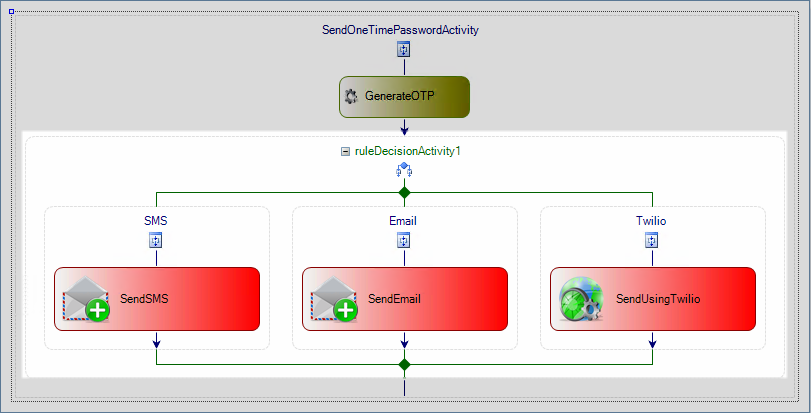
Branches:
- SMS – The activity in this branch executes if the SendPasswordToMobile property is set to True.
- SendEmail – The activity in this branch executes if either the SendPasswordToPersonalEmail property or the SendPasswordToEmail property on the workflow is set to True and the person has an email address.
- Twilio – The activity in this branch executes if either the SendPasswordTwilioSMS or the SendPasswordTwilioVoiceCall property on the workflow is set to True.
Related Resources
- Common Workflow Activity Types - Complete reference for all activity types and properties
- Common User Management Activities - Reference for password and enrollment activities
- Activities Concepts - Architectural overview of activities in workflows
- Business Rules - Understanding conditional workflow logic