About Business Roles and Locations
Business Roles and Locations are foundational components of EmpowerID's Role-Based Access Control (RBAC) model. When combined, they create a powerful polyarchical RBAC system that enables administrators to define precise, context-aware access to resources by aligning permissions with both job functions and organizational scope. This approach dramatically reduces role bloat while maintaining granular access control.
This guide explains how Business Roles and Locations work together to solve the role bloat problem common in traditional RBAC implementations. You'll learn how EmpowerID's polyarchical model allows a single Business Role to provide different access based on location, eliminating the need to create separate roles for each combination of job function and location.
Understanding Business Roles
Business Roles represent abstract job functions or titles within your organization. These roles define what a person does and help determine what access they need to perform those duties. Business Roles are user-defined hierarchical containers for grouping EmpowerID Person objects based on a particular job function.
Examples of Business Roles
- Standard Employee
- Contractor
- Manager
- Administrator
- Teller
- Sales Representative
- Department Manager
- HR Manager
Each Business Role can have specific Access Levels assigned to it, allowing for fine-grained control over what resources users with the role can access. These assignments determine the baseline permissions for anyone assigned to that Business Role, regardless of where they work within the organization.
Business Roles work in conjunction with Access Levels to grant permissions. Access Levels define the operations and rights available for a resource type, while Business Roles determine who receives those Access Level assignments based on their job function.
Understanding Locations
Locations define where resources and people exist within the organization. They are containers for holding and organizing resources, and may represent physical offices, geographical regions, or logical boundaries within your enterprise.
Examples of Locations
- All Business Locations
- Boston Office
- New York Office
- London Office
- Remote Workers
- Finance Department
- Sales Region - Northeast
- Europe Division
Locations can be mapped to external directory locations, such as Active Directory Organizational Units, to support automated resource management and synchronization. This mapping ensures that resources in physical directory structures are properly organized within EmpowerID's logical location hierarchy.
Locations can be mapped to external directory locations to maintain consistency between EmpowerID's logical structure and your physical directory infrastructure. This simplifies management and enables automated resource assignments based on directory location.
Organizations: A Special Type of Location
Within the Location hierarchy, certain locations can be designated as Organizations. An Organization is a top-level parent location within the Business Location structure that represents a business unit, geographical region, or functional grouping within your company's organizational hierarchy.
Organizations serve as logical aggregation points in a location hierarchy, connecting lower-level locations together in a unified sub-tree. Objects assigned to child locations beneath an Organization are considered to be part of that higher-level Organization.
Organization Examples:
- Business Units: Finance Division, Sales Division, IT Division
- Geographic Regions: Europe, North America, Asia Pacific
- Long-Running Enterprise Projects: Messaging Migration, Infrastructure Upgrade
Organizations are designated as "Organization - Security Container" location types during location configuration. This designation enables special delegation capabilities, such as "People in Organizations I belong to" and "Security Groups in Organizations I Belong to," which automatically include all people and security groups assigned to locations below the organization location.
When configuring delegations by organization, the RBAC engine finds the location a person is assigned to and moves up the location tree until it finds a location designated as an organization type. This determines which organization(s) the person belongs to and what delegations they receive. Administrators should ensure correct locations are configured as "Organization - Security Container" to prevent unintended delegation scope.
The Role Bloat Problem
To understand the value of Business Roles and Locations working together, consider a common challenge in traditional RBAC implementations: role bloat.
Traditional RBAC Limitation
Imagine managing resource access for Tellers in a banking institution. Most tellers perform similar tasks using comparable resources, so a single "Teller" role seems appropriate initially.
However, if the banking institution has branches in numerous cities—New York, London, and Sydney, for example—complications arise. Each teller requires access to a shared pool of resources due to their job function, but they also need resources unique to their location. Tellers in New York would require access to New York-specific resources but not those in London or Sydney, and vice versa.
Traditional RBAC solution: Establish distinct roles for each teller location.
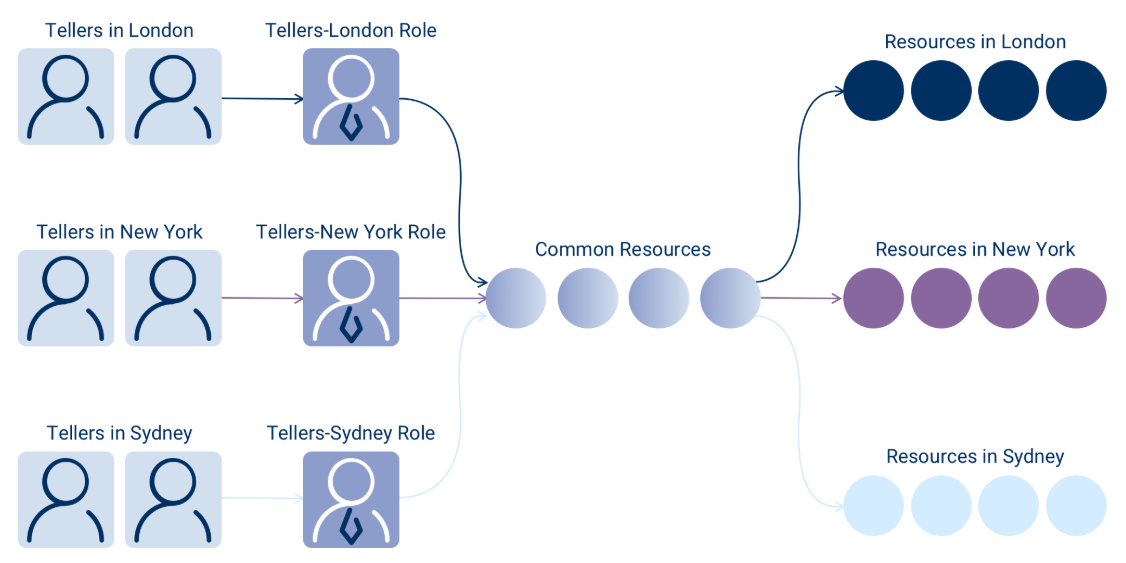
Although this approach might seem sufficient initially, it rapidly becomes unmanageable, resulting in role bloat and confusion regarding which roles possess access to specific resources. Imagine tellers in branches across every major city globally—the number of roles becomes overwhelming and difficult to maintain.
The Management Challenge
This proliferation of roles creates several problems:
- Administrative overhead: Each new location requires creating a new role
- Inconsistent permissions: Ensuring all location-specific roles have the correct shared permissions becomes error-prone
- Audit complexity: Understanding what access each role provides requires tracking dozens or hundreds of similar roles
- Policy changes: Updating permissions for all tellers requires modifying every location-specific role
EmpowerID's Polyarchical Solution
EmpowerID's polyarchical RBAC model addresses role bloat by allowing resources to be assigned to users based on a combination of their Business Roles and Locations. This method enables a significant reduction in an organization's role footprint by permitting resources to be assigned based on the intersection of job function and location, without creating separate roles for each combination.
How It Works
EmpowerID facilitates differentiation in the resources allocated to a Business Role according to the location of those resources. Consequently, tellers in London, New York, and Sydney can all possess the same "Teller" Business Role without gaining access to each other's resources.
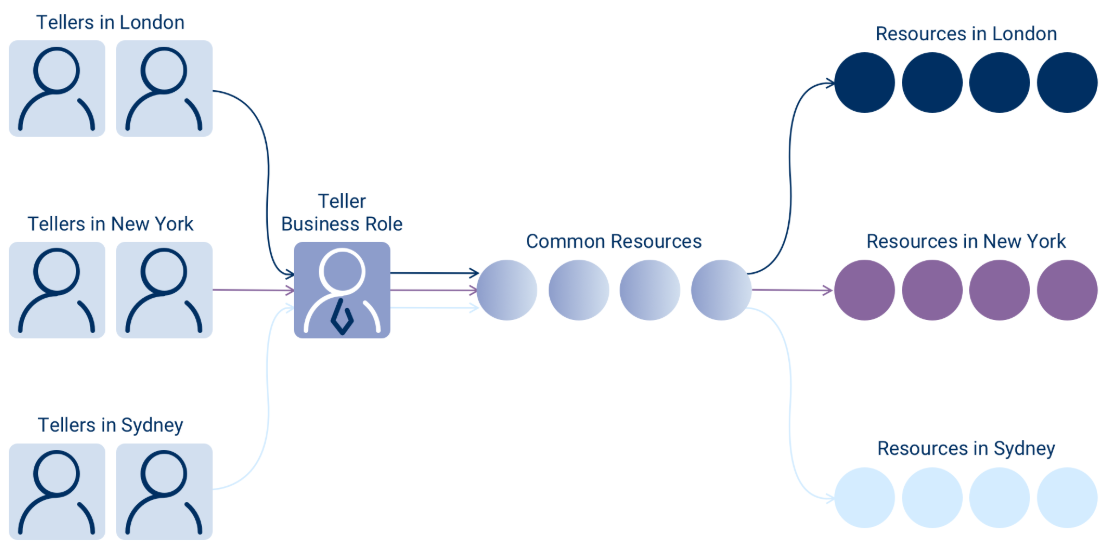
Instead of creating Teller-New York, Teller-London, and Teller-Sydney roles, you create:
- One "Teller" Business Role
- Three Locations: New York, London, Sydney
- The intersection of Business Role + Location determines access
This approach provides several key benefits:
- Reduced role count: One Business Role instead of dozens of location-specific roles
- Easier maintenance: Update the Teller role once to affect all locations
- Flexible delegation: Resources can be assigned at the Business Role + Location level
- Clear audit trail: Access is determined by two clear factors: job function and location
Business Role and Location Combinations
When a Business Role is combined with a Location, the result is a powerful access control unit that scopes a person's role-based access to a specific organizational context. These combinations enable precise, context-aware permissions that align with how organizations actually operate.
How Combinations Work
Business Role and Location combinations can be implemented in three ways:
1. Static Assignments of People
You can directly assign individuals to a Business Role and Location combination based on their job function and location. For example, if you have a "Sales Manager" Business Role for the "London" location that has been assigned all the resources that a Sales Manager in London needs, you can assign the "Sales Manager-London" Business Role and Location to a specific EmpowerID Person. This gives that person access to all the resources assigned to that combination.
2. RBAC Mapping
Business Role and Location mappings allow existing physical directory locations and roles to be mapped to logical EmpowerID Business Roles and Locations. This provides an easy resource management strategy that hides the complexity of the back-end directory structure from business users.
For example, if you have multiple AD or LDAP directory containers for London, those containers can be visually mapped to a single virtual EmpowerID "London" location. Once the mapping occurs, the resources in the physical directory containers "belong" to the corresponding EmpowerID Location. When people are assigned to a Business Role and Location, they receive access to the resources in that location in the manner defined by the Access Level assignments granted to the Business Role and Location.
3. SetGroup Mapping
SetGroups that contain collections of EmpowerID Person objects can be mapped to Business Roles and Locations to allow the people in that SetGroup to receive the Access Level assignments granted to the Business Role and Location. For example, if you have users in your organization with a Job Title of "Help Desk Technicians" and a City of "New York," you can use a SetGroup to dynamically contain users with those attributes and then map the SetGroup to a corresponding EmpowerID Business Role and Location.
What Combinations Enable
Business Role and Location combinations provide several powerful capabilities:
Streamlined Onboarding — Predefined combinations facilitate accurate Person creation with contextual access. New employees can be assigned to the appropriate Business Role and Location combination and immediately receive all necessary permissions.
Delegated Resource Assignment — Resources can be assigned at the Business Role + Location level for easier management. Instead of managing individual user permissions, administrators assign resources to combinations that serve entire groups of users.
Access Governance — Permissions are limited not just by what a person does (role), but where they do it (location). This dual-factor approach ensures users only access resources appropriate to both their job function and organizational context.
Policy Enforcement — Enable contextual security enforcement where different locations may have different compliance or security requirements. For example, contractors in New York can have different access than full-time employees in Boston, even if they share the same base Business Role.
Use Business Role and Location combinations to implement the principle of least privilege. This ensures users only receive access appropriate to both their role and their organizational location, significantly reducing the risk of unauthorized access while simplifying administration.
Relationship to Access Levels and Management Roles
Business Role and Location combinations work together with Access Levels and Management Roles to provide flexible, comprehensive access control:
Access Levels
Access Levels are bundles of operations and native system rights that get assigned to Business Role and Location combinations. When you assign an Access Level to a Business Role + Location combination, all people assigned to that combination inherit the permissions defined in the Access Level.
Example: Assigning the "Mailbox Administrator" Access Level to the "IT Support-Boston" combination grants all IT Support staff in Boston the ability to manage mailboxes, but only for resources in the Boston location.
Management Roles
While Business Role and Location combinations provide location-scoped access, Management Roles can be assigned to Business Role and Location combinations for more complex delegation scenarios. This layered approach allows for:
- Baseline permissions from Business Role + Location
- Additional capabilities from Management Role assignments
- Flexible delegation that combines job function, location, and specific task-based roles
Choosing Between Approaches
The decision to utilize Business Roles and Locations versus Management Roles when delegating resources depends on the degree of immediate visibility desired for overseeing the assignment of those resources.
Since Business Role and Location assignments occur through the intersection of two distinct EmpowerID objects, auditing the access each individual has to resources requires evaluating both the Business Role and the Location. Management Roles, by contrast, provide a single container that holds all Access Level assignments, making it easier to see at a glance what permissions the role provides.
Both approaches are powerful and can be used together to satisfy even the most complex security policies.
Location Hierarchy and Structure
EmpowerID's Location structure consists of several types of locations that work together to organize resources and enable flexible delegation:
Location Types
Logical Locations — User-defined locations representing organizational and geographical structure. These create intuitive, business-friendly nodes on a hierarchical tree, making it easier for delegated users to interact with system resources.
External Locations — Represent the actual locations of resources within resource systems, such as Active Directory OUs or Exchange organization structures.
All IT Systems — A default EmpowerID location containing locations for all IT systems protected by EmpowerID. These locations are dynamically maintained via inventory and automatically map one-to-one to external locations.
Resource Systems Locations — Unique locations representing the structure of various connected resource systems, contained under the All IT Systems node.
Hierarchy Benefits
The location hierarchy enables:
- Permission Inheritance — Access rights and roles cascade from parent to child locations
- Delegated Administration — Assign scoped administrative roles at various levels of the hierarchy
- Resource Structuring — Group resources under logical, manageable segments reflecting real-world business layout
- Simplified Reporting — Roll-up reporting across nested locations for improved audit and compliance tracking
Summary
Business Roles and Locations form the foundation of EmpowerID's polyarchical RBAC model, solving the role bloat problem inherent in traditional RBAC implementations. By combining job function (Business Role) with organizational context (Location), EmpowerID enables:
- Dramatic reduction in role count through intelligent reuse of Business Roles across locations
- Context-aware access control that aligns with how organizations actually operate
- Flexible delegation strategies including static assignments, RBAC mapping, and SetGroup mapping
- Organization-based delegation using special Organization locations as security containers
- Simplified administration while maintaining granular, auditable access control
This approach provides the structure needed for enterprise-scale access management while remaining flexible enough to accommodate diverse organizational models and changing business requirements.