Assign Approver Delegates
When managers and other decision-makers are out of the office, you can designate Approver Delegates to approve or deny requests on their behalf. This ensures that approval workflows continue without delays during absences.
For delegation to take effect, you must also set the Out Of Office property to true on the person for whom delegation will occur. To set this property, edit the person, select the Advanced tab, and enable Out Of Office.
Prerequisites
- Access to the View One Person page for the person who needs a delegate
- Appropriate delegation to edit organizational relationships
Procedure
-
Navigate to the View One Person page for the person to whom you want to add an Approver Delegate.
Navigation OptionsYou can navigate to the View One Person page by searching for the person using the Global search bar at the top of the page (quickest), or by searching for the person using the Find Person page.
-
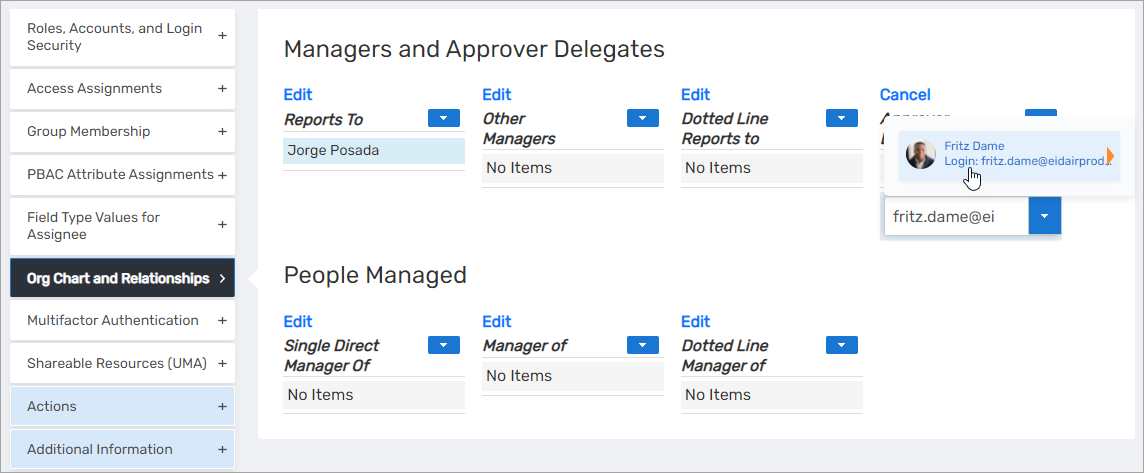
On the person's View One page, expand the Org Chart and Relationships accordion and click the Edit link in the Approver Delegates pane.

-
In the Search field that appears, enter the name of the person who will serve as the Approver Delegate and click the tile for that person.
-
Click the Save link.
Results
After completing this procedure:
- The selected person is assigned as an Approver Delegate
- When the original person's Out Of Office property is set to true, the delegate can approve or deny requests on their behalf
- The delegation relationship appears in the Org Chart and Relationships accordion for both people
You can assign multiple Approver Delegates to a single person. Repeat this procedure to add additional delegates as needed.